

What if the collection date is the least important part of your lease-end plan? Managing end-of-lease IT equipment involves more than arranging a return. Devices may hold sensitive data, teams may be unclear about their responsibilities, and incomplete condition records can complicate the next steps.
Meeting lease terms and removing equipment on time matter. A controlled transition also needs clear ownership, secure handling and a documented outcome for every asset, whether it’s returned, recovered for reuse or recycled responsibly.
This 2026 guide explains how to organise the process across teams and locations. You’ll learn how to clarify responsibilities and return requirements, build an accurate asset and condition record, plan logistics, and ensure data-bearing devices are sanitised before they leave your control.
Greenbox supports the recovery and secure processing stage, connecting data sanitisation with remarketing or e-waste recycling. This helps keep each asset’s status visible and directs retired equipment towards an appropriate next use.
Key Takeaways
- Start managing end-of-lease IT equipment with a clear timeline, named responsibilities and an up-to-date asset register.
- Review lease terms and internal approvals before scheduling collection, and keep leased equipment distinct from owned assets being refreshed.
- Treat data-bearing devices as a separate workstream: identify them, record custody, sanitise data and reconcile their final status.
- Compare return, approved reuse or remarketing, and recycling against the lessor’s requirements and your organisation’s asset decisions.
- Coordinate recovery, secure data processing and the next asset outcome to support traceability and responsible reuse or recycling.
Managing end-of-lease IT equipment starts before the return date
A controlled return starts with clear dates, ownership and asset visibility, not with a collection booking. Managing end-of-lease IT equipment means knowing which devices are leased, who uses them, where they are and what the agreement requires before teams start packing or reallocating equipment.
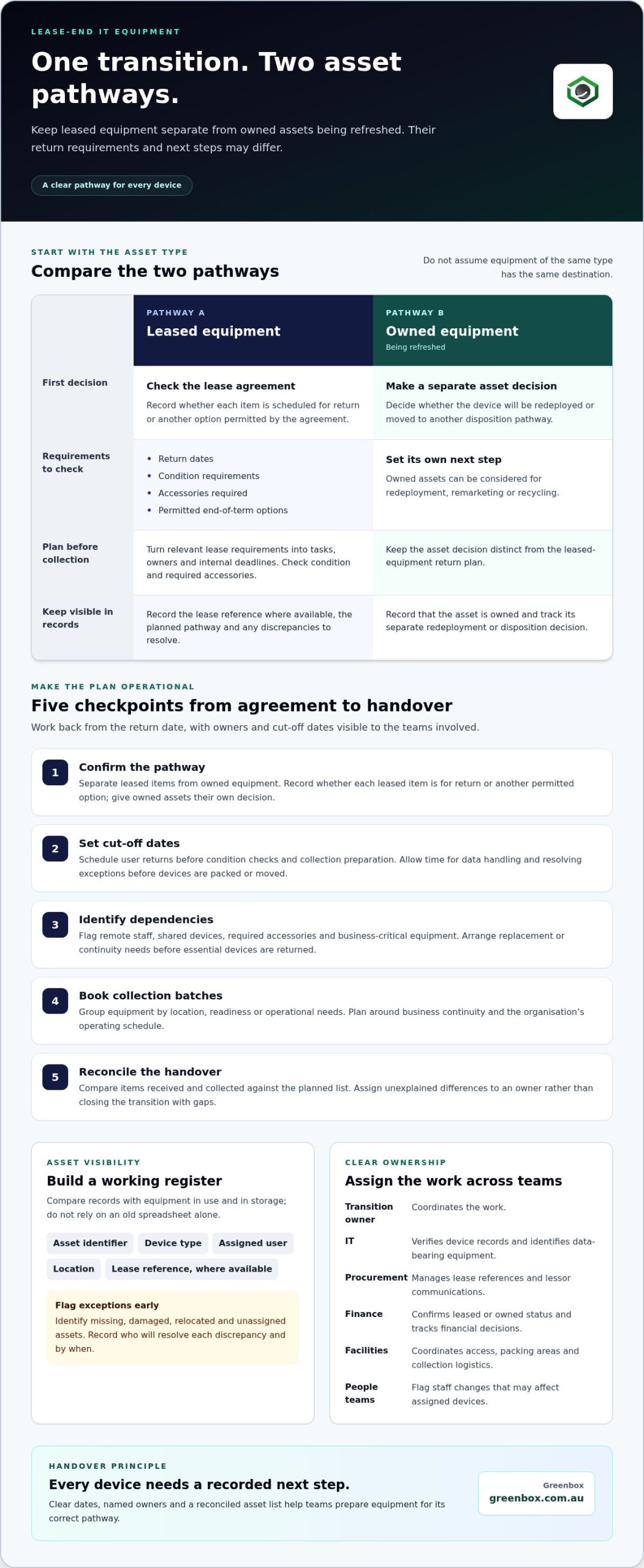
Appoint one transition owner to coordinate the work, then assign practical responsibilities across the business. Internal IT teams or external providers such as JP Technical can verify device records and identify data-bearing equipment. Procurement can manage lease references and lessor communications. Finance can confirm which assets are leased or owned and track financial decisions. Facilities can coordinate access, packing areas and collection logistics. People teams can flag staff changes that may affect assigned devices. Clear handovers reduce the risk of equipment being missed or sent down the wrong pathway.
Keep leased equipment separate from owned assets being refreshed at the same time. A leased laptop may need to meet return conditions, while an owned device could be redeployed, remarketed or recycled. Don’t assume that equipment of the same type has the same destination.
What should an end-of-lease IT inventory include?
Flag missing, damaged, relocated and unassigned assets before collection planning. Record who will resolve each discrepancy and by when. This creates a more reliable collection list and gives teams time to investigate exceptions before they become last-minute problems.
How do lease terms shape the return plan?
Review the agreement for return dates, condition requirements, accessories and permitted end-of-term options. For a general introduction to the concept, see Understanding Lease Agreements. Use the agreement’s specific terms to guide the operational plan. This step is about translating requirements into tasks, not interpreting them as legal advice.
Turn each relevant requirement into an owner and an internal deadline. For example, assign someone to confirm the return date, another person to check required accessories, and a named team to assess equipment condition. For a broader view of coordinated asset disposition in a controlled business environment, see Greenbox’s enterprise IT asset disposition framework.
Readiness checklist:
- Confirm lease milestones and set internal deadlines ahead of the return date.
- Identify users, locations and any devices held in storage.
- Reconcile device records with equipment physically in use or on hand.
- Name decision owners for discrepancies, condition checks and end-of-term outcomes.
Build a practical end-of-lease IT equipment transition plan
A practical plan turns lease requirements into assigned tasks, internal cut-off dates and final checks. Managing end-of-lease IT equipment is easier when every device has a planned next step, rather than being treated as part of one large collection.
Map the key milestones in the agreement, then work backwards from the return date. Set internal cut-offs that leave time to locate missing equipment, complete data handling, check condition and organise logistics. Keep the schedule visible to IT, procurement, finance, facilities and relevant people teams so decisions and dependencies don’t sit in separate inboxes.
- Confirm the pathway. Separate leased assets from owned equipment being refreshed. Record whether each leased item is scheduled for return or another permitted option, and give owned assets their own redeployment or disposition decision.
- Set cut-off dates. Schedule user returns before condition checks and collection preparation. Allow time for data handling and exception resolution before equipment is packed or moved.
- Identify dependencies. Flag remote staff, shared devices, required accessories and business-critical equipment. A shared laptop may need a replacement arranged before it can be returned. A remote user may need clear instructions and a return schedule that fits the collection plan.
- Book collection batches. Group equipment by location, readiness or operational needs. Avoid removing essential devices before replacement or continuity arrangements are in place.
- Reconcile the handover. Compare items received and collected against the planned list. Assign unresolved differences to an owner rather than closing the transition with unexplained gaps.
How should teams coordinate user returns and collection?
Give users one central contact and consistent instructions covering timing, return method and required accessories. At check-in, use the same record for each device to capture its asset identifier, condition and components received. Note missing chargers or other exceptions as they arise, rather than relying on memory. For shared equipment, identify the team responsible for returning it so it isn’t overlooked when individual users receive reminders.
Plan collection batches around business continuity and the organisation’s operating schedule. This avoids disrupting teams that still depend on equipment and gives facilities a clear view of what needs to be ready for handover. When preparing delicate electronics or bulk hardware for transit, custom protective materials from specialists such as Packaging For Industry (PFI) can also help prevent transit damage and meet return criteria.
How can asset records support a controlled handover?
Use one asset register to track each item through planned, returned, collected and reconciled stages. Record custody changes and exceptions, such as a device returned by someone other than its assigned user, with a named internal owner and resolution status. If a refresh coincides with replacement-device deployment, Greenbox’s enterprise IT configuration and deployment framework offers relevant context for coordinating the rollout. Greenbox’s IT asset recovery and data sanitisation supports secure processing once return requirements and internal approvals are established.
Protect data and maintain visibility during end-of-lease IT recovery
Data-bearing equipment needs its own controlled workstream, separate from ordinary packing and return logistics. A device can be physically ready for collection while still requiring data processing, so define the security steps and handover points before it leaves the organisation’s control. This is central to managing end-of-lease IT equipment responsibly: each asset should remain identifiable from internal collection through processing and its final outcome.
Use a consistent sequence for every device:
- Identify. Match the asset identifier to the register and confirm whether the device may retain business information.
- Record custody. Log who hands it over, who receives it, and any change in location or control.
- Sanitise or destroy data. Select a suitable process for the device and its condition. A reset or file deletion alone shouldn’t be treated as proof that data has been sanitised to a particular standard.
- Reconcile. Record the processing status and final disposition against the same asset record, and resolve any mismatch before closing it.
This sequence prevents a common visibility gap: a device appears on a collection manifest, but its data-processing status is unknown. Keep the data workstream connected to the asset register, not in a separate record that can’t be matched to individual devices. NIST SP 800-88 Rev. 2, published in September 2025, provides guidance on media sanitisation and emphasises organisation-wide policies, defined roles, and separate verification and validation steps. It can inform process design without being treated as an Australian legal requirement.
Which devices need data sanitisation before leaving the organisation?
Consider laptops, desktops, servers, storage media and mobile devices that may retain business information. Include equipment that’s damaged, incomplete, unassigned or unable to start normally. A fault doesn’t establish that stored data is inaccessible. Confirm each asset’s identity and data-bearing status before assigning its next step, so unusual or non-functioning devices aren’t mistakenly routed as routine returns.
What records help demonstrate secure handling?
Maintain a traceable record linking asset identifiers to custody changes, processing status and final disposition. Capture exceptions and their resolution, too. Any certificate or processing report should correspond to the work completed and identify the relevant assets, rather than imply a broader outcome. This gives internal teams a clearer basis for reconciliation and review.
For deeper guidance on sanitisation methods and evidence, Greenbox’s certified data sanitisation guide explores how organisations can structure these controls. Greenbox’s data sanitisation and destruction services can be part of the recovery pathway after lease requirements and internal approvals are established. Keep the asset record open until processing and disposition are reconciled, including when a device needs a different route because of its condition.
Choose the right outcome for recovered end-of-lease IT equipment
First separate the lessor’s requirements from your organisation’s decisions about what happens next. A leased device may need to be returned under the agreement, even if it appears suitable for reuse. For equipment your organisation owns, the options may include approved reuse or remarketing, or recycling. Managing end-of-lease IT equipment well means assessing each asset’s ownership, agreement terms, condition and data-processing status before assigning an outcome.
Use this comparison to guide decisions after reviewing the contractual requirements for each leased asset:
| Pathway | When it may fit | Key consideration |
|---|---|---|
| Return | The agreement requires the device to go back to the lessor, or the organisation has selected a permitted return option. | Meet the relevant return and condition requirements. Record the asset and handover so the return can be reconciled. |
| Approved reuse or remarketing | The organisation owns the asset, or has approval for this route, and the equipment is suitable for continued use. | Assess condition and complete appropriate data processing before redeployment or remarketing. Resale value isn’t assured. |
| Recycling | The device isn’t suitable for further use, or another approved route isn’t appropriate. | Keep it within a controlled e-waste pathway and record its final disposition. Recycling is distinct from extending an asset’s useful life through reuse. |
A device’s appearance alone shouldn’t determine its destination. A working laptop may still be subject to a lease return requirement, while a damaged device may contain data that needs secure processing. Keep ownership, condition, data status and approved outcome linked in the asset record. This makes the decision traceable and helps prevent equipment being sold or redeployed before its status is clear.
When can reuse or remarketing be considered?
Consider remarketing recovered assets only when ownership or approval, condition and data processing support that route. Suitable business technology may be refurbished and resold, extending its use rather than sending it directly to material recycling. However, not every leased asset can be resold, and market value depends on the individual asset and circumstances.
Keep reuse and recycling distinct in sustainability reporting. Reuse or remarketing supports continued use of suitable equipment; recycling is the pathway for equipment that isn’t appropriate for further use. Record the route for each asset rather than grouping all recovered equipment under one environmental outcome.
How should unsuitable equipment be routed responsibly?
Equipment that can’t be used again should move to appropriate e-waste processing, with its data status and final disposition recorded. Greenbox provides e-waste recycling alongside IT asset recovery and data sanitisation, connecting secure handling with responsible end-of-life processing. The sustainable IT asset recovery case study illustrates how these parts can fit within an asset lifecycle.
For a coordinated pathway from recovery to remarketing or recycling, plan your IT asset recovery around the approved outcome for each device.
Manage end-of-lease IT equipment with a secure recovery partner
Once your organisation has established asset ownership, confirmed lease requirements and secured internal approvals, a recovery partner can manage the equipment’s next steps. This moves the process from internal decisions to coordinated handling of retired corporate devices. A partner that connects recovery, data processing and disposition helps keep each asset’s status visible as it moves through the agreed pathway.
Greenbox is an Australian IT asset lifecycle management provider, operating since 2000. Its services include IT asset recovery, data sanitisation and destruction, asset remarketing and e-waste recycling. These capabilities connect secure processing with appropriate next-use outcomes. Greenbox’s R2-certified facilities and carbon-neutral status provide relevant context for organisations planning a controlled transition. Certification is a trust signal, not a substitute for defining the project’s requirements and records.
What can an integrated recovery process cover?
Greenbox’s IT asset recovery service supports the collection and processing of retired corporate equipment. Data-bearing assets can be routed for sanitisation or destruction, then directed towards remarketing or e-waste recycling as appropriate. The route for each asset depends on its ownership, condition, data status and approved outcome. Keeping those decisions connected supports traceable handling without assuming every device will follow the same route.
An integrated approach also brings operational and environmental considerations together. Equipment suitable for continued use may be considered for remarketing, while assets that aren’t suitable for reuse can be directed to e-waste recycling. These are distinct outcomes: remarketing supports continued use, while recycling processes equipment at end of life. Record the route taken for each asset rather than treating all recovered devices as having the same result.
How can organisations prepare to engage Greenbox?
Bring the transition plan into the discussion so the recovery stage aligns with decisions already made. A current asset schedule, relevant lease milestones, device categories and known data requirements give the project a practical foundation. Include expected volumes, collection constraints and the reporting outcomes your organisation needs, such as visibility of asset status and completed processing.
Identify exceptions early. Separate equipment with unresolved ownership or lease status, note devices that may need a different handling route, and clarify who can approve decisions internally. This helps the recovery plan reflect the actual equipment in scope, rather than relying on a collection list with gaps or unflagged exceptions.
With this information prepared, you can plan a recovery pathway that aligns collection, secure data processing and responsible asset outcomes. Discuss an end-of-lease IT recovery plan with Greenbox to plan the next stage of your equipment transition.
Build a stronger foundation for your next refresh
For organisations managing end-of-lease IT equipment, align the upcoming transition with the wider asset lifecycle. Bring the relevant stakeholders together early, agree how recovery and data processing fit your internal controls, and define the outcomes you want to track. A considered approach helps keep equipment moving towards its next appropriate use while supporting secure, responsible handling.
Plan a secure end-of-lease IT recovery with Greenbox and take the next step towards a more orderly, sustainable equipment transition.
Frequently Asked Questions
What happens if leased IT equipment is not returned by the lease end date?
The outcome depends on the agreement, including its return dates, extension options and any applicable charges. If a device looks likely to be late, raise it promptly through your organisation’s lease-management process and document the reason, expected return timing and actions taken. For example, if a departing employee hasn’t handed in a laptop, record it as outstanding and assign someone to follow it up rather than marking the fleet return as complete.
Can leased IT equipment be remarketed after the lease ends?
Not automatically. First establish who owns the equipment and whether the agreement permits it to be released for another use or resale. If it can be dispositioned, assess its condition and data status before deciding whether remarketing is suitable. For example, don’t include a device awaiting lessor approval in a resale batch. Record the decision for each asset so its route is clear.
How should a business prepare laptops for end-of-lease return?
Start with the agreement and a verified list of laptops, then give each user clear return instructions and timing. Specify which accessories are required and how to report a missing item or damaged device. Consider staff departures and leave periods when setting reminders, as the assigned user may not be available near the return date. Track each laptop until its receipt and final reconciliation are recorded.
Do leased IT devices need data sanitisation before they are returned?
Data-bearing devices should go through an appropriate sanitisation process before leaving organisational control. Don’t assume a factory reset or user deletion meets every security requirement. The process should reflect your organisation’s data-handling policies, the device and its intended destination. If a laptop won’t start or a storage component is damaged, flag the exception for a suitable handling decision instead of treating it as a routine return.
What records should a business keep during an IT equipment lease return?
Keep the lease details and return schedule alongside records showing what happened to each device. Useful additions include dated handover notes, records of accessories received, communications about delays and the resolution of discrepancies. If a device appears on a collection record but not in the final reconciliation, the documentation should help identify where it was last recorded and who is following it up. Retain records in a consistent location.
Can remote employees return leased IT equipment as part of a national collection?
Yes, remote employees can be included in a coordinated return plan, provided the process accounts for identification, timing, accessories and custody records. Give each person consistent instructions and a way to record when equipment is dispatched and received. For example, schedule a reminder before a staff member’s final working day and keep the device marked as outstanding until receipt is documented. Then apply the organisation’s data and lease processes before closing its record.