

What if a store display is more than a fixture waiting to be removed? Interactive screens, media players and connected peripherals may hold business or personal data. Managing disposal of interactive retail displays calls for the same care as retiring other IT assets. Across multiple stores, tracking equipment and directing it towards suitable reuse or recycling adds complexity.
A clear process can protect information while keeping reusable technology out of the waste stream. This guide covers how to plan removals, track assets through processing, and decide between data sanitisation, remarketing and recycling.
Greenbox brings these steps together through IT asset recovery, data sanitisation, asset remarketing and e-waste recycling. Greenbox has operated since 2000, uses R2-certified facilities and takes a carbon-neutral organisational approach. These services support businesses retiring display equipment securely, recovering value where practical and managing end-of-life outcomes responsibly.
Key Takeaways
- Build a lifecycle plan that tracks each display, media player, control unit and peripheral as a distinct asset.
- Identify data-bearing components before disconnection and document their handling through sanitisation and final processing.
- Use condition, functionality, data status and business needs to choose between reuse, remarketing, component recovery and recycling.
- Make managing disposal of interactive retail displays more orderly by planning for store access, ownership, equipment condition and removal windows.
- Coordinate recovery to connect data protection with responsible reuse and e-waste recycling.
Why managing disposal of interactive retail displays needs a lifecycle plan
An interactive retail display is a connected screen or touch-enabled fixture designed to engage shoppers, present product information or support an in-store experience. Its technology may have a separate lifecycle from the counter, wall mount or cabinet around it. Managing disposal of interactive retail displays therefore takes more than setting a removal date. Each item needs to be identified, assessed for security risks and given a suitable end-of-life route.
Display disposition is the controlled retirement of screens and associated technology, protecting information, recovering reusable value and directing remaining materials towards responsible environmental outcomes. This approach shifts the focus from clearing a store to making a considered decision about every asset and component.
Fixture removal typically centres on access, safe handling and preparing the retail space for its next use. Technology retirement adds questions about which equipment is included, who owns it, whether it may contain data and what should happen to it next. Displays combine different materials and components, making their end-of-life handling part of the broader challenge of electronic waste management. A lifecycle plan gives each item a traceable route instead of treating the whole installation as one unit.
What equipment can sit behind an interactive display?
The visible screen may be only one part of the installation. Depending on the design, associated equipment could include a media player, control unit, storage, network equipment, cabling, mounts, sensors, cameras or detachable accessories. Not every display stores data, but a connected player or peripheral may hold credentials, cached content or configuration information. Identify equipment attached to the screen rather than judging data risk by appearance alone.
Record components separately where practical. A display, media player and control unit may have different owners, asset identifiers, conditions and end-of-life routes. Separate records help teams reconcile what was installed with what was collected, flag data-bearing devices for review and keep reusable equipment visible when fixtures are dismantled. Include serial or asset numbers where available, location, condition and known accessories.
Which teams need to coordinate the retirement?
Assign decisions to the teams best placed to make them:
- Retail operations coordinates store access, local contacts and the effect of removal on trading.
- IT and information security identify connected assets, assess data risks and set handling and sanitisation requirements.
- Procurement confirms ownership, supplier arrangements and approvals needed before assets leave the business.
- Sustainability helps align reuse, recovery and recycling outcomes with organisational priorities.
Clear responsibilities prevent a common oversight: the fixture team removes the screen, but a separately managed player, router or accessory remains behind. Agree who approves each disposition route and who reconciles the inventory after collection.
Align the plan with store schedules, rollout dates and business continuity requirements. A replacement installation may depend on removing old equipment in sequence, while customer-facing services may need to remain available during the transition. Confirm locations, access arrangements and removal windows early to coordinate the work and maintain asset visibility.
Protect data and control risk before interactive displays leave the store
A screen that appears to show only promotional content may be connected to a media player, control device or removable storage that holds credentials, cached content or configuration data. Device architecture varies, and not every display stores information. Identify components before disconnecting or moving them rather than infer data risk from appearance.
A factory reset alone may not demonstrate verified sanitisation because it doesn’t, by itself, show which device was cleared, what method was used or whether the result was recorded. Decide whether to sanitise or physically destroy a data-bearing component according to its function, data, reuse prospects and the organisation’s approved policy. Record the decision and outcome against the relevant asset.
How should teams identify data-bearing components?
Start with the full installation, not just the visible screen. Inventory media players, removable storage and network-connected control devices alongside displays. Before disconnection, record serial numbers or other identifiers, location and known connections between components. If the configuration is unclear, flag it for controlled assessment. Don’t treat an unknown device as data-free simply because its purpose or contents aren’t apparent.
- Identify: note the component type and its relationship to the display.
- Record: capture available identifiers and the asset’s store location before removal.
- Flag: mark unclear configurations for assessment under the organisation’s handling policy.
- Route: specify whether the device requires sanitisation, destruction or another approved action.
What makes handling traceable from removal to processing?
Traceability connects the store inventory to the final processing outcome. Document each handover and movement, including which assets were collected, when responsibility changed and whether any identifier or count needs reconciliation. Link data sanitisation results to the matching device record. A general statement that a batch was processed may leave uncertainty about an individual player or storage component.
Set a process for discrepancies. If a listed component can’t be located, or an unlisted device appears during removal, record the exception and assign follow-up instead of closing the inventory without explanation. The record can also capture the approved sanitisation or destruction route and its completion status. Teams developing their procedure can refer to the US EPA’s electronics management guidance for a lifecycle perspective. It is a US resource, not Australian regulatory advice.
For managing disposal of interactive retail displays, clear asset records and documented handovers make data protection part of the removal plan, not a task left until equipment reaches processing. Greenbox’s data sanitisation and IT asset recovery bring secure handling into a coordinated end-of-life process. Linking each device’s identification, approved treatment and recorded outcome helps maintain accountability from collection through processing.
Choose reuse, remarketing or recycling for each retired display
A store may have screens in excellent working order alongside damaged units, outdated media players and incomplete installations. Assigning one outcome to the whole group can overlook reusable equipment or components that need a different route. Assess each item against its condition, functionality, data status and the organisation’s requirements.
Use this comparison as a starting point. Different components from the same installation may suit different routes, so assess them asset by asset.
Working equipment that meets an internal need and can be redeployed with suitable accessories.
Complete required data handling first, then confirm the device fits its intended use and support requirements.
Functional equipment that is complete and suitable for a secondary market.
Address sanitisation and asset controls before transfer. Resale outcomes depend on condition and market suitability, so don’t assume an item will have resale value.
A display or installation with some usable parts but no clear path for reuse as a whole.
Separate recoverable components from data-bearing parts, and ensure the route meets business and security requirements.
Damaged, obsolete or otherwise unsuitable equipment that can’t be responsibly reused or recovered.
Direct materials into appropriate recovery streams through responsible e-waste processing.
When can an interactive display be reused or remarketed?
Assess working condition, completeness and ongoing supportability alongside the organisation’s needs. A screen that powers on may still be unsuitable if essential accessories are missing, performance is unreliable or it can’t support the intended use. Separate functional displays and players from damaged or incomplete components so each can be considered on its own merits.
Reuse may suit equipment that can serve another internal purpose. Remarketing may suit functional assets with a viable secondary-market use. In either case, process data-bearing components appropriately before redeployment or transfer. Greenbox’s asset remarketing and data sanitisation connect value recovery with secure handling, without assuming every item will have resale value.
When should components move to recycling?
Choose recycling when equipment is damaged, obsolete or unsuitable for further use, and responsible component recovery isn’t practical. Separating usable parts and material types can help direct components into appropriate recovery streams instead of treating the whole installation as one undifferentiated item.
Managing disposal of interactive retail displays works best when reuse, remarketing, recovery and recycling are treated as distinct routes. Greenbox’s sustainable IT asset recovery supports a tailored approach across a display estate, with each asset directed according to its condition, data status and intended outcome.
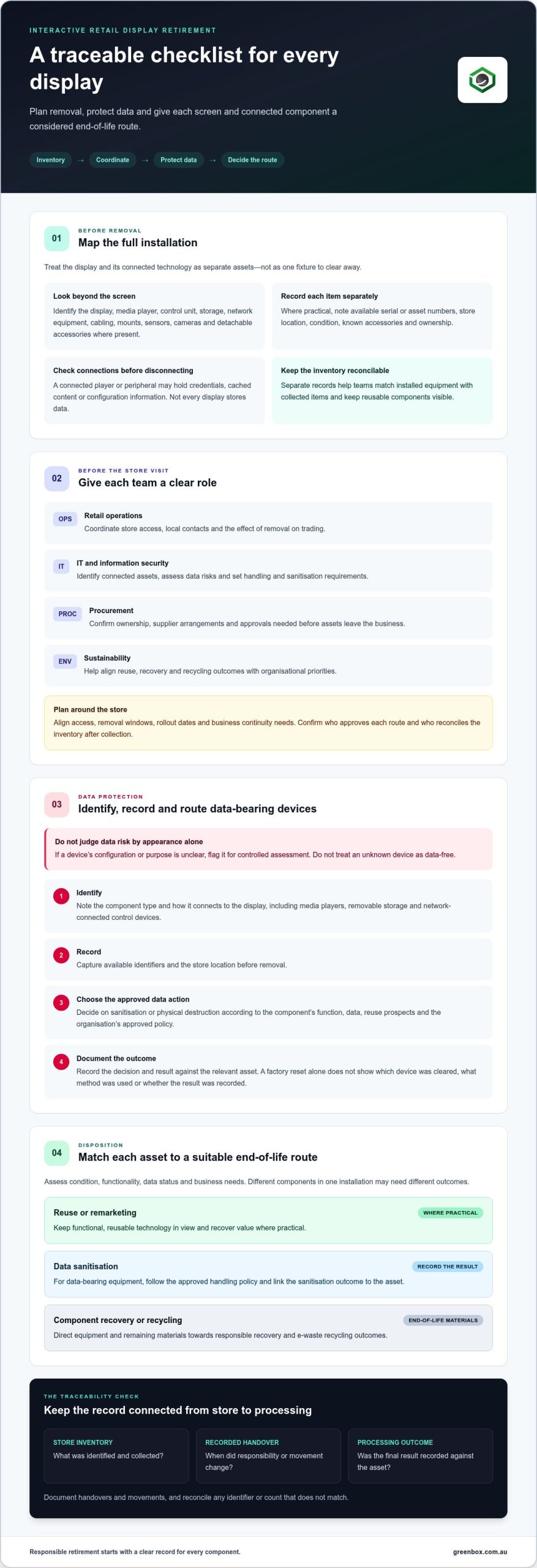
Plan an orderly display removal and disposal workflow
A multi-store retirement is easier to control when each location follows the same process. Define the project scope, assign decision-makers and agree how assets will be tracked before equipment is taken down. For managing disposal of interactive retail displays, a pilot location or small batch can test inventory fields, handovers and approvals before the wider programme begins.
Use a consistent workflow:
- 1. Define scope: list the stores, display types, connected equipment and intended project dates. Confirm ownership, including whether an equipment arrangement affects who can approve its retirement.
- 2. Prepare each location: confirm display locations, access arrangements, removal windows and local contacts. Note trading or rollout schedules that could affect business continuity.
- 3. Build the inventory: record asset identifiers, condition, components and location before removal. Assign responsibility for identifying equipment and reconciling the inventory.
- 4. Set disposition approvals: establish who approves data sanitisation or destruction, reuse, remarketing, component recovery and recycling. Record the agreed route against each asset or asset group.
- 5. Coordinate collection: brief store teams on what is being removed and how collected items will be matched to records. Document handovers and movements to keep equipment accounted for in transit.
- 6. Reconcile and report: compare collected items with the original inventory, investigate discrepancies and record final processing outcomes for internal review.
What should teams prepare before collection?
Prepare a location-level schedule with display counts, connected devices, access details and removal windows. Capture identifiers and equipment condition before disconnection, then clarify ownership and required approvals. Agree who can authorise each data and disposition decision, and what happens if equipment is missing, damaged or differs from the inventory. A small pilot can reveal process gaps before they affect multiple stores.
Consistent preparation helps prevent conflicting instructions on site. Give store contacts a clear scope, including which items are in or out, who records exceptions and how collection is confirmed. Align the removal window with store operations and any replacement rollout.
What records help close out the project?
Use the same reporting fields across locations: store, asset identifier, equipment type, recorded condition, collection status, approved outcome and processing result. Reconcile each collection against the starting inventory, noting missing, additional or mismatched items rather than silently changing the record. Retain relevant sanitisation, recovery and recycling documentation with the asset data for internal governance.
Close-out reporting should make exceptions visible and show which items still need follow-up. This gives project leads a clear view of completion across sites and creates a practical record for future asset reviews. Greenbox coordinates recovery, data sanitisation and end-of-life processing to support a consistent project approach. Plan a coordinated display asset recovery project.
Manage interactive retail display disposal with Greenbox
Retiring interactive displays involves more than arranging a collection. Screens, media players and associated equipment may need different handling based on condition, data status and potential for further use. Greenbox brings IT asset recovery, data sanitisation, asset remarketing and e-waste recycling together in one lifecycle approach, connecting information security with responsible end-of-life outcomes.
Greenbox has operated since 2000 and uses R2-certified facilities. Its carbon-neutral organisational approach supports businesses seeking to align technology retirement with environmental priorities. These capabilities bring equipment recovery, sanitisation and next-step decisions into a coordinated process.
What a managed recovery approach brings together
A managed process can coordinate collection, asset recovery, data sanitisation and disposition without treating a display estate as one type of equipment. Functional assets can be assessed for reuse or remarketing, while unsuitable items can be directed to e-waste recycling. Data-bearing components can be handled according to the agreed sanitisation or destruction requirements.
Bringing these activities into one process can reduce handovers between internal teams and processing stages. It also helps maintain a consistent view of which assets were recovered and how their end-of-life outcomes were determined. Greenbox tailors handling to the project scope, device mix and reporting requirements, rather than assuming every display installation has the same configuration or needs.
That flexibility matters across a varied estate. One store may have complete, working displays, while another has damaged screens or separate media players. A coordinated approach accounts for these differences while keeping security, recovery and environmental considerations within the same programme.
How to move from planning to action
Start with a clear picture of the project: the display estate, store locations, expected timing, known device types and internal requirements for data handling, approvals and reporting. Share available inventory and note where equipment condition or ownership needs review. These details help shape a practical approach for the assets involved.
Greenbox tailors project handling to that scope, including the recovery, sanitisation, remarketing or recycling pathways required. A defined process supports operational control from collection through final reporting and gives each asset an appropriate route. The plan can reflect the equipment mix and the outcomes the organisation needs to track.
For businesses managing disposal of interactive retail displays, Greenbox connects secure recovery with data protection and responsible processing. Discuss a secure, sustainable display retirement programme and establish an approach tailored to your project.
Make display retirement part of your next refresh plan
The next display replacement is an opportunity to include end-of-life decisions from the outset. Build retirement requirements into refresh planning, clarify who owns approvals and record the information teams need before equipment is removed. A repeatable approach can help stores transition more smoothly and make future asset decisions easier to oversee.
Managing disposal of interactive retail displays doesn’t need to become a last-minute task at the end of a rollout. A defined process helps your organisation plan for secure handling, maintain oversight as equipment moves and make responsible choices about its next destination.
Greenbox can shape a display retirement programme around your estate, project scope and reporting needs. Discuss a secure, sustainable display recovery programme with Greenbox and take the next step towards a controlled, responsible transition.
Frequently Asked Questions
Do interactive retail displays store customer or business data?
It depends on the display and its connected equipment. A screen may only show content, while a media player, control unit or attached computer could retain credentials, configuration details or cached information. Check equipment and setup records where available, and include linked devices in your review. Treat uncertainty as a reason to assess a component, not as evidence that it contains no data.
Is turning an interactive display off enough before disposal?
No. Powering down doesn’t remove stored information or close accounts and access associated with a device. Before removal, identify storage-bearing components and follow your organisation’s approved sanitisation or destruction process. If the display connects to a content or device management system, include access removal in the retirement plan. Record the action against the asset identifier to distinguish it from simply switching equipment off.
Can interactive displays be reused after a retail campaign ends?
Yes, if each item is functional, complete and suitable for its next purpose. For example, a screen might suit another internal setting if its connections, mounting and performance meet that use. Check ownership and support requirements, and process data-bearing components before redeployment. Record the assessment and new destination so the asset history remains clear after the campaign ends.
Should media players be disposed of separately from display screens?
They may need separate assessment. A media player can have different data risks, condition and reuse potential from the screen it served. Give it its own asset record or identifier where available, while linking that record to the associated display. This helps teams apply the right treatment to each item and prevents a player from being overlooked when the screen is recorded as collected.
What should retailers do with removable storage or accessories?
Include removable media, control devices, cables and accessories in the project scope instead of leaving them as untracked extras. Check whether each item has a separate owner or operational purpose, then document its handling route. For example, record and assess a USB storage device found behind a display rather than placing it in a general accessories box. Link related components to the display record where that supports reconciliation.
Can display software licences transfer to another site or owner?
Possibly, but transfer depends on the licence terms, account ownership and system configuration. Before redeployment or remarketing, involve the internal software or procurement owner to establish what can be transferred and what must be ended. Remove organisational access through approved procedures and record the decision. A factory reset doesn’t, by itself, transfer a licence, close an account or confirm that access has been withdrawn.
What information should a display disposal report include?
A useful report identifies collected assets and records their identifiers, reconciliation status, approved processing route and final outcome. Add relevant sanitisation or recycling evidence, along with notes on missing, additional or mismatched equipment. Use the same fields across stores so teams can review results consistently. Retain supporting records with the organisation’s asset documentation to make it easier to answer later questions about a particular display or component.
How can retailers reduce disruption during a multi-site display removal?
Plan the work around store trading needs and any replacement rollout, with agreed access arrangements and a clear point of contact at each location. A staged approach to managing disposal of interactive retail displays can help teams test instructions and collection records at a pilot site before expanding the programme. Set a process for recording exceptions on the day, then reconcile each store’s collection promptly to keep the project on track.