

What if a retired laptop became a security risk simply because no one knew who owned its next step? Unclear handovers between IT, security, procurement and sustainability teams can leave data-bearing devices, disposal decisions and records inconsistently managed. Knowing how to write an IT asset disposal plan helps turn one-off clearances into a controlled, auditable process.
It’s not enough to decide that old equipment should be recycled. A usable plan assigns responsibility, sets consistent data-handling controls and records why each asset is reused, remarketed, recycled or destroyed. It also gives the people managing technology clear steps to follow, from authorising an asset’s release to recording its final outcome.
This Australian guide provides a structure you can adapt to your assets, risks and internal roles. You’ll learn what to include, how to record decisions and how to establish secure, environmentally responsible pathways for retired equipment. It also explains how an IT asset disposition partner can support execution, from asset recovery and data sanitisation through to remarketing and recycling.
Key Takeaways
- Learn how to write an IT asset disposal plan that sets clear responsibilities, controls and review steps before equipment reaches end of life.
- Build an asset register that helps teams identify equipment, ownership, location, status and data-bearing components.
- Use consistent decision rules to determine whether equipment is suitable for continued use, internal redeployment, remarketing, recycling or destruction.
- Draft and approve the plan, then pilot it with a representative group of assets before wider adoption.
- See how an ITAD partner can support recovery, data sanitisation and responsible end-of-life outcomes while your organisation retains governance oversight.
Why write an IT asset disposal plan before equipment reaches end of life?
An IT asset disposal plan is a documented framework for deciding what happens when business technology leaves service. It sets out the decision criteria, controls, responsibilities and records that guide each asset from retirement to its next outcome. Rather than relying on individual judgement or a last-minute arrangement, teams can follow an agreed process and create a traceable record of what happened.
Planning early gives the organisation time to identify data-bearing equipment, confirm ownership and choose an appropriate pathway. Without that lead time, a departing employee’s laptop, a server room refresh or an office move can prompt rushed decisions about data sanitisation, collection and recycling. That can result in inconsistent handling, or reusable equipment being treated as waste because no one assessed it in time.
A disposal plan is broader than a one-off collection or decommissioning checklist. A checklist can guide a particular batch through tasks such as disconnecting, labelling and handing over equipment. The plan establishes the organisation-wide rules behind those tasks, including who approves decisions, what evidence is retained and how exceptions are handled. It should work across teams and retirement events, while allowing controls to reflect each asset’s risk.
What should an IT asset disposal plan achieve?
The plan should make three things clear: how assets are assessed, who is accountable and what happens to information and materials. Set criteria for deciding whether equipment stays in use, is redeployed, remarketed, recycled or destroyed. Assign responsibilities across IT, information security, procurement and sustainability so no decision depends on an informal handover. Link each outcome to suitable data-handling and record-keeping controls.
For example, IT can confirm a device’s condition and asset record, while information security determines its data-handling requirements. Procurement can clarify ownership or lease terms, and sustainability can help apply the organisation’s preferred material recovery outcomes. Define how these roles hand work over, including who resolves missing information and who approves exceptions.
Which assets and disposal events should it cover?
Define the scope clearly. It may include computers, servers, storage media, mobile devices, peripherals and network equipment, including components that can hold data. Cover relevant events such as scheduled refreshes, office changes, leased-asset returns and damaged equipment. A damaged device may need a different handling route from a working laptop, even when both leave service at the same time.
Set the level of control according to asset criticality, data sensitivity and business context. A device used for general administration may need a different approval pathway from storage containing sensitive business information. If ownership, condition or data status is uncertain, define a hold-and-review process rather than allowing the asset to move directly to an end-of-life outcome. This makes disposal planning a governance task, not just a logistics exercise.
What to include in an IT asset disposal plan
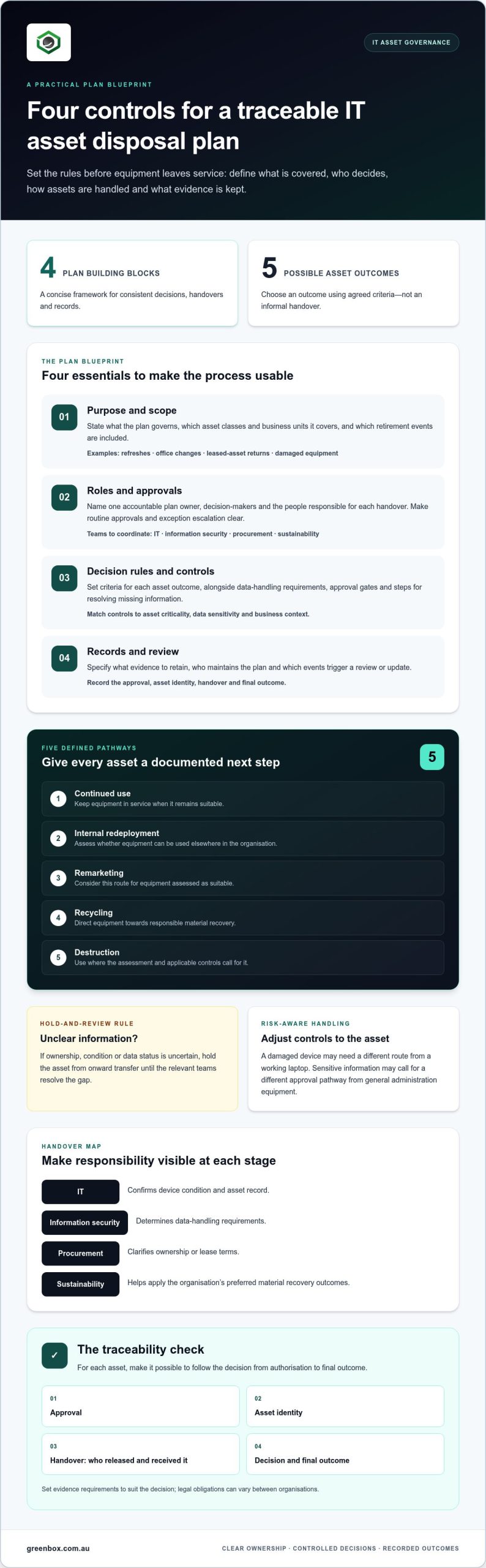
A practical plan should be specific enough to guide decisions, yet flexible enough to cover different equipment and retirement scenarios. Use a concise blueprint that teams can apply:
- Purpose and scope: State what the plan governs, which asset classes and business units it covers, and which disposal events are included.
- Roles and approvals: Name the accountable owner, decision-makers and people responsible for each handover.
- Decision rules and controls: Set criteria for continued use, redeployment, remarketing, recycling or destruction, alongside data-handling and escalation steps.
- Records and review: Define the evidence to retain and the events that trigger a review or update.
These sections make an IT disposal plan actionable: scope, ownership, decision rules, controls, records and review triggers.
Make approval gates explicit. For example, hold an asset with unknown ownership or data status from onward transfer until the relevant teams resolve the gap. Define who can approve routine outcomes, which decisions need additional authorisation and where staff should escalate exceptions. Match evidence requirements to the decision by recording the approval, asset identity, handover and final outcome, without assuming the same legal obligation applies to every organisation.
How to assign plan ownership and responsibilities
How to set scope, records and review triggers
Define the asset classes, business units and events covered, including refreshes, relocations, lease returns or damaged equipment where relevant. Set a consistent record from authorisation through to final outcome. Review the plan when technology, organisational risk, business structure or applicable regulatory settings change. The accountable owner can coordinate reviews and document updates.
The asset register should connect each physical item to its decision and supporting evidence. Useful fields include:
- Asset identifier, equipment type, make or model, and serial number where available.
- Business owner or custodian, assigned team, and current location.
- Lifecycle status, condition, and retirement reason or event.
- Whether the item or a component can store data, its data sensitivity classification where used, and the required handling route.
- Approval status, handover details, sanitisation or destruction evidence where applicable, and final disposition.
Keep the register practical. If teams can’t reliably update a field, specify who supplies the information and at what stage. A consistent record supports decisions across departments and makes exceptions easier to spot. For organisations planning recovery through to end-of-life outcomes, IT asset recovery and responsible recycling can form part of the documented pathway.
How to choose an IT asset’s next step: reuse, remarket, recycle or destroy
Start with evidence, not a default preference for resale or recycling. Assess each asset against its condition, data sensitivity, reuse potential and material recovery options. Then record the selected outcome and the reason for it. This gives teams a repeatable way to balance security, practical value and environmental considerations without assuming one pathway suits every device.
| Possible outcome | Condition and reuse potential | Data sensitivity and material recovery |
|---|---|---|
| Continue using | Asset remains fit for its current role and meets business needs. | Apply appropriate information controls if its use or custodian changes; reassess when it is eventually retired. |
| Redeploy internally | Asset is functional and suitable for another team or purpose. | Set data-handling steps before reassignment, especially if the new user or role has different access needs. |
| Remarket | Equipment is in a condition and configuration that may support another user. | Address data before transfer. Consider ownership, lease terms and the organisation’s approval criteria. |
| Recycle | Repair or reuse isn’t suitable, or the equipment has reached the end of its useful life. | Plan data handling for storage components and direct materials towards responsible recovery. |
| Destroy | Physical destruction may be considered where the asset or media can’t be safely reused, or another route doesn’t meet the organisation’s risk criteria. | Document the reason and evidence of the completed outcome. |
How asset condition and residual value shape the decision
Use clear condition categories, such as fit for continued use, suitable for redeployment, repairable, suitable for remarketing or unsuitable for further use. Apply them consistently, but consider business requirements too: an older device may still suit a lower-demand role, while a working leased asset may need to follow return terms. Record why an item isn’t suitable for reuse or recovery rather than leaving its final route unexplained.
Ownership matters. Before approving remarketing or another transfer, establish whether the organisation owns the asset and whether lease or contractual arrangements affect its next step. If condition, ownership or data status is unclear, pause the decision and send it for review.
How security and environmental priorities fit together
Make the information-handling decision separately from the asset’s final outcome. A device intended for reuse, resale or recycling may still contain data-bearing components, so define the sanitisation or destruction control and retain relevant evidence before transfer. Technical methods depend on the media and risk context; Greenbox’s certified data sanitisation guide provides further technical detail.
Once information risks are addressed, assess reuse and material recovery rather than sending every retired item down the same route. Where equipment can’t be reused, responsible recycling should remain an explicit planned outcome. This joined-up approach to security and environmental responsibility is also explored in sustainable IT asset recovery. Document the criteria and approval behind each pathway so similar assets receive consistent treatment.
How to write, approve and implement the plan in practice
Turn the framework into a working document through a structured drafting process. Involve the teams that manage assets, information risk, purchasing and sustainability early, so the final plan reflects how equipment actually moves through your organisation.
- Establish scope. Identify the asset classes, business units, locations and disposal events the plan covers. Note any exclusions and who can approve a change to the scope.
- Gather inputs. Review asset records, existing information-handling procedures, procurement and lease arrangements, and current end-of-life practices. Ask each team to identify gaps and recurring exceptions.
- Set controls. Define decision criteria, data-handling steps, approval gates, custody handovers and the evidence needed to record each outcome.
- Assign owners. Name the accountable plan owner and specify who carries out, approves and escalates each action. Make handovers between teams explicit.
- Approve and communicate. Obtain approval through the organisation’s governance process, publish the current version and explain how staff should use it.
For Australian regulatory references, verify current guidance against authoritative sources before including it. Requirements can depend on an organisation’s circumstances, so avoid presenting a general reference as a universal duty.
How to turn the framework into a usable working document
Make the plan easy to apply at the point of decision. Use concise decision tables, role definitions and task checklists rather than relying on policy prose alone. Add simple templates for disposal authorisation, custody handover, outcome recording and exceptions. Tailor the depth of each control to the assets, data risks and operating model, so the process is clear without adding steps that don’t help manage risk.
Design templates around the information teams need to act. For example, an authorisation form can capture the asset identifier, proposed outcome and approval. A handover record can show who transferred and received the equipment. An exception template should record the issue, decision-maker, agreed action and closure evidence.
Pilot the draft with a representative asset group before wider adoption. Include different equipment types and at least one less straightforward case, such as an item with uncertain ownership or incomplete records. Note where staff hesitate, which fields they can’t complete and whether approval routes are clear. Update the document before rolling it out across the organisation.
How to maintain evidence and improve the plan
Assign an owner and a review schedule that fits the organisation’s governance cycle. Track record completeness, adherence to approval steps, exceptions and the proportion of assets with a documented outcome. Review recurring delays or missing information as signs that a form, handover or responsibility needs refining.
Close the loop by updating the asset-register status and retaining the relevant decision and outcome evidence in the organisation’s chosen record system. This creates a clearer basis for audit-ready reporting and future reviews. Greenbox supports plan execution through IT asset recovery, data sanitisation, remarketing and e-waste recycling. Greenbox’s IT asset recovery support can be part of the process you document.
How Greenbox can help put your IT asset disposal plan into action
Your plan sets the rules; an IT asset disposition partner can support the work that follows. Greenbox helps organisations put defined pathways into practice through IT asset recovery, data sanitisation and destruction, asset remarketing and e-waste recycling. These services connect the plan’s controls to the physical movement and final outcome of equipment.
Your organisation remains accountable for its governance framework, including approvals, risk settings and record requirements. A partner supports delivery within that framework, with responsibilities and handovers aligned to your process. Keeping those roles clear supports operational delivery without shifting decision-making accountability.
Where an ITAD partner fits into the plan
Map partner-supported activities to your workflow before a disposal project begins. Define who authorises release, what custody information is recorded, which data-handling steps apply and what outcome evidence your teams need. A clear handover maintains visibility between internal owners and the people supporting recovery and processing.
- Recovery: Arrange the planned collection and receipt of retired equipment, following the organisation’s authorisation and custody controls.
- Data sanitisation: Treat information handling as a distinct stage, with the method and evidence aligned to the organisation’s requirements.
- Asset outcomes: Direct suitable equipment towards remarketing and items that can’t be reused towards responsible recycling, in line with documented decisions.
Greenbox operates R2-certified facilities and is a carbon-neutral organisation. These are relevant considerations when assessing how service delivery aligns with your plan’s security and environmental priorities. They don’t replace your organisation’s own risk assessment, approval process or evidence requirements. For broader Australian disposal context, the Australian business e-waste guide provides additional background.
What to prepare before starting an ITAD conversation
A clear project brief helps shape a practical approach around your organisation’s assets and operating requirements. Gather the information you have and note any details that still need to be resolved.
- Asset categories, approximate volumes, condition and planned disposal timing.
- Internal owners, approval points and any lease or ownership considerations.
- Data-handling expectations, custody controls and reporting or evidence needs.
- Preferred outcomes, including opportunities for remarketing and requirements for recycling.
This preparation helps align delivery with the plan while keeping governance responsibility with your organisation. Greenbox can support IT asset recovery, data sanitisation, remarketing and recycling as part of your asset lifecycle. Speak with Greenbox about your project requirements.
Make your disposal plan part of everyday asset governance
A plan delivers lasting value when teams use it as technology and business needs change, not only during a major equipment refresh. Treat each retirement as an opportunity to strengthen the process: capture decisions, identify friction and update guidance where practice reveals a gap. Regular feedback helps keep responsibilities clear and end-of-life choices aligned with organisational priorities.
Knowing how to write an IT asset disposal plan is the starting point. The next step is putting it to work in a way that fits your organisation’s assets, risks and operating model. Greenbox supports IT asset lifecycle management, helping organisations plan secure and responsible outcomes for business technology.
Bring your priorities, asset profile and planned timeframes into a conversation about an approach for your organisation. Discuss a secure, sustainable IT asset disposal approach with Greenbox and take the next step towards a clear, workable lifecycle process.
Frequently Asked Questions
What should an IT asset disposal plan include?
Include the rules staff need to make and explain a disposal decision, not just a list of tasks. Define key terms such as “retired”, “data-bearing” and “exception” so teams interpret the process consistently. State where the current approved version lives, who maintains it and how superseded copies are controlled. These details help staff find the right guidance and reduce the risk of following an outdated process.
How do you write an IT asset disposal policy step by step?
To work out how to write an IT asset disposal plan, start by examining recent retirement cases and noting where decisions stalled or records were unclear. Use those findings to draft practical decision rules and clear exception wording. Ask representatives from affected teams to review the draft for conflicting instructions, then test whether staff can apply it to realistic scenarios. Incorporate their feedback before seeking formal approval and publishing the controlled version.
When should an organisation create an IT asset disposal plan?
Create the plan before the organisation needs to retire equipment, rather than during a clearance. A useful time is when planning a technology refresh, reviewing lease arrangements or introducing a new class of equipment with different data-handling considerations. Changes such as a merger, new business unit or revised operating model can also expose gaps in existing processes. Establishing the framework early gives teams time to align decisions and responsibilities.
Who is responsible for IT asset disposal in a business?
Responsibility should be shared across relevant teams, with one designated role accountable for overseeing the process. IT may coordinate asset details and operational handovers, while information security advises on data risks. Procurement can clarify purchasing or lease conditions, finance may assess asset value, and sustainability can inform environmental priorities. Name a decision-maker for unresolved cases so exceptions don’t remain stuck between teams or proceed without clear authority.
How should a business choose between reusing, remarketing and recycling IT equipment?
Choose at the individual asset level when condition, ownership or data risk differs across a batch. For example, a group of laptops may include devices suitable for another internal role and others that are damaged or no longer fit for purpose. Apply the organisation’s criteria to each item and record why it follows a particular route. This avoids assuming that equipment collected together must all have the same outcome.
What records should be kept when disposing of IT assets?
Keep records that let someone reconstruct the decision and follow the asset through to its outcome. Link approvals, custody events and data-handling evidence to the same asset identifier used in the asset register. Record corrections or exceptions rather than silently overwriting gaps, and limit access to records according to internal information-handling practices. Set retention and disposal of these records under the organisation’s applicable record-management arrangements.
How often should an IT asset disposal plan be reviewed?
Set a review schedule that fits the organisation’s governance cycle, then bring reviews forward when a meaningful change occurs. Triggers may include a new type of data-bearing equipment, changes to internal responsibilities, repeated exceptions, audit findings or a revised operating model. Record the review date, decision and version changes, even if the plan remains unchanged. This gives staff confidence that the document is current and shows how it is maintained.