

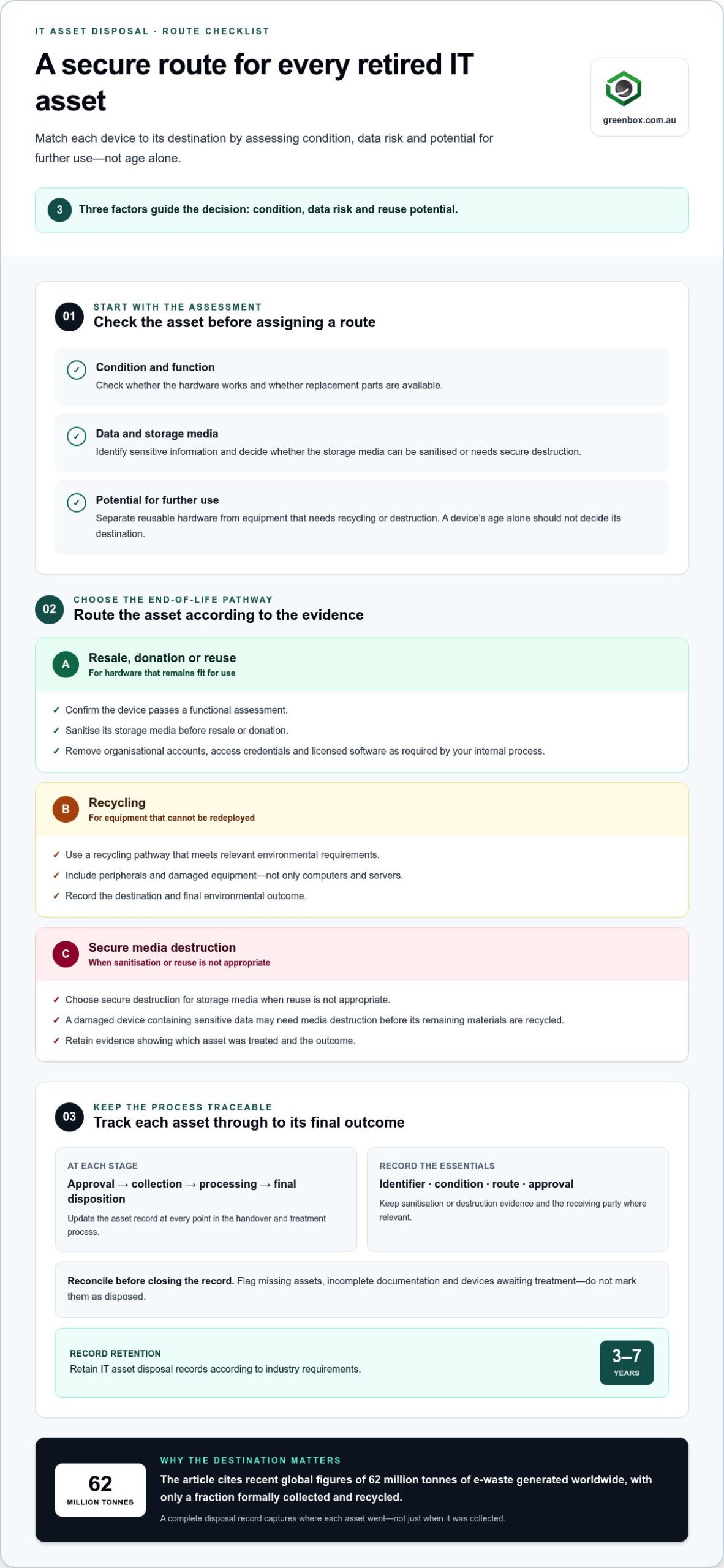
The safest IT disposal process starts before equipment leaves your site: record each asset, assess its condition and data risk, sanitise or destroy its storage media, then assign it a destination such as reuse, resale, recycling or destruction. Effective IT asset inventory management for disposal gives you a clear record of what is leaving, how it will be handled and what evidence to retain. A device’s age alone should not determine its destination.
It’s easy to focus on the handover and overlook the decisions that make disposal secure. A complete inventory helps your team identify data-bearing devices, apply consistent criteria and trace each asset through to its final outcome.
This guide explains how to build and maintain a disposal-ready inventory, classify assets by condition and data sensitivity, and choose an appropriate end-of-life pathway. It also covers what to document so security, value recovery and environmental responsibility remain part of one controlled process.
Key Takeaways
- Set a disposal policy that assigns responsibilities, defines asset destinations and aligns with applicable regulations and corporate requirements.
- Record each device’s condition, location, data sensitivity and lifecycle status so its disposal route is based on evidence, not age alone.
- Before resale or donation, sanitise data-bearing equipment and retain records that show what was done and which asset was treated.
- Match each asset to resale, donation, recycling or destruction according to its condition, data risk and potential for reuse.
- Keep inventory records current through collection, processing and final disposition to support traceability and informed retirement decisions.
What is the safest way to dispose of IT assets?
In Australia, compare IT asset disposition vendors by their data security controls, recycling pathways, resale processes and reporting; require a clear account of how each asset is handled. Apply relevant laws, sector standards, environmental rules and corporate policies; public sector disposal processes must align with applicable government procurement legislation and frameworks.
Check applicable regulations and corporate policies
Start by mapping the rules and internal procedures that apply to each asset group. Record who approves disposal, who handles devices and which destinations are permitted. Public-sector organisations should consider applicable procurement requirements when setting disposal procedures. For other Australian organisations, consider applicable industry standards, environmental laws and corporate policies rather than assuming one process fits every asset.
Write a structured procedure covering approval, transfer, reuse and final disposal. Set criteria for when equipment can be resold, donated, recycled or destroyed. Train employees involved in disposal on these steps, data security protocols and environmental requirements. Review the policy as business needs and applicable rules change, so staff aren’t relying on outdated instructions.
Assess data security and regulatory compliance
Identify devices that hold sensitive or personal information before they leave your organisation. Assess laptops, servers, storage media and network equipment, then specify the required sanitisation or destruction method for each category. Don’t treat a working device as safe to transfer just because its files appear deleted. Data must be completely wiped, or its storage media securely destroyed when reuse isn’t appropriate.
Compare vendors using practical evidence: documented erasure procedures, secure handling, staff training and traceable asset processing. Ask whether reporting records the device identifier, sanitisation outcome and final destination. R2 or e-Stewards certification can support accountability for responsible disposal, while the right choice still depends on your organisation’s policy and asset requirements. Document the checks that support your compliance decision.
Update records and prepare compliance reports
Update each asset record at approval, collection, processing and final disposition. Match the record to a unique identifier, such as a serial number or asset tag, and retain purchase details, location, condition and assigned disposal route. Add evidence of data sanitisation or destruction, transfer approvals and the receiving party where relevant. These records support audits and help resolve discrepancies.
Prepare reports that reconcile the original inventory with completed outcomes. Flag missing assets, incomplete documentation and devices awaiting treatment instead of marking them as disposed. Retain IT asset disposal records for three to seven years, depending on industry retention requirements. ISO 27001 is relevant to post-disposal tracking and compliance, so align recordkeeping with your organisation’s control framework and reporting needs.
Confirm environmental and e-waste compliance
Choose an end-of-life route that meets relevant environmental requirements and avoids sending electronic equipment to general waste. Reuse can extend the working life of suitable devices, while recycling provides a pathway for equipment that cannot be redeployed. In recent global figures, the world generated 62 million tonnes of e-waste, and only a fraction was formally collected and recycled. Those figures reinforce why disposal records should capture the destination, not merely the collection.
Choose a route that accounts for materials requiring careful handling, and record the final outcome. Include peripherals and damaged equipment, not just computers and servers. Assign responsibility for separating reusable assets from recycling or destruction streams, then retain relevant processing documentation. A complete record links each asset’s identity and approval to its environmental outcome and final status.
Reselling, donating, recycling, or destroying equipment
Choose each asset’s destination according to its condition, data risk and potential for further use. Separate reusable hardware from equipment needing recycling or destruction, and record the reason for each decision.
Choose a route for retired equipment
Assess each device before assigning it to resale, donation, reuse, recycling or destruction. Check whether the hardware works, replacement parts are available and its storage media can be sanitised. A functioning laptop may suit resale or donation; a damaged device containing sensitive data may require secure media destruction before its remaining materials are recycled.
Keep software licensing and configuration decisions separate from the hardware assessment. Remove organisational accounts, access credentials and licensed software as required by your internal process. Record the asset identifier, condition, chosen route and approval, so staff can explain why one device was reused while another followed a different end-of-life pathway.
Resell or donate reusable equipment
Prioritise resale or donation when equipment remains fit for use and can be prepared securely. First sanitise storage media, remove organisational configurations and confirm the device can be transferred without exposing sensitive information. A laptop that passes a functional assessment may retain value; a server with failing drives might be unsuitable for reuse, even if some components still work.
For each transfer, document the asset tag, condition, data treatment and recipient or resale outcome. Check that software is removed or transferred in line with your organisation’s licensing arrangements. Keep the handover record with the inventory update rather than marking equipment as disposed when it leaves the storeroom. This supports traceability and clarifies the asset’s final status.
Destroy equipment and arrange certified recycling
Choose physical destruction when storage media cannot be reliably sanitised, reuse is unsuitable or policy requires destruction. Shredding hard drives is one option when reuse isn’t possible or physical destruction is required. Match the method to the media type, then retain records linking the destruction outcome to each asset identifier.
Route electronic waste through certified recyclers rather than general waste. R2 or e-Stewards certification can support accountability for responsible recycling. Older laptops, servers and peripherals may contain lead, mercury or cadmium, so use a controlled recycling pathway rather than dismantling them informally. Separate recoverable materials from equipment requiring destruction, and document the final route for each batch.
For organisations managing end-of-life equipment at scale, e-waste recycling pathways can form part of a documented disposal process.
What Does a Secure Disposal Process Look Like?
Use a controlled sequence: log each asset, protect it during removal, sanitise its media, verify the result and record its final status. Keep the asset identifier consistent across custody logs, sanitisation evidence and disposition records.
Log custody and arrange physical removal
Record every device before it leaves its assigned location. Capture its asset tag, serial number, collection point, custodian and transfer time in a tracking log or asset platform. These details link the physical item to its inventory status and help identify gaps during reconciliation.
Restrict access to the collection area and keep devices together in documented batches. At handover, record who released and received each batch, then update its location. For network equipment, include attached storage media and removable drives in the same custody process. Don’t mark an asset as removed until its handover is recorded.
Sanitise data before disposal
Identify each storage type and choose a sanitisation method that suits its media and intended destination. NIST SP 800-88 is a United States standard covering media sanitisation methods such as overwriting, degaussing and physical destruction. PCI DSS also provides guidance on media sanitisation and end-of-life data handling.
Sanitise devices before donation or resale, not after transfer. An operating system reset may not establish that a laptop’s stored data is unrecoverable, so use a defined erasure procedure and record the method applied. When reuse is unsuitable or policy requires destruction, route the media for physical destruction and keep it in controlled custody until processing.
Verify data sanitisation
Check the sanitisation outcome against the device identifier and recorded method. Retain formal logs, verifiable erasure procedures or certificates of destruction, as applicable. Evidence should distinguish completed sanitisation from an unsuccessful attempt, so the asset’s status reflects the actual result rather than a scheduled task.
If a wipe is unsuccessful, keep the device out of resale or donation channels and assign an approved alternative method. Reconcile the sanitisation record with the inventory before changing the asset status. Documented evidence of data removal is relevant under frameworks such as GDPR and HIPAA, which organisations should apply where relevant to their operations.
Complete secure asset disposition
Close the record only after the asset has a verified data outcome and a documented destination. Link its final status to the custody log, processing evidence and transfer or recycling record. This structured trail lets the organisation trace an individual device from collection through secure disposition.
Review completed records for missing identifiers, duplicate entries or assets still marked as in use. Keep environmental outcomes alongside security evidence, noting whether equipment was reused, recycled or destroyed. Reconcile the physical batch against the platform to confirm every item has a recorded endpoint, rather than disappearing from the network inventory without explanation.
What Is IT Asset Inventory Management?
IT asset inventory management tracks technology from purchase through use, retirement and final disposition. For disposal planning, it links each asset’s identity, condition and lifecycle status to a practical next step.
Identify assets ready for retirement
Use your inventory to identify equipment approaching retirement instead of relying on a replacement date alone. Record the asset type, location, purchase details, current condition and lifecycle status. These fields help teams distinguish equipment suitable for continued use from devices ready for assessment and disposal.
CIS Control 1 emphasises inventorying, tracking and managing assets across physical, virtual, remote and cloud environments. Apply that discipline to retirement decisions: include network equipment and remote devices alongside office computers. A complete view helps expose assets that have moved locations or remain assigned to staff after their operational use ends.
Review utilisation, maintenance history and lifecycle costs before retiring a device. Include disposal costs in the lifecycle calculation so the decision reflects more than the original purchase price. For example, an underused device with ongoing maintenance needs may warrant retirement assessment, while a well-used asset may still have a role in the organisation.
Follow retirement and disposal workflows
Build a structured workflow that moves each approved asset from active use to assessment, sanitisation and its recorded final destination. Assign responsibility for each transition and use clear status labels such as “in use”, “awaiting assessment” and “retired”. This gives teams visibility into work still awaiting action.
IT asset management software can automate workflows for asset requests and maintenance scheduling. Adapt those workflows for retirement by linking approvals and task ownership to the asset record. Don’t close a record just because equipment has been removed from a desk; disposition is incomplete until its destination and status are recorded.
Assess retired equipment for resale or donation when its condition supports further use. Selling or donating old IT assets can help recover some value, but the route should follow your organisation’s approval and data-handling process. Record the decision and outcome against the inventory entry, so later reports distinguish transfer from recycling or destruction.
Use workflow reports to compare retired assets with completed outcomes. If a device remains marked “awaiting assessment”, assign the next action instead of letting it disappear from view. Consistent records of approval, condition and destination link lifecycle decisions to disposal documentation and cost analysis.
Asset inventory and classification for end-of-life devices
Before disposal, record each device’s identifier, type, location, purchase details and condition. Add its lifecycle status, data-bearing components and proposed destination so the inventory supports a clear decision.
Record asset information before disposal
Update the inventory before scheduling a device for removal. Include its asset tag or serial number, hardware type, physical location, purchase timing and cost. Add the current custodian, condition, maintenance history and lifecycle status. These fields help distinguish a desktop awaiting assessment from a server approved for retirement.
Record where storage media sits within the equipment. A server may contain internal drives, while a workstation may also have removable storage. Include these components in the asset record so they remain visible during handling. Mark the intended destination as pending assessment until the organisation approves resale, donation, recycling or destruction.
Keep information accurate by reconciling inventory entries against physical devices and available purchase records. Correct duplicate asset tags, outdated locations and equipment still assigned to former users. If a device has moved, update its location before disposal planning. This gives operations teams a reliable record for collection, approval and reporting.
Link disposal documentation to the same asset identifier. Record approvals and subsequent processing evidence against the relevant entry, rather than keeping disconnected batch notes. For example, a report listing a serial number can be matched to its inventory record, purchase information and retirement status.
Classify devices reaching end of life
Classify each device by condition, usefulness, data sensitivity and likely end-of-life route. Separate working equipment suitable for reassignment from devices needing repair, recycling or destruction. A laptop that starts reliably may be considered for reuse; damaged storage media may need a different pathway, even if other components remain usable.
Use consistent categories throughout the asset lifecycle. For example, “reuse assessment”, “data sanitisation required”, “recycling” and “destruction” describe distinct operational needs. Avoid labelling every retired device simply “surplus”, because that doesn’t show the next action or which team owns it.
Use inventory reports to identify equipment with incomplete records or unclear status. Flag devices with missing purchase details, unknown locations or unrecorded storage media for review. IT asset management software can report lifecycle status, utilisation and compliance metrics, supporting retirement decisions alongside purchase planning.
Apply the same classification rules across sites and teams, then update them as operations change. A consistent vendor handover record can use those categories to preserve traceability. Prepare your end-of-life asset register with clear identifiers, condition details and proposed outcomes.
Greenbox: Data Sanitisation and Destruction
Greenbox provides Data Sanitisation and Destruction for organisations preparing data-bearing equipment for retirement. Use this service when devices need secure data treatment before resale, donation or another disposal route. IT Asset Recovery and Asset Remarketing can support the next stage by managing retired equipment and identifying assets for remarketing.
For inventory teams, aligning these activities with asset records helps connect each device to its data treatment and intended outcome. Greenbox’s R2-certified facilities and focus on data security and environmental compliance support a considered approach to end-of-life technology.
Contact Greenbox to discuss your organisation’s IT asset disposal requirements.
Make disposal part of the next asset cycle
Use disposal planning to improve decisions before retirement. Accurate records of condition, use and final outcomes help teams spot patterns, refine purchasing priorities and build secure processes into the next technology transition. That’s the longer-term value of IT asset inventory management for disposal: it makes end-of-life handling an informed part of asset planning.
Greenbox offers Data Sanitisation and Destruction and IT Asset Recovery for organisations managing retired equipment. Asset Remarketing can support suitable devices, while Pre-Configuration and Imaging helps prepare technology for deployment. Together, these services connect secure retirement with the next stage of an organisation’s technology lifecycle.
Ready to plan your next disposal project? Contact Greenbox about IT asset disposal and take the next step towards a controlled transition.
Frequently Asked Questions
How do ITAD solutions support sustainability goals?
ITAD supports sustainability by prioritising continued use and responsible material recovery over unnecessary disposal. A functional laptop, for example, may be refurbished for resale or donation, while unusable equipment can be directed to recycling. Track the outcome of each asset to measure reuse and recycling activity in organisational reporting. This connects disposal decisions with resource conservation and helps teams identify whether purchasing or redeployment practices could reduce future e-waste.
How does ITAD connect to asset tracking software?
ITAD connects with asset tracking software when disposal updates the same record used to manage equipment during active operations. Effective IT asset inventory management for disposal links an asset’s identifier to its status, collection and final outcome. Use consistent fields across inventory and ITAD records, then reconcile completed items against the original register. This helps prevent retired devices from remaining active or disappearing without a recorded disposition.
How should a business manage electronic waste disposal?
Separate electronic equipment from general waste and assign each item a reuse, recycling or destruction route. Start with an inventory of devices, peripherals and storage media, then identify which items can be reused safely. Send equipment that cannot be reused through a responsible recycling pathway. Retain records linking each asset to its destination and processing outcome. This makes it easier to report on e-waste handling and identify gaps between collected equipment and completed processing.
The IT inventory control tower: How systems should work together?
Connect inventory, procurement, maintenance and disposal workflows through consistent asset identifiers and status updates. The inventory should show what equipment exists and where it is; procurement records add purchase details, while maintenance history helps inform retirement decisions. IT asset management software can use automated discovery to identify network assets and report on utilisation or lifecycle status. Assign ownership for correcting mismatches so teams can act on a coherent record rather than conflicting lists.
What are the essential steps for a legal and ethical ITAD programme?
Establish a written policy, assign responsibilities, train staff and document each asset’s route from approval to final disposition. Map the process to relevant Australian laws, environmental requirements, industry standards and corporate policies. Include data sanitisation criteria, permitted reuse routes and escalation steps for incomplete processing. For example, a device awaiting a failed wipe should remain recorded as pending, not reported as ready for resale. Review procedures as regulations and organisational needs change.
What are the steps for managing IT assets from retirement to disposal?
Begin by approving retirement and checking the inventory record against the physical device. Assess condition, data sensitivity and reuse potential, then assign a route such as redeployment, donation, resale, recycling or destruction. Complete required data treatment before transfer, and retain evidence linked to the asset identifier. Finally, update the asset’s status and reconcile the register against completed outcomes. This sequence distinguishes equipment that has left a site from equipment whose disposal is complete.
How can organisations securely erase or destroy data on IT assets before disposal?
Select a method suited to the storage media and intended outcome. Secure wiping can prepare reusable equipment, while degaussing or shredding may suit media requiring physical treatment. NIST SP 800-88 describes media sanitisation methods, including overwriting, degaussing and physical destruction. Record the device identifier, method and result, then retain verification evidence. If sanitisation fails, keep the asset out of resale or donation pathways until an appropriate treatment is completed.
How should IT assets be disposed of under Australian e-waste rules?
Identify the environmental requirements that apply to your organisation, asset type and disposal pathway, then document how each item meets them. Keep electronic waste out of general waste and direct it to a responsible recycling route. Separate reusable equipment from items requiring material recovery or destruction, and retain records of final destinations. Because disposal processes must align with applicable environmental laws and organisational policies, include those requirements in written procedures and staff training.