

A device leaving campus is not just an equipment decision: university IT asset disposal must account for research data before hardware is reused, resold or recycled. For Australian organisations covered by the Privacy Act 1988, APP 11.2 requires reasonable steps to destroy or de-identify personal information that is no longer needed, according to the Federal Register of Legislation. Research records may also need to be retained under university and project requirements, so the first step is to identify what the device holds and who is responsible for it.
Universities need a university IT asset disposal process that protects sensitive information while identifying equipment with useful life or recoverable value. This guide explains how to prepare research devices for retirement, coordinate collections across campuses, document data sanitisation and direct equipment towards reuse, remarketing or responsible e-waste recycling.
A clear asset record and secure chain of custody connect every stage, from decommissioning and sanitisation to recovery and recycling. This gives campus teams a more controlled way to retire technology while addressing data security and environmental responsibility together.
Key Takeaways
- Separate reusable equipment from end-of-life items so each can be directed towards appropriate recovery, remarketing or recycling.
- Plan campus collections around site access, equipment readiness and a clear handover process to keep logistics organised.
- Use an asset manifest to connect each device’s identity with its data sanitisation or destruction outcome.
- For organisations covered by the Privacy Act 1988, APP 11.2 requires reasonable steps to destroy or de-identify personal information that is no longer needed, according to the Federal Register of Legislation.
E-waste recovery and zero-landfill processing
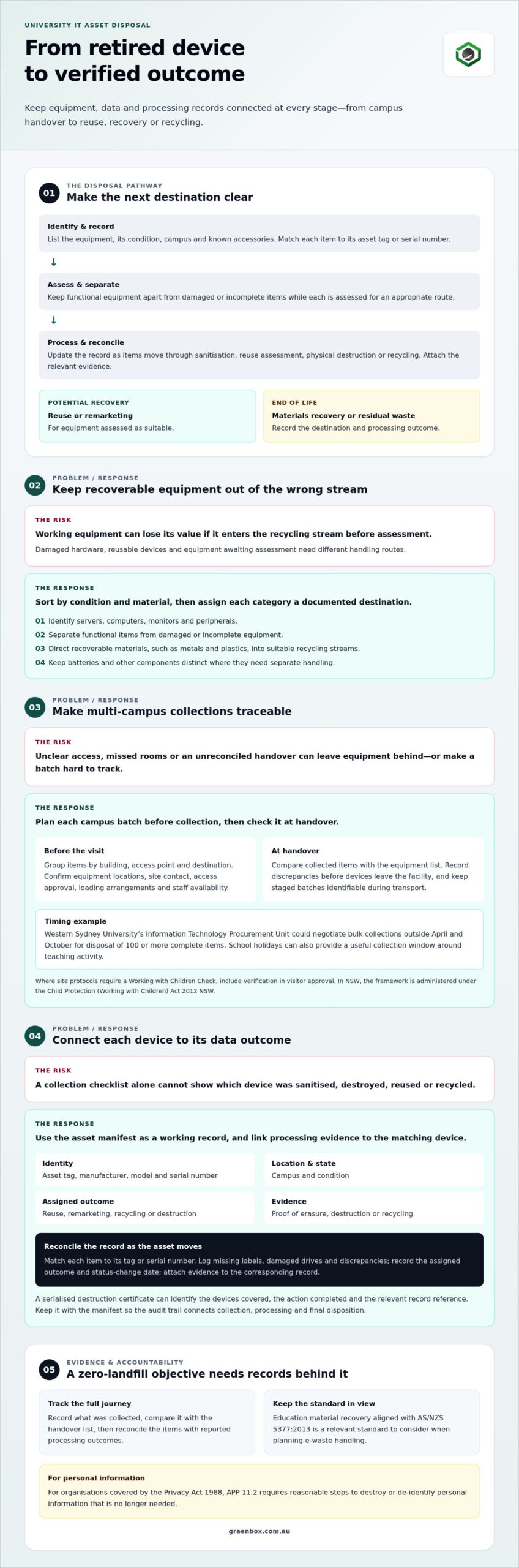
For a campus, diverting e-waste from landfill starts by sorting retired equipment by condition and material. A working server may be suitable for reuse or recovery, while damaged hardware needs a different route. Separate equipment awaiting assessment from items designated for materials recovery. This helps prevent reusable assets from entering the recycling stream before their value is assessed.
Use a documented process to track equipment from collection through its final destination. Education material recovery aligned with AS/NZS 5377:2013 gives campuses a relevant standard to consider when planning e-waste handling. A zero-landfill objective should be supported by clear records of recovered materials and any residual waste. The label alone doesn’t show how each item was processed.
- Identify devices and components, including servers, computers, monitors and peripherals.
- Separate functional equipment from damaged or incomplete items for appropriate assessment.
- Direct recoverable materials, such as metals and plastics, into suitable recycling streams.
- Record the destination of each category and retain evidence of processing.
These steps turn landfill diversion into a practical workflow. For example, a server that cannot be reused can be assessed for component and material recovery. Batteries and other components may require separate handling from general equipment. Keeping categories distinct supports safer sorting and clearer records throughout disposal.
Before collection, campus teams can prepare a list of equipment types, condition and any known accessories. At handover, compare the list with the items collected and record discrepancies. After processing, reconcile those records with the reported outcomes. This creates a traceable account of what was reused, recovered or treated as residual waste, helping the university assess its landfill diversion approach and improve future disposal planning.
Multi-campus and school-holiday collection logistics
Improper disposal can expose research or personal data and send recoverable materials to landfill. A planned collection separates data-bearing equipment from general recycling loads and gives each campus a clear handover process.
On-site campus collections
For a multi-campus collection, group equipment by building, access point and destination before scheduling vehicles. Confirm which rooms hold retired devices, who can authorise access, and whether loading areas suit bulky items. School holidays can provide a useful window to coordinate collections around teaching activity. Western Sydney University’s Information Technology Procurement Unit could negotiate bulk collections outside April and October for disposal of 100 or more complete items.
Secure collection and transport
Before collection day, prepare an equipment list and identify a responsible site contact for each campus. At handover, reconcile collected items against the list and record discrepancies before equipment leaves the facility. Use secure, access-controlled holding areas for staged loads, then keep separate batches identifiable during transport. Where site access protocols require a Working with Children Check, include verification in visitor approval. In NSW, the Working with Children Check framework is administered under the Child Protection (Working with Children) Act 2012 NSW.
Holiday schedules call for practical coordination, not just a date in the calendar. Confirm building access, loading arrangements, equipment locations and staff availability at each site. A campus with several storage rooms, for example, may need a local escort to move assets to a central collection point. A shared schedule helps avoid missed equipment and unplanned repeat visits.
For a coordinated approach to campus equipment recovery, consider IT asset recovery services alongside collection planning. A documented handover helps connect each campus batch with its next processing step.
Asset manifests and serialised destruction certificates
A useful asset manifest links each collected device to its final outcome. Record the asset tag, manufacturer, model, serial number, campus and condition. Note whether each item is intended for reuse, remarketing, recycling or destruction. These details help teams reconcile handover records and identify devices that need data sanitisation before leaving controlled storage.
Use the manifest as a working record, not just a collection-day checklist. Update each entry as equipment moves through sanitisation, reuse assessment or physical destruction. At ANU, assets are removed from registers when they are obsolete, unserviceable, traded in, sold, missing or otherwise disposed of. Linking register updates to processing evidence gives the university a clearer record of each asset’s final status.
- Match every collected item to its recorded asset tag or serial number.
- Log missing labels, damaged drives or differences found during reconciliation.
- Record the assigned outcome and the date the status changes.
- Attach proof of erasure, destruction or recycling to the corresponding record.
A destruction certificate is most useful when it identifies the devices covered, the action completed and the relevant record reference. Serialised details can distinguish one drive from another, especially when a batch contains similar models. Keep the manifest and certificate together so the audit trail connects collection, processing and final disposition without relying on staff memory.
For Australian organisations covered by the Privacy Act 1988, APP 11.2 requires reasonable steps to destroy or de-identify personal information that is no longer needed, according to the Federal Register of Legislation. A documented record helps show how each data-bearing asset was handled. Separate records for sanitised equipment and physically destroyed media also make it easier to trace outcomes and resolve discrepancies.
IT asset buyback and end-of-life asset recovery
Decommissioning starts with approval, network removal, data sanitisation and a recorded disposal outcome. Universities can assess usable assets for internal reuse, donation or resale, then select an e-waste provider based on certification and traceable processing.
Decommissioning university equipment
Start by checking ownership, lease terms and approval requirements, then remove the device from the university network. Identify stored data, sanitise or destroy it, and record the asset’s final destination. For Australian organisations covered by the Privacy Act 1988, reasonable steps must be taken to destroy or de-identify personal information that is no longer needed, under APP 11.2, according to the Federal Register of Legislation.
Reuse, refurbishment and resale
Before retiring equipment, consider whether another university team could use it. Functional devices may be suitable for redeployment, while repairable equipment can be assessed for refurbishment. Assets with remaining market value may be considered for resale or buyback, subject to university approvals and finance processes. Donation is another option, provided data is sanitised first and the recipient and transfer are recorded.
Base the decision on each asset’s condition, support status, data risk and potential for reuse. Equipment with no practical reuse value can proceed to materials recovery instead.
Recycler and provider selection
Australian universities can assess providers with R2-certified facilities, documented data handling and clear evidence of final processing. Certification is one selection factor: also consider whether the provider can connect asset records with erasure, destruction, remarketing or recycling outcomes. AS/NZS 5377:2013 is a relevant reference for education material recovery, helping frame questions about how equipment and recovered materials are handled.
For a structured next step, plan an IT asset recovery pathway that separates reusable equipment from end-of-life items and records each outcome.
Greenbox: Data Sanitisation and Destruction
When university equipment is ready for retirement, Greenbox can support secure data handling and responsible recovery. Its Data Sanitisation and Destruction service handles data-bearing devices to military-grade security standards. IT Asset Recovery and Asset Remarketing help assess equipment for further value, while Pre-Configuration and Imaging can prepare hardware for redeployment.
Include these services in the disposal workflow when devices hold research, staff or student information, or when a campus refresh creates surplus equipment. Handling data sanitisation before making reuse decisions helps teams manage information risk and identify suitable next destinations for assets. Greenbox also supports structured recovery and remarketing aligned with the university’s approvals and records.
To discuss secure handling of university IT equipment, contact Greenbox.
Plan the next campus technology transition
Technology planning works best when retirement is considered alongside procurement, deployment and future reuse. Before a refresh begins, define who approves retirement, which records accompany each asset, and how teams choose between redeployment, remarketing and recycling. This gives research, IT, finance and facilities teams a shared process for the transition.
A considered approach to university IT asset disposal can support a stronger lifecycle plan. Greenbox offers Data Sanitisation and Destruction, IT Asset Recovery and Pre-Configuration and Imaging. These services address data handling, asset recovery and preparation for redeployment. Set priorities according to campus needs, whether that means protecting information, recovering useful equipment or preparing replacement hardware.
Bring an upcoming refresh or surplus equipment requirement into a practical discussion with Greenbox. Contact Greenbox about university IT disposal to plan the next step. With clear priorities in place, your team can move forward with confidence.
Frequently Asked Questions
What about university research data?
Assess research data retention and access needs before equipment is sanitised or destroyed. A sound university IT asset disposal process identifies the research owner, applicable project requirements and whether records need to be preserved elsewhere. Research data management should align with NHMRC guidance and Privacy Act obligations. Once retention needs are addressed, teams can prepare devices for reuse or retirement while keeping necessary research records accessible.
What policies govern IT asset disposal at Australian universities?
Each university’s asset, finance, information security and records policies set its internal disposal controls. They can specify who approves retirement, how leased equipment is returned, when assets leave registers and how information is protected. Section 45 of the Australian National University Act (1991) requires ANU Council to maintain adequate control over assets owned by or in the University’s custody. This illustrates how legislation and institutional procedures can work together.
What Australian laws and regulations apply to disposing of university computers and electronic waste?
The Privacy Act 1988 applies to covered organisations: APP 11.2 requires reasonable steps to destroy or de-identify personal information that is no longer needed, according to the Federal Register of Legislation. State laws can also apply to particular records and institutions. In NSW, examples include the State Records Act 1998 NSW and the Health Records and Information Privacy Act 2002 NSW. AS/NZS 5377:2013 is a material-recovery standard, not a disposal law.
How should universities securely erase or destroy data on IT assets before disposal?
First, identify data-bearing equipment and confirm that required research and business records have been retained. Then sanitise storage media so university information cannot be accessed or recovered, or destroy the media when sanitisation is unsuitable. Victoria University requires IT assets to be sanitised before disposal, destruction or lease-end return. Before internal reuse, arrange data wiping and retain a record linking each device to its sanitisation outcome.
How should universities document asset disposal, data destruction, and recycling for audits?
Keep disposal approvals, asset-register changes, processing evidence and finance entries connected to each asset’s record. Include the asset identifier, outcome and supporting erasure, destruction or recycling evidence. ANU records sale or trade-in proceeds in the ledger before removing an asset from its system. Its retirement accounts distinguish sales other than motor vehicles, recorded in 9370M, from motor vehicle sales, recorded in 9370V.
How do IT asset disposal requirements differ across Australian states and territories?
Requirements differ through state and territory privacy, public-records and education rules, alongside each university’s delegations and asset procedures. In NSW, public-sector schools and TAFE are subject to the Privacy and Personal Information Protection Act 1998 NSW. NSW school nursing records and university student health service records are covered by the Health Records and Information Privacy Act 2002 NSW. The applicable requirements depend on the institution and the records involved.