

A switched-off POS terminal can still hold sensitive data. Secure disposal of point-of-sale systems means identifying every device, sanitising or destroying data, and arranging controlled collection and transport before equipment is recovered or recycled. Card readers may retain temporary transaction data, while POS computers and monitors can contain customer information, transaction logs and payment details.
Retiring the equipment is only part of the task. A clear inventory and lifecycle records help you account for each device and document its handling. Secure collection and transport protect information as assets leave your premises.
This guide explains what POS systems may contain, which device and lifecycle records to retain, and how collection and transport fit into responsible disposal. It also shows why data security and materials recovery belong together, helping you plan an orderly transition from active use to final treatment.
Key Takeaways
- Build an inventory that captures each terminal, reader, peripheral and software asset, so equipment can be accounted for throughout retirement.
- Keep device and lifecycle records together to show what was collected, how data was handled and where each asset went.
- Plan secure collection and transport around controlled access and clear handover records, especially when equipment leaves multiple sites.
- Separate data protection from materials recovery: sanitise or destroy data before equipment is reused, remarketed or recycled.
POS hardware and software components
A POS setup may include a terminal, monitor, keyboard, barcode scanner, cash drawer, receipt printer and payment card reader. A mobile terminal may combine the screen, processor and reader in one device. Back-office computers and network equipment can also support sales, inventory and reporting. List every item in the equipment inventory, including peripherals that may not look like standalone systems.
POS software may run locally, connect to a cloud service or use both. Record the software name, device it runs on, licence or subscription arrangement, and any linked payment or inventory applications. Review remote support tools and software distribution channels too: identify who has access, limit privileges to legitimate business needs, and remove retired devices from remote management and update groups. Otherwise, an old terminal could remain connected to your business environment after collection.
For Australian businesses, protect personal information held on POS equipment throughout retirement, including during reuse, resale and recycling. The Payment Card Industry Data Security Standard (PCI DSS) 4.0 emphasises ongoing security practices, according to the PCI Security Standards Council; include payment-related systems and access controls in the disposal review.
Hardware and software costs vary by configuration. These values make accurate asset identification useful when deciding whether equipment should be redeployed, remarketed or retired.
Software costs also affect lifecycle planning. Before disposal, match each device to its software and support arrangements, then record which subscriptions, licences and remote access must end. This clarifies which equipment is leaving service and which systems remain active.
Secure collection and transportation
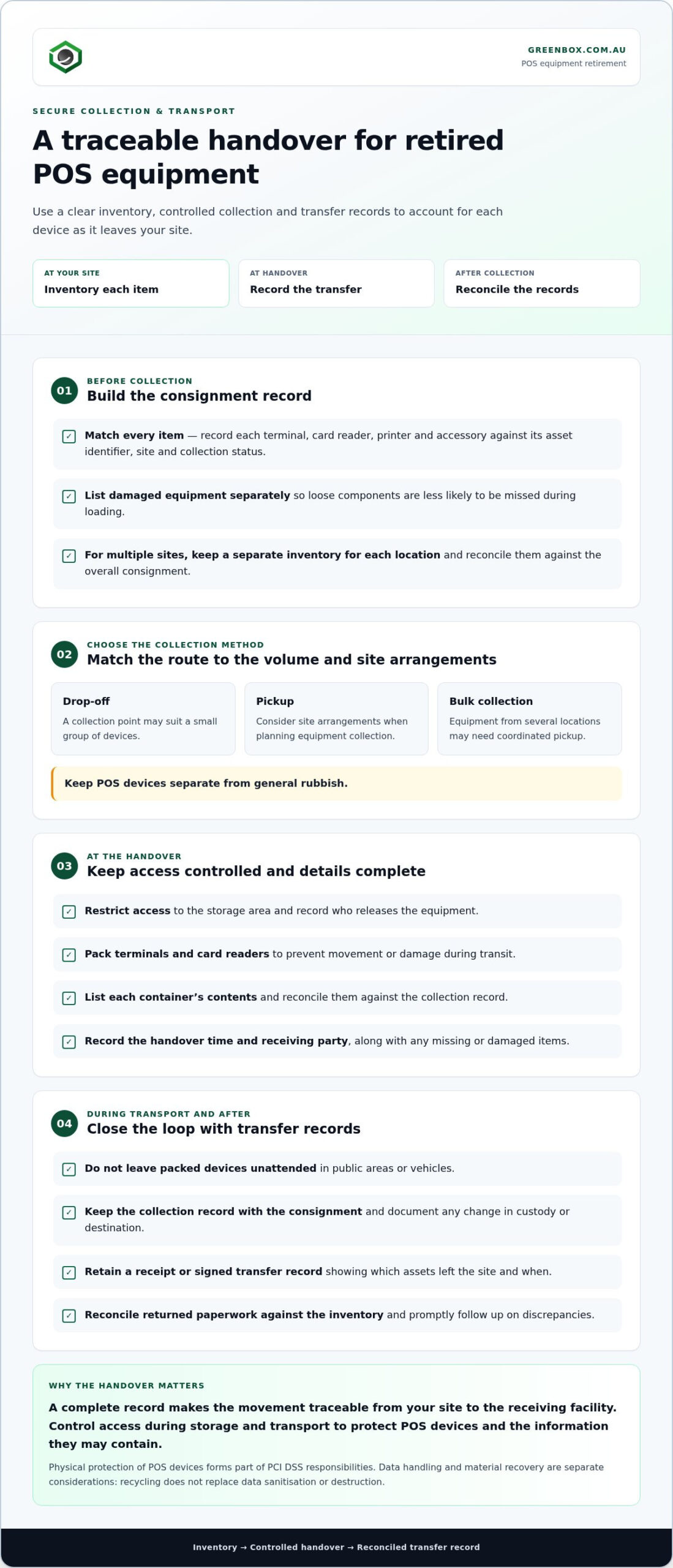
Collection planning starts with a complete consignment record. Match each terminal, card reader, printer and accessory to its asset identifier, site and collection status. List damaged equipment separately, since loose components can be missed during loading. Reconcile the inventory against the items physically handed over, then retain the transfer record in the device lifecycle file.
Australian businesses can arrange commercial e-waste recycling through drop-off, pickup or bulk collection. Choose the method that fits the volume and site arrangements. A small group of devices may suit a collection point, while equipment from several locations may need coordinated pickup. Keep POS devices separate from general rubbish.
Before collection, prepare a controlled handover:
- Restrict access to the storage area and record who releases the equipment.
- Pack terminals and card readers to prevent movement or damage during transit.
- List each container’s contents and reconcile them against the collection record.
- Record the handover time, receiving party and any missing or damaged items.
These steps create a traceable movement from your site to the receiving facility. For multiple locations, keep a separate inventory for each site, then reconcile the records against the overall consignment. Avoid leaving packed devices unattended in public areas or vehicles. Physical protection of POS devices forms part of PCI DSS responsibilities, so control access during storage and transport.
Transport arrangements should protect data as well as equipment. Keep the collection record with the consignment, and document any change in custody or destination. A receipt or signed transfer record shows which assets left the site and when. After handover, reconcile returned paperwork against the inventory and promptly follow up on discrepancies. This closes the gap between devices recorded for retirement and those received for recycling.
For businesses planning responsible material recovery, business e-waste recycling provides a route for retired equipment beyond general waste.
E-waste and landfill impacts
A retired checkout terminal contains reusable materials and components that need careful handling. Circuit boards, wiring, metals and plastics can be separated after dismantling. Sending intact POS devices to general landfill bypasses material recovery, even when some components can be processed for reuse.
Recovery depends on separating materials instead of treating a whole terminal as one item. Copper, aluminium and steel can be melted for reuse, while recovered plastics can be processed into new products. A receipt printer, payment terminal and monitor may each contain different material combinations. Keeping devices identifiable helps the receiving facility sort them into appropriate recovery streams.
Data security must remain part of the environmental decision. A POS device can contain transaction information, so recycling must follow data sanitisation or destruction, not replace it. Data security controls and materials recovery address different risks: one protects information, while the other keeps recoverable components out of landfill. Neither outcome should be assumed from a device’s appearance or condition.
A practical retirement plan assigns clear responsibilities. Before collection, an employee can reconcile the equipment inventory, separate damaged devices and record which items are intended for reuse or recycling. At handover, match the receiving facility’s acceptance record against the inventory. This makes missing items visible and supports traceability from your site through processing.
- Separate terminals, monitors, receipt printers and card readers in the inventory.
- Keep data treatment records distinct from material recovery records.
- Reconcile collected equipment against the site inventory and acceptance record.
These steps help businesses balance secure retirement with responsible resource use. A damaged checkout reader, for example, may be unsuitable for redeployment but still contain recoverable materials. Directing each device to an appropriate recovery pathway reduces avoidable landfill disposal and maintains a clear handling record. The final record should show the asset’s destination and treatment, not just that it left the premises.
What data is stored on point-of-sale systems and payment terminals?
A payment terminal or card reader may retain temporary transaction data on internal chips. POS computers and monitors can hold customer information, transaction logs and payment details. A device’s storage can also include sales reports, product records, staff account details and system settings. The exact contents depend on the equipment and software used at each checkout.
Don’t assume a terminal is clear because it’s switched off, reset or disconnected. Local storage and removable components may retain information independently of the main system. A payment device, for example, might store transaction data while the POS computer holds reports and user records. Include every device and storage component in the data review.
Australian businesses must keep accurate sales records for at least 5 years. Retain required business records separately from retired equipment, and identify which information is held on each device. For payment environments, PCI DSS 4.0 emphasises ongoing security practices, according to the PCI Security Standards Council. Its Requirements 7 and 8 address access control and authentication, while Requirements 10 and 11 concern logging, monitoring and testing.
- Identify terminals, readers, computers and attached storage.
- Record the data categories and business systems associated with each asset.
- Separate records that must be retained from data no longer needed.
- Arrange data sanitisation or destruction before reuse, resale or recycling.
Data handling continues through collection and processing. PCI DSS requires strong encryption when cardholder data travels over open or untrusted networks. Keep a record of each asset, its data treatment and its final destination. This supports accountability without retaining unnecessary information on equipment leaving service.
Plan secure handling for retired POS equipment as part of your disposal process.
Greenbox: Data Sanitisation and Destruction
Greenbox provides Data Sanitisation and Destruction for businesses retiring POS terminals, card readers and connected equipment. Its military-grade data sanitisation helps address data risks before devices move into reuse, remarketing or material recovery. This is a practical next step when your inventory is ready and you need a clear path for end-of-life assets.
Where equipment remains suitable for another use, Greenbox’s IT Asset Recovery and Asset Remarketing can support its next stage. Pre-Configuration and Imaging can help prepare replacement hardware for deployment. Together, these services connect data handling with the next stage in an asset’s lifecycle, rather than treating secure retirement and recovery as separate concerns.
Contact Greenbox to discuss secure disposal of your POS equipment.
Make POS retirement part of your next transition
Plan the secure disposal of point-of-sale systems alongside your next technology refresh, rather than treating retired equipment as a separate clean-up task. This gives your business a clear opportunity to decide which assets need data treatment, which may be reused, and how replacement equipment will enter service.
Greenbox supports this transition with Data Sanitisation and Destruction and IT Asset Recovery. Where equipment is suitable for another lifecycle stage, Asset Remarketing may be relevant; Pre-Configuration and Imaging can help prepare replacement hardware for deployment. Coordinating these activities connects secure retirement with practical technology planning.
Set out the assets involved, the outcome required and any operational timing that affects the transition. Then discuss POS disposal with Greenbox to explore the next step for your equipment. A well-planned retirement can help your team move forward with greater clarity and confidence.
Frequently Asked Questions
How do you securely wipe a POS system before disposal?
Use a documented sanitisation process for every data-bearing device, not just the main terminal. Identify the model and storage type, then follow the manufacturer’s secure-erase procedure or use a suitable data sanitisation service. Include the operating system, local user accounts, saved reports and attached storage. Record the asset identifier, method and result, and retain evidence of completion before releasing the equipment.
How should payment terminals be decommissioned and returned to the provider?
Coordinate decommissioning with the payment provider before disconnecting or dispatching a terminal. Through your established provider contact, confirm the device identifier, return destination and any required account or service closure steps. Remove the terminal from local networks and remote-management systems, then record its condition and handover. Keep provider instructions and return acknowledgement with the asset record to reconcile the returned device against your inventory.
How should POS hard drives, SSDs, and removable media be destroyed or sanitised?
Match the treatment to the media type and intended outcome. Use a suitable sanitisation method when a hard drive, SSD or removable device will be reused; arrange physical destruction when reliable sanitisation isn’t appropriate. Deleting files or reformatting does not prove that data is unrecoverable. Record each component separately, including its identifier, treatment and outcome, particularly if storage was removed from a terminal before collection.
What are the risks of selling, donating, or recycling a POS system without wiping it?
An unwiped POS device could expose customer details, transaction logs, business reports or staff account information to whoever receives it. A reset menu or change of ownership doesn’t document that storage was sanitised. This can create privacy, fraud and reputational risks, particularly when several devices leave service together. Treat reuse, donation and recycling as separate destinations, but ensure data is handled before any transfer.
What records or certificates should an Australian business keep after POS disposal?
Keep an asset-level record showing identifiers, collection and transfer details, the data treatment performed, its outcome and the equipment’s destination. Retain any sanitisation or destruction certificate, recycler receipt and handover acknowledgement alongside that record. Australian businesses must keep accurate sales records for at least 5 years; disposal documentation should also follow the organisation’s retention policy and applicable obligations. Reconcile certificates against the inventory so each retired device has a recorded outcome.