

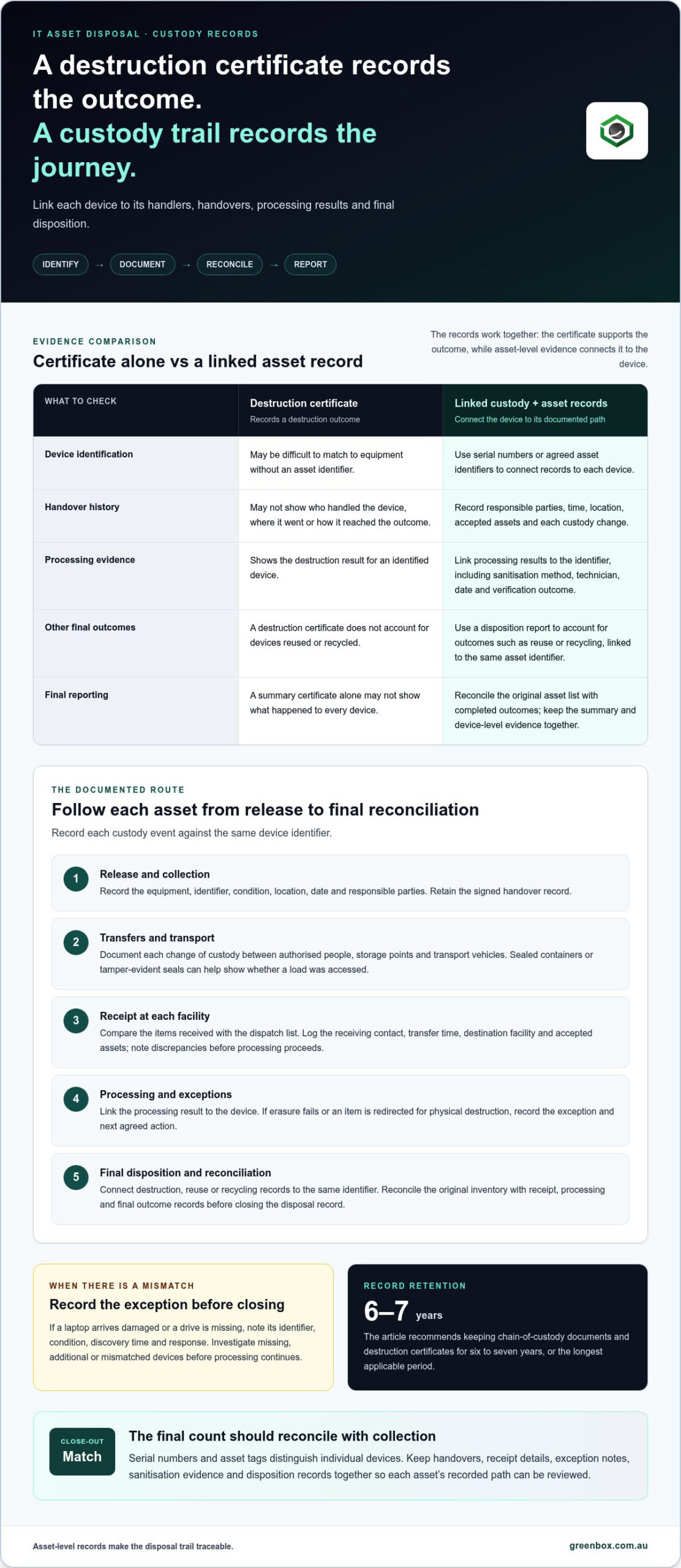
A destruction certificate records an outcome, not the full journey. A chain of custody for IT asset disposal tracks each device from collection through transport and processing to its final disposition. It records who handled it, when and where custody changed, and what happened to the asset. The final count should reconcile with the collection record.
It’s understandable to expect a certificate to close the file. But without linked handover and asset records, it may not show which device was received, where it went or how it reached its recorded outcome.
This article explains what useful custody records contain, how serial-number tracking and reconciliation help identify gaps, and why a destruction certificate may not be enough on its own. It also covers record retention and how a clear audit trail supports accountability when assets are sanitised, destroyed, reused or recycled.
Key Takeaways
- Capture each handover to a specialist processing partner, including the responsible parties, time, location and asset condition.
- Use destruction certificates alongside asset-level records so final reporting shows the outcome for each device.
- Reconcile collection and receipt lists by serial number, then record exceptions before closing the disposal record.
- Set a retention approach that reflects your organisation’s compliance needs, and keep sanitisation and disposition evidence accessible for review.
What should a chain of custody record include?
A custody record links each asset to its handlers, handovers, location and final outcome. Certified external disposal adds provider handovers; in-house disposal keeps handling internal, while your team records each step.
To maintain custody, record the asset’s release, every transfer, receipt at each facility, processing results and final reconciliation.
Recording Asset Handling and Transfers
To document asset handling and transfers, record each device’s identity, condition, handler, time and location whenever custody changes. This creates a trail from the collection record to the receiving facility’s inventory. At release, record who handed over the equipment; at receipt, compare the items with the log and note discrepancies. If a laptop arrives damaged or a drive is missing, document its identifier, condition, discovery time and response.
Secure Pickup and Handoffs
Secure pickup and handovers control how assets move between authorised people, storage points and transport vehicles. At collection, record the equipment, location, date and responsible parties, then retain the signed handover record. Sealed containers or tamper-evident seals can help show whether a load was accessed during transport. Records of each handover help pinpoint where an interruption or damage occurred, rather than relying on vehicle movements alone.
Transfers to Processing Partners
Record transfers to specialist processing partners as separate custody events, not as an undocumented continuation of transport. Log the receiving contact, transfer time, destination facility and accepted assets, using serial numbers or agreed asset identifiers. Compare the receipt with the dispatch list and note exceptions before processing proceeds. If equipment is later resold, reused or recycled, connect the final disposition record to the same asset identifier.
A transparent record lets an organisation follow each device through collection, transport, storage and processing. Keep handovers, receipt details and exception notes together so a missing or damaged item can be traced through the documented sequence.
Isn’t a certificate of destruction enough?
A certificate records that destruction occurred, but may not show how each device reached that outcome. Final reporting is stronger when certificates link to asset-level records and the documented disposal trail.
Certificates and Final Reporting
A data destruction certificate records the destruction outcome for an identified device, while a disposition report accounts for other outcomes, such as reuse or recycling. Together, these records help show what happened to each asset. Use serial numbers to connect certificates with the inventory, and review exceptions such as failed erasure or a device redirected for physical destruction. Without an asset identifier, a certificate can be difficult to match to the equipment it concerns.
Final reporting should reconcile the original asset list with completed outcomes. Separate certificates that identify each device make destruction easier to trace, while a summary report shows the overall disposition. Keep both records together so the summary does not replace evidence for individual devices.
Digital Logs and Automated Certificates
Digital logs store asset events and processing results in a searchable record, and automated certificates can be generated from those entries. Their value depends on accurate identifiers and complete details: serial number, sanitisation method, technician, date and verification outcome. A log of a completed action that is not linked to a specific device leaves a gap in the evidence.
Review exceptions before closing the report. If data erasure fails, the exception record should state the next agreed action, such as further processing or destruction. This keeps the final certificate consistent with what happened to the asset.
A recycling certificate can support environmental reporting, but may not identify every device or document each handover. Treat it as one part of the evidence, alongside data destruction and disposition records. The research for this topic recommends keeping chain-of-custody documents and destruction certificates for six to seven years, or the longest applicable period.
For disposal that includes secure data processing, data sanitisation and destruction can form part of a documented final outcome.
Inventory reconciliation and serial-number tracking
Serial numbers and asset tags link each device to its recorded status throughout disposal. Reconciliation compares the original inventory with receipt, processing and final outcome records.
Asset Identification and Serial Numbers
Asset identification gives each device a usable tracking identifier, such as its serial number or asset tag. This distinguishes individual equipment when a bulk count could conceal a missing item. A laptop serial identifies the computer; its drive serial identifies the storage device. Record the agreed identifiers before collection and, where relevant, link each device to its data sensitivity and model.
Barcodes or RFID labels can make identifiers easier to scan during handling. Update the scan list if assets are added or removed so the recorded scope reflects the equipment actually released.
Inventory Reconciliation and Status
Inventory reconciliation compares successive asset lists to find missing, additional or mismatched devices. Match the original scan list against the collection record, then compare it with the receiving inventory. Investigate discrepancies before processing continues instead of carrying an unresolved count into final reporting.
Track the status of each identifier, such as received, awaiting erasure, erasure completed, exception, destroyed, reused or recycled. This gives data-bearing devices a clear recorded path and helps link secure data destruction results to the correct equipment.
Tracking Through ITAD Workflows
ITAD workflow tracking links an asset’s identifier to each processing event and final outcome. A central tracking system or ERP workflow can keep scan records, status changes and reporting in one asset history. It is useful only if each event refers to the agreed identifier, not just a shipment or batch total.
For example, record a device as received, then link its erasure result or destruction record to its serial number. If it is earmarked for remarketing or recycling, update its status and link the final disposition evidence. This lets an organisation trace individual devices from release through processing without confusing a laptop’s identifier with its drive’s.
Regulatory compliance and record retention
Australian privacy law requires reasonable steps to protect personal information. APRA CPS 234 also requires financial institutions to assess and manage third parties handling their information assets.
The relevant requirements depend on your organisation, the information held and the standards governing its operations. Disposal records help demonstrate how data-bearing equipment was controlled and what happened to it.
Governance and Auditability
Governance sets responsibility for disposal decisions, record access and retention; auditability lets reviewers follow the evidence. Assign an accountable role to approve the asset scope, resolve exceptions and close records. If an audit identifies a missing device, its serial number and last recorded status can guide the investigation. Keep reports, approvals and exception outcomes together so decisions remain traceable.
Regulatory and Standards Compliance
Regulatory and standards compliance means matching disposal controls and records to the obligations relevant to your organisation. Australian privacy law requires reasonable steps to protect personal information, while APRA CPS 234 addresses financial institutions’ assessment and management of third parties handling information assets. NIST SP 800-88 is a data sanitisation standard that disposal methods should align with. These requirements make documented sanitisation outcomes important.
Record the method, technician, date and verification outcome for each data-sanitisation action. If erasure fails, document the exception and next agreed action. This provides evidence of the control applied to each device, rather than relying only on a general process description.
Data Protection and Legal Evidence
Data protection evidence links physical custody to the handling of information on each asset. Retain records that connect a serial number to its sanitisation result, destruction certificate or final disposition. This helps show what happened if a device is missing, damaged or disputed, and supports accountability across internal teams and third parties.
Set a retention schedule that reflects applicable obligations and internal governance. Restrict access to disposal records to authorised roles, and make reports retrievable for audit. Strengthen your disposal evidence by linking sanitisation outcomes to asset-level records.
Greenbox: Data Sanitisation and Destruction
Greenbox provides Data Sanitisation and Destruction for organisations retiring data-bearing equipment. This service is relevant when devices need secure data treatment before their final disposition, with records linked to the organisation’s asset identifiers.
When equipment may be suitable for reuse, IT Asset Recovery and Asset Remarketing provide a route beyond destruction. The right outcome depends on the device’s condition and the organisation’s disposal requirements. Aligning the chosen outcome with asset records helps maintain a clear account of what happened to each device.
For organisations reviewing how data-bearing assets move from retirement to their final outcome, Greenbox’s services can support the disposal process. Contact Greenbox to discuss your IT asset disposal requirements.
Make asset retirement part of your next lifecycle decision
Build disposal controls into asset retirement planning, rather than leaving them until equipment leaves the workplace. Decide who owns the record, which identifiers link each device to its outcome, and how staff will handle exceptions. This makes the chain of custody for IT asset disposal a practical part of information governance, not a file assembled after collection.
Greenbox provides Data Sanitisation and Destruction, IT Asset Recovery, and Pre-Configuration and Imaging. These services can support organisations managing data-bearing assets as part of wider technology lifecycle decisions. The next step is to align the disposal process with your operational requirements and recordkeeping approach.
Discuss your ITAD requirements with Greenbox and take a considered next step towards accountable asset retirement.
Frequently Asked Questions
What Is Chain of Custody in IT Asset Disposal?
A chain of custody for IT asset disposal is the evidence trail showing control of equipment from release to its final outcome. It connects physical devices with the people and processes responsible for them. For example, the trail can clarify whether a particular server was returned for reuse or sent for destruction, rather than relying on a general collection summary.
Does a recycling certificate prove chain of custody?
No. A recycling certificate can document a recycling outcome, but may not establish which individual assets were collected or what happened during earlier handovers. For example, a certificate covering a mixed batch may not identify a particular laptop or drive. Treat it as one record in the disposal file, and link it with device-level evidence where individual tracking is needed.
How can I tell a real chain of custody from a casual pickup?
A documented process leaves records that can be matched to the equipment, not just a collection note saying items were taken away. Look for an asset schedule, a record of authorised release and evidence that the receiving party accepted the equipment. For instance, a signed handover linked to a scanned list provides a stronger audit trail than an unsigned receipt describing only boxes or pallets.
What Makes This On-Site Logging So Important?
On-site logging captures an asset’s identity before it leaves the organisation’s control. This matters if equipment is added to a collection at the last minute or removed from the planned load. A scan at the staging area can update the inventory before handover, helping staff distinguish a drive from its host computer and investigate later discrepancies without relying on memory.
What should ITAD chain of custody cover?
It should cover the asset’s documented journey and final outcome, including reuse, remarketing, recycling or destruction. The record should also show exceptions, such as an item rejected at receipt or redirected after assessment. For example, if a device is unsuitable for reuse, update its status to reflect the agreed next outcome, keeping operational records aligned with disposition evidence.
Where is the risk in disposal, if not the destruction?
Risk can arise before destruction, particularly during handover, storage, transport and pre-processing. A device might be separated from its recorded load, left in an uncontrolled holding area or delayed before its data is sanitised. These gaps matter because the organisation may still be accountable for information on the equipment. A clear record of exceptions helps pinpoint where control needs attention.