

A remote worker’s departure should trigger a controlled equipment return, not leave company devices in limbo. For Australian businesses, managing remote employee IT asset returns means identifying what must come back, arranging secure shipping, tracking each item and deciding how to handle the device and its data once received.
Sending a box or arranging a courier is only part of the process. Clear instructions, timely follow-up and a documented record for each asset are also essential. Without them, equipment can remain with a former employee while its condition, data security and next use remain unresolved.
A reliable return programme covers four areas: retrieval logistics, asset records and accountability, data protection, and recovery options after equipment arrives. Each stage helps bring remote-worker returns into a secure, organised process and supports responsible reuse or recycling where appropriate.
Key Takeaways
- Start returns with a clear inventory, assigned responsibility and practical shipping instructions so every device has a traceable path back.
- Use structured reminders and a documented escalation process to address overdue returns and shipping delays consistently.
- Set out how company data will be protected, accessed and sanitised, and align return procedures with your privacy obligations.
- Once equipment arrives, assess its condition and choose an appropriate next step, such as redeployment, remarketing or responsible recycling.
1. Challenges of retrieving equipment from remote workers
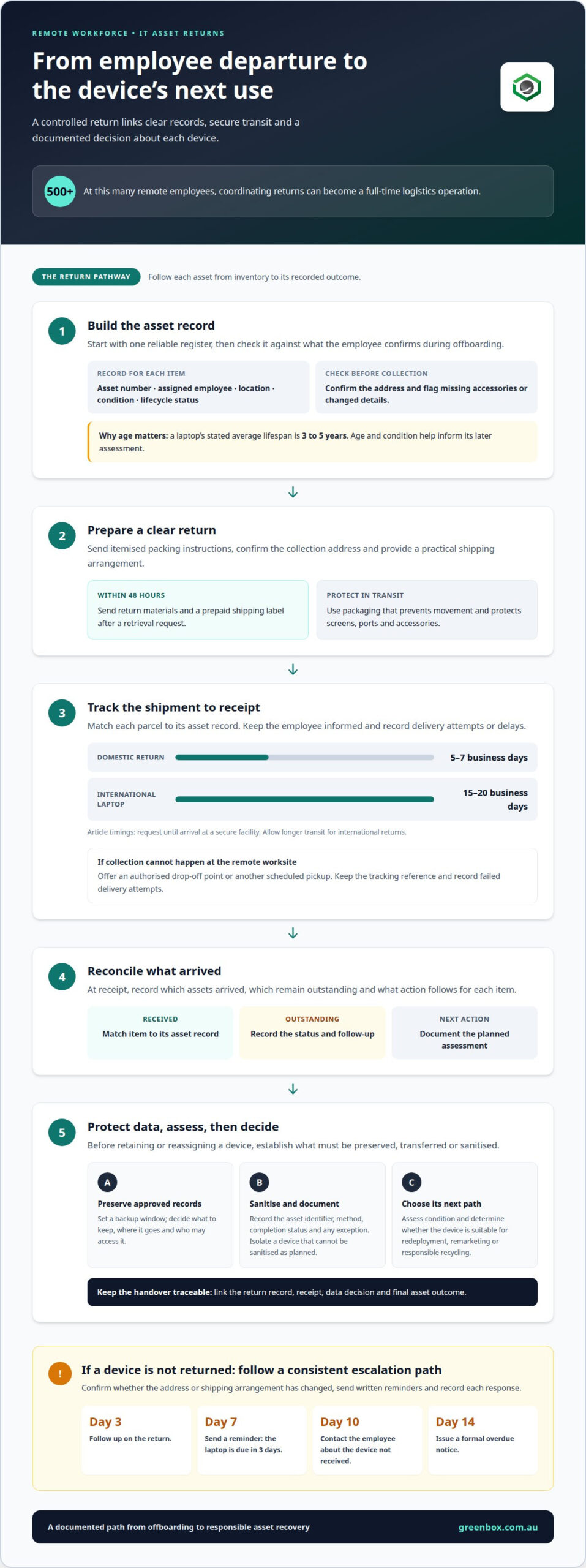
Remote work separates company equipment from the office systems that once made returns straightforward. A departing employee may hold a laptop, monitor, dock, phone and security accessories across different locations. Each item needs an owner, a return instruction and a recorded outcome. At 500 or more remote employees, coordinating those steps can become a full-time logistics operation. Dealing with scattered equipment is not simply a courier task: reminders, shipment tracking and follow-up all affect whether assets come back.
Begin with a reliable inventory. Record each device’s asset number, assigned employee, location, condition and lifecycle status in one register. Match those records against what the employee confirms during offboarding, then flag missing accessories or changed addresses before booking collection. A laptop’s stated average lifespan is 3 to 5 years, so its age and condition help determine whether it should be assessed for reuse, remarketing or recycling. Without consistent tracking, an expensive device can remain unaccounted for after its user leaves.
In Australia, the relevant framework includes the employee’s contract and applicable workplace laws. An unreturned device does not, by itself, determine how payroll should be handled. Manage any proposed wage deduction under the rules that apply to the employment arrangement. Record the return request, the equipment involved and any response, then keep final pay separate from asset-recovery follow-up.
Data sanitisation is another key handover step. Before retaining or reassigning a returned device, establish whether company data must be preserved, transferred or sanitised. Record the device identity and sanitisation outcome against its asset record. This gives IT teams a clear checkpoint before the equipment goes to another employee and helps reduce the risk of company information remaining on the device after its original assignment ends.
For each departure, send itemised packing and return instructions, confirm the collection address and track the shipment through receipt. Record which assets arrived, which are outstanding and what action follows each arrival. A consistent process for managing remote employee IT asset returns links offboarding to the wider asset lifecycle, so equipment is not forgotten between an employee’s final day and its next assessment.
2. Handling non-returns and shipping problems
A return can stall before a laptop reaches the courier: the employee may have moved, lack suitable packaging or miss the collection. Start by confirming the worksite address, contact details and preferred handover method. For remote locations, provide clear packing instructions and a prepaid shipping label, then track each parcel against its asset record. This helps distinguish a delayed shipment from equipment that has not been dispatched.
Protect devices in transit with packaging that prevents movement and shields screens, ports and accessories. Send the return materials and prepaid label within 48 hours of a retrieval request. Domestic returns generally take 5-7 business days from request until arrival at a secure facility. International laptop returns may require 15-20 business days, so allow for longer transit and keep the employee informed about milestones.
If an employee fails to return company IT equipment, send a written reminder, confirm whether the address or shipping arrangement has changed, and record each response. Follow a consistent escalation path: follow up on day 3, send a reminder on day 7 stating the laptop is due in 3 days, contact the employee about an unreceived device on day 10, then issue a formal overdue notice on day 14.
A return platform can bring instructions, shipment status and receipt records into one workflow. If a courier cannot collect from a remote worksite, offer a practical alternative, such as an authorised drop-off point or another scheduled pickup. Keep the tracking reference and record failed delivery attempts so the team can respond to the specific issue instead of restarting the process.
Clear communications also reduce refresh headaches: the employee knows what to pack, where to send it and how progress will be recorded. For organisations managing complex returns, structured IT asset recovery can support a controlled handover from transit to assessment.
3. Legal and data privacy considerations
Offboarding should manage access as deliberately as equipment recovery. For each departing employee, record the device, assigned accounts, access changes and responsible team. Revoke access through the relevant identity and business systems, then confirm that credentials or sessions linked to the device no longer provide company access. This is especially important in hybrid teams, where employees may use several systems away from the office.
Australian employers should align device handling with applicable privacy obligations, employment terms and internal retention rules. Before removing data, identify business records that must remain available and decide who can authorise their transfer or retention. Documenting this decision helps address concerns about data: employees can be told what happens to work information and when personal material may be affected.
Set a backup window before sanitisation begins. Confirm which files, project records or mailbox content need to be preserved, where they will be stored and who can access them. For example, a project lead may need a departing designer’s current files to keep work moving. Once the approved transfer is complete, record its status and authorisation before wiping the device.
Data sanitisation and destruction should follow a defined sequence, not an informal instruction to “clear the laptop”. Record the asset identifier, sanitisation method, completion status and any exception that needs review. If a device cannot be sanitised as planned, isolate it from reuse and document the next action. This creates a clear handover between offboarding, IT and the team managing the returned equipment.
For organisations handling many devices, consistent records make it easier to show who authorised access changes and sanitisation. Keep evidence with the asset record, limit access to people responsible for the process, and separate routine returns from investigations or legal holds. A device subject to a preservation requirement should not enter the standard wiping workflow until the appropriate internal authority resolves the hold. Clear steps protect information and help avoid unnecessary disruption.
Handle equipment recovery in line with the employee’s employment terms, applicable privacy obligations and the organisation’s internal retention rules.
4. Remote employee IT asset recovery
Recovery completes the asset lifecycle by connecting a returned device to its next authorised use. For a remote workforce, use a consistent workflow: confirm the asset, record its arrival, assess its condition and assign a next action. This replaces manual chasing with a traceable record for laptops, monitors and accessories.
A multinational HVAC company recovered equipment from hundreds of remote technicians and sales representatives. Its collection cycle ran every two to three years to support lease returns or refresh cycles. The example shows how scheduled recovery can align device collection with workforce changes and planned equipment renewals.
A remote employee IT asset return checklist should include the employee and asset identifiers, equipment list, return status, receipt date, condition assessment and approved next step. Record data destruction and any exceptions too, so each request can be closed with a clear outcome.
After a device arrives, data destruction, condition assessment and next steps typically take 3-5 business days. Assess the asset’s age, working condition, completeness and suitability for redeployment. If it no longer fits internal needs, asset remarketing can help recover value from eligible equipment rather than leaving it idle.
Timing matters. A laptop may lose 3-5% of its resale value for every month it sits unused in an employee’s home after departure. Prompt recovery therefore supports both inventory control and timely decisions about reuse or remarketing. Record the decision alongside the asset’s condition and sanitisation outcome.
For a coordinated process from receipt through assessment, arrange IT asset recovery and bring returned equipment into a documented recovery workflow.
Greenbox
Greenbox helps Australian organisations manage remote equipment returns through a secure, documented recovery process. IT Asset Recovery supports assessment and decisions about a device’s next use. Data Sanitisation and Destruction addresses data handling before reuse or remarketing, while Pre-Configuration and Imaging can prepare suitable equipment for redeployment. Asset Remarketing provides an option for surplus assets that are suitable for resale.
This approach connects return logistics with the next stage of each asset’s lifecycle, rather than leaving recovered devices idle. Greenbox also operates as a carbon-neutral organisation with R2-certified facilities, supporting a focus on data security and environmental responsibility.
Planning a remote employee return programme or managing equipment already in transit? Contact Greenbox to discuss your requirements.
Make each return part of a stronger asset lifecycle
Use each offboarding cycle to improve how equipment moves from one role to the next. A consistent approach to managing remote employee IT asset returns connects workforce changes with asset planning, instead of treating every departure as a one-off task. Assign clear ownership for decisions, keep records accessible to the teams involved and make the next step for each returned device visible.
Greenbox supports this process with IT Asset Recovery, Data Sanitisation and Destruction, and Pre-Configuration and Imaging. These services help businesses manage returned equipment, protect data and prepare suitable devices for redeployment. The right approach depends on your asset volumes, internal workflows and intended outcomes.
To discuss how Greenbox can support your return process, contact Greenbox about IT asset returns. A clear plan is a practical step towards more controlled, secure equipment transitions.
Frequently Asked Questions
What Happens When Remote Workers Leave?
When a remote worker leaves, their access ends and assigned equipment enters a return and assessment process. IT and HR should coordinate system access, outstanding work and asset records. For example, a manager may need approved project files transferred before a laptop is sanitised. The organisation then records whether each device is redeployed, remarketed or retired.
What is remote employee asset management?
Remote employee asset management is the oversight of company equipment assigned to staff working away from an office. It covers allocation, inventory records, support changes, recovery and decisions about reuse or retirement. Managing remote employee IT asset returns is one part of this lifecycle: the organisation links each returned phone or laptop to its assigned user and records what happens next.
What steps should Australian employers follow to recover IT assets from remote employees?
Use a coordinated offboarding workflow that connects the employee, IT, HR and the equipment record. Confirm assigned items and the return address, provide practical shipping instructions, restrict access at the appropriate time, and record receipt and condition. If a laptop contains active project files, arrange an authorised transfer before sanitisation. Close the record only when every item has a documented outcome.
Who pays for shipping and packaging when a remote employee returns company equipment in Australia?
Set out shipping and packaging arrangements in the employment terms or equipment-return policy, and communicate them before issuing equipment. Explain how the employee should return items, who arranges packaging and collection, and how to report shipping problems. Keep any proposed deduction from final pay separate from the return workflow and handle it under the applicable employment arrangements.
How should employers track and document returned laptops, phones and accessories?
Maintain one asset record for each item, linked to its assigned employee and return request. When it arrives, record the asset identifier, item type, arrival date, condition, included accessories and any discrepancy. For example, note if a returned phone arrives without its charger. Restrict access to relevant staff and record the final disposition, so the register reflects redeployment, remarketing or retirement.
What secure data-wiping and device-reset steps are needed before reissuing returned IT assets?
First preserve approved business records and confirm that no retention hold prevents wiping. Remove the previous user’s access, sanitise stored data, verify completion and record the result against the asset. Then reset the device, install the organisation’s approved configuration and test it before reassignment. Greenbox’s Data Sanitisation and Destruction meets military-grade security standards, supporting secure handling before suitable equipment is reused.