

What if the most consequential part of retiring a server happens after it’s switched off? A shutdown may take minutes, but data-bearing components, connected workloads and the asset’s next destination all need careful consideration. For a server decommissioning Australia project, the work starts well before equipment is removed.
That concern is justified. A rushed decision can put business continuity and sensitive information at risk, while treating every server as waste may overlook viable recovery options. Planning calls for a controlled asset decision, not simply a hardware removal job.
This guide explains how to plan and carry out server retirement with greater confidence. You’ll learn how to map dependencies, coordinate shutdown and migration, identify data-bearing media, choose an appropriate sanitisation or destruction pathway, and keep handling and sanitisation evidence on record. It also explains how to assess each asset for reuse, remarketing or responsible recycling, based on its condition, data requirements and your organisation’s policy. Use the steps to reduce disruption, protect business data and make informed end-of-life decisions.
Key Takeaways
- Server decommissioning Australia projects benefit from a defined scope that separates infrastructure retirement, data treatment and asset disposition.
- Map service owners, application dependencies and backup status before setting shutdown approvals and windows.
- Compare sanitisation, physical destruction, reuse, remarketing and recycling against media condition, data requirements and organisational policy.
- Use a controlled handover process, with custody records that help reconcile assets and identify exceptions.
- Assess a potential partner’s security controls, processing scope, subcontracting arrangements and approach to environmental outcomes.
What server decommissioning in Australia involves, and why planning matters
Server decommissioning is the planned retirement of server infrastructure, including assessment of connected assets, treatment of data and a decision about each asset’s next destination. It goes beyond switching off and removing hardware. The process can include migration or shutdown planning, data sanitisation or destruction, asset recovery and remarketing, and responsible recycling when equipment can’t be reused.
Businesses may decommission servers during a technology refresh, infrastructure consolidation or relocation, at lease return, or when equipment reaches end of support. The right approach depends on operational dependencies, data requirements, asset condition and internal policy. Treating server decommissioning Australia-wide as an asset decision, rather than a removal task, helps teams coordinate these factors before work begins.
Physical removal is only the logistics step. Data destruction is one possible treatment for storage media, while e-waste recycling concerns how discarded equipment is processed. A decommissioning plan brings these decisions together so equipment isn’t removed before its services, data and disposition have been considered.
Which assets and components need to be considered?
Start with an asset inventory that identifies servers, storage devices, removable media and any other components that may hold data. Confirm ownership, configuration, condition and known dependencies before scheduling work. A server may support an application, database or integration that isn’t obvious from its location in a rack.
Associated network or data-centre equipment may also need attention, but don’t assume it falls within the server project. Define its inclusion, ownership and required treatment separately. An item-level scope gives technology teams and any recovery partner a shared record of what is included.
What can go wrong when retirement is treated as a simple removal?
An overlooked workload, integration or backup dependency can interrupt a service when equipment is disconnected. Confirm service owners, migration or shutdown responsibilities, and backup status before approving the work. The existence of a backup doesn’t establish that it is current or suitable for the planned transition, so confirm this with the responsible team.
Data-bearing media also needs an explicit treatment decision. Exposure risk and undocumented custody are possibilities to assess, not inevitable outcomes. Record who is responsible at each handover and how exceptions will be escalated. The certified data sanitisation guide offers further detail on method selection. For a general overview of data sanitization methods, see Wikipedia.
How to plan server decommissioning without disrupting operations
A controlled plan turns server retirement into a sequence of decisions, approvals and verified handovers. Map dependencies before shutdown so teams can identify affected services, confirm migration or backup arrangements, and prevent avoidable interruptions. This is the operational foundation for server decommissioning Australia projects, whether one server is retiring or a larger environment is changing.
Build an inventory and confirm operational dependencies
Start with an inventory that records each asset’s identifier, owner, organisational location and known configuration. Link each server to the applications, storage, network connections and services that rely on it. Confirm with accountable internal teams who owns retention decisions, backup validation and migration tasks. For systems containing business records, the Public Record Office Victoria’s Decommissioning Checklist provides a government perspective on system retirement and the records it contains.
Use the inventory and dependency map to work through a sequence such as this:
- Discover: Reconcile physical assets against configuration records and confirm ownership.
- Assess: Identify service owners, integrations, storage links and downstream impacts.
- Approve: Document the business reason, scope, decision-makers and required change approvals.
- Prepare: Confirm migration responsibilities, backup status, retention needs and shutdown criteria.
- Schedule: Select an approved shutdown window, notify affected stakeholders and name escalation contacts.
- Test and shut down: Follow the runbook, verify expected service behaviour and use an agreed rollback or contingency plan if checks fail.
- Treat and reconcile: Sanitise or destroy data-bearing media as required, confirm each asset’s disposition, and reconcile transferred equipment against the inventory.
Set approvals, timing and collection controls
Change control should make clear who authorises shutdown, who confirms services can be retired, and who can pause the work. Communicate the schedule and expected impacts to service owners and affected teams. Define escalation triggers in advance, such as a failed migration check, an unidentified dependency or a mismatch between the physical equipment and the asset list.
Before collection, agree on access controls and how equipment will be labelled, packaged and transferred. Record asset identifiers and the responsible party at each handover, then compare the returned processing or disposition information with the original inventory. This creates a traceable account of completed transfers and exceptions. If external support is being considered, review Greenbox’s IT asset recovery and data sanitisation services as part of your planning.
Compare server data sanitisation, physical destruction and asset recovery
There are two separate decisions in a server retirement. First, determine how data on each storage component will be treated. Then decide whether the server or its materials can be reused, remarketed or recycled. The appropriate pathway depends on media condition, data requirements, organisational policy and intended reuse. No single method suits every asset.
This distinction matters in server decommissioning Australia projects. A server may be unsuitable for resale while some components remain recoverable, or it may be suitable for reuse once its data has been treated in line with policy. For a wider explanation of disposal pathways, see ITAD and e-waste recycling compared.
| Option | What it involves | What to assess |
|---|---|---|
| Software-based sanitisation | Uses an approved process to make data on compatible media inaccessible. | Check media condition, whether the process can be completed and verified, and whether policy permits subsequent use. |
| Physical destruction | Physically damages the relevant data-bearing media so it can’t be reused as storage. | Assess sensitivity, policy, media type and condition, plus the required evidence of processing. |
| Reuse | Keeps suitable equipment in service, internally or with another user. | Consider condition, support needs, data treatment and organisational approval. |
| Remarketing | Assesses eligible assets for resale after required data treatment. | Confirm asset condition, client policy and any requirements for resale. |
| Recycling | Processes equipment for material recovery when reuse or remarketing isn’t appropriate. | Check that data-bearing components receive the required treatment before recycling. |
When might sanitisation support continued use or remarketing?
Where media is functional and the applicable policy permits it, verified sanitisation may allow a storage device to remain in use or an asset to be considered for remarketing. That outcome isn’t automatic. Assess the equipment’s condition and complete the required data treatment before deciding whether it is suitable for another user. Review the refurbished IT asset resale guide for more on value recovery.
When should physical destruction be assessed?
Consider destruction where risk, policy, client requirements or media condition make sanitisation unsuitable or unverifiable. The decision applies to the relevant data-bearing component, not automatically every part of a server. Before selecting a method, confirm applicable standards, method specifications and evidence requirements with your security and compliance teams. Document the rationale alongside the asset’s final disposition.
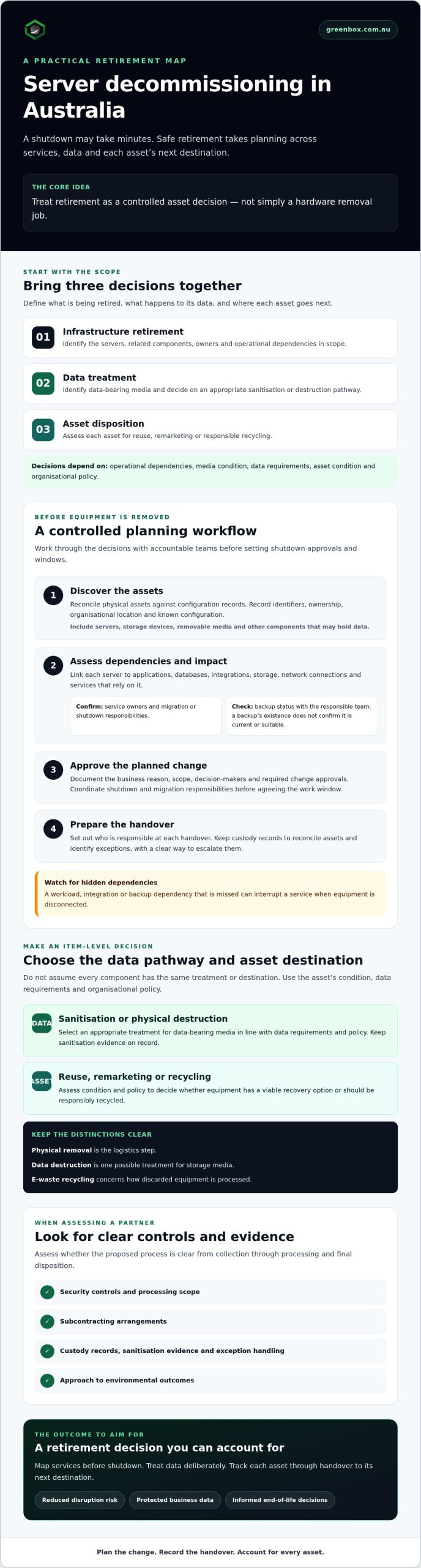
Follow a controlled server decommissioning workflow from shutdown to handover
A controlled workflow makes each transfer visible, from approval to final reconciliation. In server decommissioning Australia projects, chain-of-custody records help show which assets moved, who was responsible at each handover, and whether the agreed data treatment and final disposition were recorded. Confirm in advance what records each party will maintain and what information will be available after processing.
- Authorise: Confirm approvals, shutdown criteria, responsible decision-makers and completion of migration or retention tasks.
- Disconnect: Follow the approved runbook. Record when equipment is disconnected and flag any unexpected service impact before proceeding.
- Identify: Match each server and data-bearing component to an asset identifier. Note quantities and any differences from the approved inventory.
- Secure: Apply access and handling controls suited to your organisation’s risk requirements, including secure packaging where appropriate.
- Transfer: Record the date, asset identifiers, quantities and custody change at each handover. Document exceptions rather than leaving gaps to resolve later.
- Process: Confirm the agreed data treatment and asset pathway for each item, such as sanitisation, destruction, remarketing or recycling.
- Reconcile: Compare the processing information with the original inventory, investigate discrepancies and obtain internal sign-off.
Protect assets during disconnection and transfer
Don’t release equipment until an authorised person has confirmed that shutdown is approved and required migration, backup or retention tasks are complete. Keep labels legible and linked to the inventory throughout handling. For each custody change, note who transferred and received the items, what was transferred and whether any issue occurred. Set packaging and access controls according to your organisation’s assessment of the assets and data involved.
These controls provide a practical record of movement, but they don’t replace the agreed data treatment or prove that processing is complete. Set expectations for both before collection.
Close the process with evidence and reconciliation
At completion, match each collected asset identifier against the approved list. Record missing, additional or mismatched items for review, and assign an owner to resolve each discrepancy. Request records that identify the agreed data treatment and final disposition, then check the provider’s available report formats against your organisation’s documentation needs.
Keep the final reconciliation with the project record, capture internal sign-off and name who owns any unresolved items. This closes the loop between the original scope, custody changes and outcome without assuming a particular provider supplies a specific document.
For support with recovery and end-of-life processing, discuss a managed IT asset recovery approach with Greenbox.
Choose an Australian server decommissioning partner with clear controls
The right provider should be able to explain how security, custody, processing and end-of-life decisions fit together. For server decommissioning Australia projects, assess the proposed controls against your data requirements, asset scope and environmental objectives. Don’t rely on broad assurances alone. Ask who handles each stage and what evidence will be available.
Questions to ask before appointing a provider
Use these questions to compare providers and clarify responsibilities before equipment leaves your organisation:
- Security: How are data-bearing components identified, treated and protected during handling?
- Custody: How are collection, transfers and changes in responsibility recorded?
- Scope: Which activities are performed directly, and which involve subcontractors or other parties?
- Reconciliation: How are asset identifiers checked against the approved inventory, and how are missing or mismatched items escalated?
- Reporting: What records are available for the agreed data treatment and final disposition? Confirm formats and availability before engagement.
- Environmental outcomes: How are assets assessed for reuse or remarketing, and how is equipment that can’t be reused directed to recycling?
Request evidence relevant to your organisation’s requirements, and establish who is responsible for preparing, reviewing and retaining it. Check the scope and current status of any certification a provider cites, including which facilities or activities it covers. Verify standards and legal claims against authoritative sources and your own requirements. A certification or general compliance statement shouldn’t substitute for checking that it applies to the specific work.
How Greenbox can fit into a broader ITAD programme
Greenbox is an Australian IT asset lifecycle management provider offering IT asset recovery, data sanitisation and destruction, asset remarketing and e-waste recycling. Its national operations may suit organisations looking for a partner to coordinate recovery and end-of-life processing. Confirm that the proposed scope fits your assets, data requirements and client policy.
Greenbox states that its facilities are R2-certified and describes its operations as carbon-neutral. Before relying on either claim, confirm current certification status and facility scope, and request evidence of the applicable carbon-neutral scope. This lets you assess environmental and assurance claims against your organisation’s procurement criteria.
Once your checklist is clear, you can discuss your server recovery requirements with Greenbox and confirm which services and records may apply to your project.
Make your next server retirement a controlled transition
Effective server decommissioning Australia projects begin with a clear inventory and dependency map, then move through approved shutdown, documented custody, appropriate data treatment and asset-by-asset disposition. Separating data sanitisation or destruction from the decision to reuse, remarket or recycle helps protect information while keeping recovery options in view.
Greenbox offers IT asset recovery, data sanitisation and destruction, asset remarketing and e-waste recycling. If you’re evaluating a partner, confirm the proposed scope, available records and evidence, and verify the current scope of any certification or carbon-neutral claims against your requirements.
Discuss secure server recovery and end-of-life options with Greenbox as you shape a process that supports continuity, accountability and responsible asset decisions. With a considered plan, your team can move forward with greater confidence.
Frequently Asked Questions
What does server decommissioning involve?
Server decommissioning is the planned retirement of server infrastructure, including assessment of connected equipment, data treatment and decisions about each asset’s next destination. It can involve identifying dependencies, migrating or shutting down services, sanitising or destroying data-bearing media, and directing suitable equipment to reuse, remarketing or recycling. Physical removal is only one step. The full process also considers ownership, operational risk, custody records and final asset reconciliation.
How do you decommission a server safely?
Start with an inventory and dependency map, then confirm approvals, service owners, backup status and migration or retention responsibilities. Set shutdown criteria, communicate the schedule and prepare a rollback or contingency plan before disconnecting equipment. Identify data-bearing components and agree on an appropriate treatment method. During transfer and processing, track asset identifiers, custody changes and exceptions. Reconcile the outcomes against the approved inventory before closing the project.
Can decommissioned servers be reused or resold?
Yes, suitable servers may be reused internally or considered for remarketing, depending on condition, data requirements and organisational policy. Assess the equipment and its components individually rather than assuming every item has resale value. Complete the required data treatment before reuse or resale. Assets that aren’t suitable for continued use or remarketing may be directed to recycling, with the selected pathway recorded against the asset inventory.
Is data sanitisation enough before a server is resold?
It can be appropriate when the media is functional, the sanitisation method can be completed and verified, and the method meets your organisation’s policy and data requirements. Sanitisation alone isn’t an automatic clearance for resale. Consider the type and condition of each data-bearing component, the sensitivity of the information and the evidence required. If the chosen method can’t be verified or doesn’t meet policy, assess another treatment option, including destruction.
What records should a server decommissioning provider supply?
Agree on records before work begins. Ask what information will be available to show asset identifiers, collection and custody changes, agreed data treatment, final disposition and any exceptions. Confirm the format, timing and availability of records rather than assuming a particular certificate or report is included. Your organisation should reconcile these details against its inventory, investigate discrepancies, obtain internal sign-off and retain the completed project records according to its own requirements.
How can server decommissioning avoid business disruption?
Map application, storage, network and service dependencies before shutdown, and confirm who owns each migration or retention task. Check backup status with the responsible team, set an approved shutdown window and notify affected stakeholders. Use change control, escalation contacts and a rollback or contingency plan. For server decommissioning Australia projects, this sequence helps teams identify potential impacts early and pause work if a dependency or validation check fails.
What happens to servers after they are collected?
After collection, assets should be identified and reconciled against the approved inventory, then processed according to the agreed scope. Data-bearing components may undergo sanitisation or destruction, while equipment may be assessed for reuse or remarketing where condition and policy allow. Items unsuitable for continued use may be sent for e-waste recycling. Ask how custody, processing outcomes and exceptions will be documented, and verify the records against your asset list.