

What if the best outcome for retired IT equipment isn’t immediate destruction? Secure end of life IT equipment disposal starts by protecting the data, then assessing whether devices can be reused or remarketed before recycling what’s no longer serviceable. That sequence can help your organisation manage risk and keep suitable assets in circulation.
It can be difficult to know which devices still hold sensitive information, what happens after collection or whether equipment has any remaining value. Under the Privacy Act 1988, organisations must take reasonable steps to destroy or de-identify personal information when it’s no longer needed. A clear, controlled process helps make those steps manageable.
This guide explains the main end-of-life options for business IT equipment and how sanitisation, asset recovery and responsible recycling fit together. It also covers what to ask a disposal provider about collection, processing and records, so you can make informed decisions and track the outcome for each asset.
Key Takeaways
- Use an approved, documented process for end of life IT equipment disposal, from identifying assets to recording their final outcome.
- Check which devices may hold data and agree how sanitisation and evidence will be managed.
- Assess condition, functionality and demand to decide whether equipment should be reused, refurbished, remarketed or recycled.
- Assign clear responsibilities across IT, security, procurement and facilities to coordinate collection and processing.
- When assessing a provider, ask about data controls, transport, downstream handling and reporting, and check the scope of any certification.
What does end-of-life IT equipment disposal involve for a business?
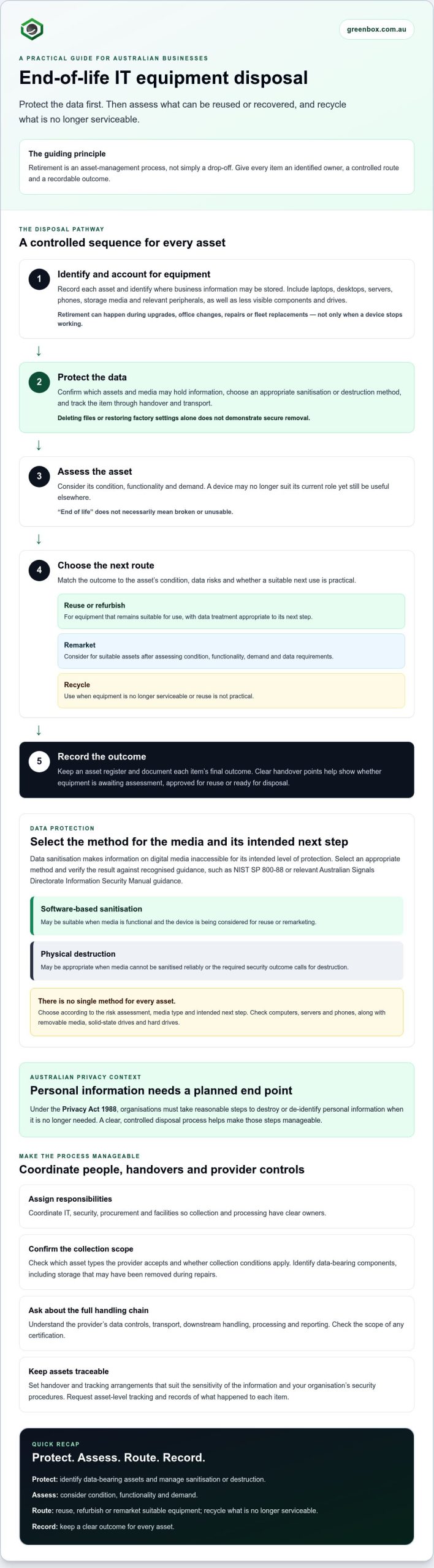
End-of-life IT equipment disposal is the managed retirement of business technology, including decisions about data protection, reuse, recovery and recycling, followed by records of the outcome. It’s an asset management process, not simply a drop-off. Each item should be identified and handled according to its condition, data risks and intended next step.
“End of life” doesn’t necessarily mean broken or unusable. A device may no longer suit its current role because it’s outdated, incompatible or being replaced, yet still be useful elsewhere. A controlled process helps determine what happens next instead of treating every retired asset as waste.
Which business IT assets need an end-of-life plan?
Include equipment that stores, processes or connects to business information. This may cover laptops, desktop computers, servers, phones, storage media such as drives, and relevant peripherals. Devices can be retired during upgrades, office changes, repairs or fleet replacements, not just when they stop working.
Account for less visible assets, too. A server component or storage device may still contain information even if it’s no longer connected to the network. Before arranging processing, confirm which asset types the provider accepts and whether any collection conditions apply.
Why is disposal more than getting rid of old equipment?
Retirement brings together three responsibilities: protecting information, maintaining control of business assets and handling equipment appropriately at the end of its useful life. The process may include secure data sanitisation, recovery or remarketing of suitable assets, and recycling when reuse isn’t practical. The broader Electronic waste overview explains why discarded technology can raise environmental concerns and why material recovery matters.
Without an assigned process, retired devices can accumulate in storage rooms or cupboards with unclear ownership and status. Staff may not know whether an item is awaiting assessment, still contains data, has been approved for reuse or is ready for disposal. That uncertainty makes it harder to account for equipment and confirm what has happened to it.
A clear asset register and defined handover points help close those gaps. For more context on the equipment and materials that may fall within scope, read this guide to computer waste for Australian businesses. A managed end of life IT equipment disposal process gives every asset a planned route and a recordable outcome.
How do businesses protect data during end-of-life IT disposal?
Deleting files or restoring a device to factory settings doesn’t, by itself, demonstrate that stored information has been securely removed. Data may remain recoverable, and the appropriate treatment depends on the device, media, data sensitivity and whether the equipment is intended for reuse. Data sanitisation is the process of rendering information on digital media inaccessible for its intended level of protection, using an appropriate method and verifying the result against a recognised standard, such as NIST SP 800-88 or relevant Australian Signals Directorate Information Security Manual guidance.
Which devices and media may hold business data?
Start with computers, servers and phones, then check removable media and storage components such as solid-state drives and hard drives. An inventory can miss embedded storage, extra drives or media removed during repairs. Ask IT to identify where information may reside, and confirm relevant asset types and handling requirements with your disposal provider before collection.
What should a controlled data process include?
Set out a clear sequence for end of life IT equipment disposal. Identify each asset and its data-bearing components, track it during handover and transport, apply the chosen sanitisation or destruction method, then record the result. Make sure access, packaging and transfer arrangements suit the sensitivity of the information and your organisation’s security procedures.
Software-based sanitisation may be suitable when media is functional and the device is being considered for reuse or remarketing. Physical destruction may be appropriate when media can’t be sanitised reliably or the required security outcome calls for destruction. Neither method suits every asset. Choose based on your risk assessment, media type and intended next step. CISA’s guidance on securely removing data also explains why deleting files alone may not be enough.
What evidence should a disposal process produce?
Request asset-level tracking and records showing what happened to each data-bearing item. A certificate or report should match the work performed. For example, it shouldn’t describe sanitisation if the media was physically destroyed. Check which identifiers, method details and outcomes the provider can document, and how it will report exceptions or assets that couldn’t be processed.
For more detail on standards and evidence, see the enterprise guide to certified data sanitisation. If you’re assessing a managed business process, you can also review Greenbox’s data sanitisation and destruction services as one option, then confirm the methods and records available for your assets.
Should retired IT equipment be reused, remarketed or recycled?
Not every retired device is waste. During end of life IT equipment disposal, assess each asset’s condition, age, functionality, market demand and data status before choosing a route. Reuse can keep suitable equipment in service. Refurbishment or remarketing may give working assets another user, while component recovery and recycling are options when a whole device isn’t suitable for further use.
Protect data whichever route you choose. Equipment intended for reuse or resale still needs appropriate sanitisation before it leaves your organisation. Maintain asset tracking so the data treatment and final outcome are linked to the correct item.
| Route | Suitable circumstances | Key checks | Records to request |
|---|---|---|---|
| Continued use | The device remains functional and meets another internal role’s requirements. | Confirm suitability, ownership and any required data sanitisation before reassignment. | Updated asset register and recorded data treatment, where applicable. |
| Refurbishment or remarketing | Equipment works, or can be restored for a potential next user, and there is demand. | Check condition, functionality, sanitisation and how assets will be tracked through transfer. | Asset-level processing and sanitisation outcomes, plus the recorded disposition. |
| Component recovery | A whole device isn’t suitable for reuse, but components may have further value or use. | Confirm which components are recovered and how data-bearing parts are handled. | Processing records that identify the asset and its documented outcome. |
| Recycling | Equipment or components aren’t suitable for continued use or remarketing. | Ask how materials are handled downstream and what visibility is provided. | Records showing the items processed and their recycling outcome. |
When can equipment be reused or remarketed?
Start with a practical assessment: does the device function, is it in suitable condition, and could it meet another user’s needs? Age alone doesn’t determine suitability. Sanitisation and accurate asset tracking help separate data handling from commercial assessment during remarketing. Any return or resale value depends on the equipment and market, so don’t assume every working device will find a buyer.
When is recycling the appropriate route?
Equipment that can’t be reused may still contain materials suitable for recovery. Recycling should be a visible downstream process, not an untracked final step. Ask what is processed, how outcomes are documented and whether the provider can explain its downstream handling. For broader context, read the Australian business e-waste recycling guide.
How can a business organise end-of-life IT equipment disposal?
A clear workflow makes end of life IT equipment disposal easier to coordinate and audit. Assign a process owner, agree who approves retirement, and involve IT, security, procurement and facilities. IT can identify devices and data-bearing components; security can advise on handling; procurement can confirm approvals and provider arrangements; facilities can coordinate access and collection logistics.
What should an IT disposal inventory include?
Build the inventory before equipment is moved. For each item, record its type, serial number or asset tag, location, owner and known data-bearing components. After assessment, note the intended route, such as reuse, sanitisation, destruction or recycling. Keep these details consistent with the collection handover and the provider’s processing records.
Check the inventory against the physical equipment. Reconcile serial numbers, asset tags and quantities, and investigate mismatches before collection where possible. This helps clarify which assets were approved, transferred and processed.
How should collection and processing be controlled?
Agree the collection scope and handling responsibilities in advance. Confirm what equipment is included, who will prepare and release it, how it will be secured during transport, and what handover records will be supplied. A practical sequence is:
- Approve: obtain the relevant ownership and retirement approvals, then confirm the assets and intended outcomes.
- Prepare: update the inventory, identify data-bearing items and agree any handling requirements with the provider.
- Handover: reconcile the items and quantities against the collection record, and retain a copy for your organisation.
- Review: match returned processing records to the original inventory and follow up on exceptions before closing the job.
Plan for discrepancies. Agree how missing assets, damaged equipment or items that can’t be processed as expected will be recorded and escalated. Don’t treat an incomplete report as process closure. Document the resolution and update the asset register.
Requirements can vary according to the equipment, information involved and the jurisdictions where your organisation operates. Check current Australian and relevant state or territory obligations with your internal legal or compliance advisers, rather than assuming one process applies everywhere.
For a managed business process covering collection, recovery and end-of-life processing, explore Greenbox’s IT asset recovery services.
How do you choose a responsible end-of-life IT disposal partner?
A provider should explain what happens to assets from collection through to their final outcome. For end of life IT equipment disposal, look beyond broad assurances. Ask for clear answers about data controls, transport, downstream handling and the records your organisation will receive. A suitable partner should be transparent about both its process and its limits.
What should businesses ask an IT disposal provider?
Use these questions to check whether a provider’s process aligns with your security and operational requirements:
- Tracking: How are assets identified and tracked from collection to final processing? How are differences between the inventory and collected items recorded?
- Data handling: Which sanitisation methods are available for each media type? What evidence is provided, and how are failed or incomplete processes escalated?
- Logistics: Who is responsible at each handover, and how are assets protected during transport?
- Asset outcomes: Which reuse, remarketing, component recovery or recycling routes are considered for eligible equipment?
- Reporting: What asset-level records are supplied, and do they distinguish sanitisation from physical destruction?
Check certification claims against the actual scope and facility details. Ask which facility will process your equipment, whether its certification applies to the relevant activities, and how you can verify that information. A certificate or logo alone doesn’t explain how your assets will be handled or what evidence you’ll receive.
How does a managed ITAD service support responsible disposal?
When asset recovery, data sanitisation and downstream processing are coordinated, your team has fewer handovers to manage and a clearer path from collection to record closure. An integrated approach can also help ensure suitable equipment is assessed for recovery or remarketing, while other assets are directed to recycling. Confirm the service scope, accepted equipment types and available documentation before making arrangements.
Greenbox provides business IT asset recovery, data sanitisation and destruction, asset remarketing and e-waste recycling. The company states that its facilities are R2-certified and that it operates as a carbon-neutral organisation. Check the current certification scope and facility details, along with the specific processes and records relevant to your assets.
To assess whether its business services suit your organisation’s requirements, explore Greenbox’s business IT lifecycle services.
Put a clear retirement process in place
Responsible end of life IT equipment disposal is a managed process, not a last-minute clean-out. Identify assets and data-bearing components, protect them through handover, then choose reuse, remarketing or recycling based on condition and suitability. Keep records that connect each asset to its processing outcome, and assign clear responsibility across the teams involved.
These steps help your organisation reduce uncertainty, protect business information and make considered use of equipment that may still have value. A capable partner can coordinate recovery, data sanitisation and e-waste recycling as connected parts of the asset lifecycle, while providing visibility into what happens next.
Greenbox provides business IT asset recovery, data sanitisation and e-waste recycling. It states that it operates R2-certified facilities and is a carbon-neutral organisation. Confirm current certification scope, facility details and available records as part of your provider assessment. To discuss your organisation’s requirements, explore Greenbox’s business IT lifecycle services.
Frequently Asked Questions
What counts as end-of-life IT equipment?
End-of-life IT equipment is business technology that’s no longer suitable for its current role, whether or not it still works. Examples include laptops, desktops, servers, phones, storage media and peripherals. A device may be retired during an upgrade, repair, office move or fleet replacement, yet remain useful to another user. Assess its condition, data and potential next use before deciding whether to reuse, remarket or recycle it.
How should a business dispose of old computers securely?
Use a controlled process that tracks each computer from approval to its final outcome. Identify its asset tag and storage components, arrange secure handling during collection, then have the data sanitised or the storage media destroyed using a method suited to the device and your security requirements. Request records describing the work performed. A business end of life IT equipment disposal process should also assess whether a sanitised computer can be reused or remarketed.
Is deleting files enough before disposing of a business computer?
No. Deleting files or resetting a computer may not remove data in a way that demonstrates secure sanitisation, and information may remain recoverable. Choose an appropriate sanitisation method for the storage media and intended outcome, or consider physical destruction where required. Ask for evidence of the work completed, and check that any certificate or report describes the method actually used. Include removable and embedded storage in your assessment.
Can end-of-life IT equipment be reused or resold?
Yes, some retired equipment can be reused internally, refurbished or remarketed if its condition, functionality and suitability support another use. Secure data sanitisation and asset tracking should happen before equipment is transferred or resold. Not every device will be suitable, and resale outcomes depend on its age, condition and market demand. Equipment that can’t be reused may still be suitable for component recovery or responsible recycling.
What happens to business IT equipment after collection?
After collection, equipment should be matched to the agreed inventory and assessed for its next route. Depending on condition and data status, that may involve sanitisation, destruction, recovery, remarketing or recycling. The provider’s process should explain how assets are tracked, how exceptions are handled and what records are returned. Reconcile those records against your original inventory to confirm the documented outcome for each item.
How can a business verify that IT equipment was sanitised or recycled responsibly?
Request asset-level records identifying the items processed and describing the outcome. For data-bearing assets, check that the evidence distinguishes sanitisation from physical destruction and matches the work performed. For recycling, ask what downstream handling is documented. If a provider cites certification, confirm its current validity, scope and the facility it applies to rather than relying on a general claim. Follow up on missing assets or incomplete records before closing the process.
Are Australian businesses required to recycle all end-of-life IT equipment?
No single recycling requirement applies to every item in every circumstance. Requirements can depend on the equipment, the applicable scheme and the state or territory. For example, the National Television and Computer Recycling Scheme covers televisions, computers, printers and computer peripherals, while state and territory rules may also affect disposal options. Check current requirements for your organisation and location. Where suitable, assess reuse or remarketing before choosing recycling.