

A working laptop can still become computer waste, while a device that’s no longer useful to one team may have a second life elsewhere. So, what is computer waste for an Australian business? It includes more than desktop computers: laptops, tablets, monitors, printers, keyboards, mice and other peripherals can all enter the e-waste stream when they’re retired.
It’s easy to treat disposal as a straightforward recycling task. But business technology may hold sensitive information, and recycling isn’t the only possible outcome. Reuse, data security and material recovery are separate decisions, each requiring a clear process.
This guide explains which devices count as computer waste, where common disposal assumptions can leave gaps, and how to assess responsible next steps. It also covers how the National Television and Computer Recycling Scheme applies to eligible computers and related equipment, and why it may not cover every item your organisation needs to retire. A considered approach brings asset recovery, secure data sanitisation and environmental handling into the same decision-making process.
Key Takeaways
- Understand what is computer waste and which common workplace devices may belong in the e-waste stream.
- Assess whether retired equipment can be reused, repaired, remarketed or should go to recycling.
- Keep data protection separate from recycling: deleting files alone doesn’t confirm that business information has been sanitised.
- Use a clear process to identify assets, protect data, choose a suitable pathway and retain records.
- Check current Australian and state or territory requirements, and consider coordinated IT asset recovery for end-of-life equipment.
What is computer waste? Define the devices and materials involved
What is computer waste? It is computer equipment that has been discarded because it is obsolete, unwanted, damaged or no longer fit for its intended use. It is different from general rubbish and includes both computers and the peripherals and infrastructure used to operate them, connect to networks, print or store information.
Computer waste commonly falls within the broader category of electronic waste, often shortened to e-waste. The categories overlap, but they aren’t interchangeable in every situation. A business may retire computers alongside other electronic equipment, and each item may need different handling. Treating assets as part of a managed technology stream helps an organisation identify what it has, assess whether it can be used again and decide what processing it needs.
Which devices count as computer waste?
Common examples include desktop computers, laptops, monitors, keyboards, mice, printers and accessories such as cables and docking equipment. Businesses may also retire servers, networking equipment and data storage devices. These items differ in design and function, so identifying something as computer waste doesn’t mean it should automatically follow the same processing route as every other device.
Other electronics, such as phones or household appliances, may also be e-waste, but they aren’t necessarily computer equipment. Check the item type and the requirements of the collection or processing pathway before grouping it with computers.
What materials and components may be recovered?
A computer may contain metals, plastics, circuit boards and, in some devices, batteries. These are potential material streams, not a guarantee that every component can be recovered. Equipment design, condition and the available processing pathway all affect what can be done.
Components may need to be separated and handled through different processes. Identify the equipment before deciding on its final destination. A monitor, a battery-containing laptop and a server aren’t identical items, even if they’re all part of the same technology refresh.
The practical distinction is that computer waste describes equipment at the end of its useful role for an organisation, not necessarily equipment with no further value. Its condition, whether it stores data and the materials it contains all help determine what happens next. Those checks are central to choosing between continued use, recovery for another purpose or material processing.
Computer waste types: distinguish reusable devices from end-of-life equipment
Not every device removed from a workplace has reached the end of its useful life. To understand what is computer waste in practice, look beyond age: condition, repair potential, organisational needs, stored data and suitability for material recovery all help determine the next step. Assess each asset before deciding to reuse, remarket, recycle or dispose of it.
Working, repairable and end-of-life devices
Equipment that remains suitable for use, or could be refurbished, may be considered for reuse after assessment. A working laptop might no longer meet a team’s requirements, while a damaged desktop could be repairable. Neither condition alone establishes that an asset should be reused or has resale value. Compatibility, repair needs, security requirements and potential demand also matter.
A first sort can help organise decisions:
- Working: check whether the device still meets requirements and can be securely prepared for another use.
- Repairable: assess its condition and whether repair is appropriate before selecting a recovery pathway.
- End-of-life: identify equipment that isn’t suitable for continued use or refurbishment, then choose an appropriate recycling or disposal route.
These are assessment categories, not guaranteed outcomes. A device may be old but usable, or relatively recent yet unsuitable for reuse.
Data-bearing and battery-powered equipment
Computers and storage devices can hold business information. Some peripherals, including multifunction printers, may also retain data, so include them in an asset review rather than assuming only laptops and desktops need attention. Data sanitisation or destruction addresses information stored on an asset; physical recycling addresses its equipment and components. They’re connected responsibilities, but one doesn’t automatically resolve the other.
Some devices contain batteries that may need a separate handling pathway. Before packaging or transferring battery-powered assets, check current Australian and relevant state or territory guidance, along with the requirements of the organisation receiving the equipment.
For eligible televisions and computers, the Australian Government’s National Television and Computer Recycling Scheme may provide a recycling pathway. Check the scheme’s current scope and access arrangements before relying on it for a business equipment stream. For broader context, see this Australian e-waste recycling business guide.
For help coordinating asset recovery, data sanitisation, remarketing or recycling, Greenbox’s IT asset recovery services may be relevant.
Computer waste myths: what recycling and disposal do not automatically solve
Two assumptions can complicate decisions about retired technology: that every computer should go straight to recycling, and that deleting its files makes it safe to pass on. Neither is a reliable shortcut. Understanding what is computer waste is only the starting point; organisations also need to assess each asset’s condition, data and appropriate next step.
Myth: deleting files makes a computer safe to pass on
Deleting a file or emptying a recycle bin removes it from ordinary view, but that action alone doesn’t establish that information has been securely sanitised. A sanitisation process is designed to address data stored on the device, and a documented process can record what was done. The appropriate method depends on the device, the sensitivity of its data and the organisation’s policies.
Include storage devices and equipment that may retain information in the review, not just computers currently in use. For a practical overview, read this certified data sanitisation guide. Data handling and physical recycling are connected parts of an asset’s lifecycle, but recycling an item doesn’t confirm that its data has been sanitised.
Myth: recycling is always the first or only option
Recycling is important, but it isn’t automatically the best first step for every asset. The waste hierarchy can help teams consider options in sequence, while taking the condition and requirements of each item into account:
- Continued use: keep suitable equipment in service if it still meets operational needs.
- Refurbishment or remarketing: assess whether an asset can be prepared for another use, subject to its condition, data handling and suitability.
- Material recovery: send equipment that isn’t suitable for reuse through an appropriate recycling pathway.
This is a decision aid, not a rule that overrides security, safety or operational needs. A device that powers on may still be unsuitable for another user. One that no longer meets a team’s requirements may warrant assessment before recycling. Not every item will be suitable for reuse or remarketing.
A recycling label can indicate a stated destination or programme, but it doesn’t necessarily describe every stage of an item’s handling. Check what the pathway covers, how data-bearing assets are treated and what records are available. A considered process makes the outcome clearer: assess the asset, address its data, then select a suitable reuse, remarketing or recycling route.
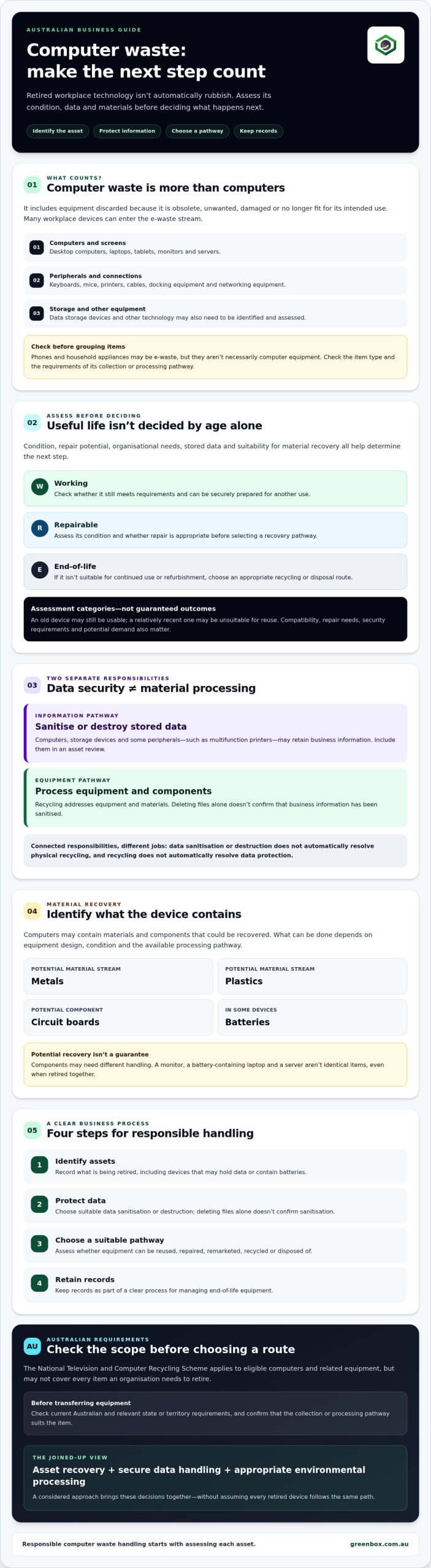
How Australian organisations can handle computer waste responsibly
A consistent process helps organisations manage retired technology without treating every item the same way. Identify the equipment, assess its condition, protect any stored information, choose a suitable pathway and keep records of the outcome. Before acting, check current Australian requirements and relevant state or territory guidance, as rules and options can vary.
Build an inventory and assess each asset
Record enough detail to identify each item and support a sound decision. Useful fields include device type, ownership, condition, serial number or asset identifier, and whether it may contain business data. Include relevant peripherals and storage devices, not only computers.
Use the inventory to distinguish equipment that may be suitable for continued use or refurbishment from damaged or end-of-life items. Check organisational policies and confirm that the proposed collection or recycling option accepts the equipment involved.
The National Television and Computer Recycling Scheme provides free access to industry-funded collection and recycling services for televisions, computers, printers, and computer parts and peripherals for households and small businesses. It doesn’t cover every kind of e-waste or automatically apply to every organisation, so check current eligibility and scope before relying on it for a business equipment stream.
Protect information and document the outcome
Before an asset leaves your control, determine whether it holds data and select a sanitisation or destruction method suited to the device type, data sensitivity and organisational policy. Keep this step distinct from the physical recycling decision: a recycling destination alone doesn’t confirm that information has been addressed.
Retain appropriate records of the assets transferred, the data-handling process and the final disposition, such as reuse, remarketing or recycling. Ask a provider what its process covers and what documentation it supplies. A certificate or marketing statement can form part of your records, but shouldn’t be treated on its own as proof that every organisational requirement has been met.
For a practical overview of business e-waste pathways, explore responsible e-waste management. A considered process connects asset records, information protection and environmental handling, giving your organisation a clearer basis for each decision.
From computer waste to responsible IT asset recovery
Once an organisation has identified its retired equipment and assessed its condition, the next step is to coordinate what happens to each asset. Suitable devices may be prepared for reuse or remarketing, while equipment that isn’t fit for another use can be directed to recycling. The right pathway depends on the asset, its data and the organisation’s requirements. The label “computer waste” alone doesn’t determine the outcome.
What a responsible business recovery pathway includes
A managed recovery process can bring together several distinct stages: arranging collection, recording and assessing assets, sanitising or destroying data where required, and directing equipment to an appropriate downstream pathway. Keeping these stages clear helps organisations understand how devices move from the workplace to their final outcome.
Assessment may identify equipment suitable for remarketing, but resale isn’t guaranteed. Condition, specifications, data handling and demand all influence whether an asset can be remarketed. Other items may be more appropriate for recycling. Ask a provider how it distinguishes between these outcomes and what records it can supply.
Greenbox is an Australian IT asset lifecycle provider offering IT asset recovery, data sanitisation, asset remarketing and e-waste recycling. It operates R2-certified facilities and is a carbon-neutral organisation. These details can inform a provider review, alongside questions about the specific processes and documentation relevant to your organisation.
When to seek specialist IT asset support
Specialist support may be useful when a business is retiring a large volume of devices, handling equipment that may contain sensitive information, or coordinating assets across multiple locations nationally. A structured process can bring logistics, data handling and environmental processing together, rather than leaving teams to manage separate decisions without a clear record.
Before choosing a provider, ask practical questions:
- How are assets identified and tracked through each stage?
- What data sanitisation or destruction processes are available for the devices involved?
- Which certifications apply to the facilities or processes, and what do they cover?
- How are reuse, remarketing and recycling outcomes documented?
- What environmental reporting is available, and what does it measure?
Clear answers help you assess whether a provider’s approach fits your organisation’s security, operational and environmental requirements. Greenbox offers IT asset recovery, data sanitisation and e-waste recycling services across Australia. Find out more about Greenbox’s IT asset recovery services.
Make your next technology transition a responsible one
Understanding what is computer waste is the first step. Next, assess each asset before deciding its future. Equipment may be suitable for continued use or remarketing, while other items need data sanitisation and an appropriate recycling pathway. These decisions work best when asset records, information protection and environmental handling are considered together.
A clear process gives your organisation better visibility over where retired equipment goes and how its data is handled. Greenbox provides national IT asset recovery, data sanitisation and e-waste services, and operates R2-certified facilities.
To discuss a secure and responsible IT asset recovery pathway for your organisation, contact Greenbox.
Frequently Asked Questions
What is considered computer waste?
Computer waste is discarded computer equipment that’s obsolete, unwanted, damaged or no longer fit for its intended use. For businesses asking what is computer waste, common examples include desktop computers, laptops, monitors, printers, keyboards, mice, servers, networking equipment and storage devices. Accessories may also be included. An item’s condition matters: equipment no longer needed by one team may still be suitable for assessment for another use.
Is computer waste the same as e-waste?
Computer waste is a type of e-waste, but e-waste covers a broader range of discarded electrical and electronic equipment. Computers and related peripherals sit within that category alongside other electronics that aren’t computer equipment. The terms are often used interchangeably in everyday conversation, but collection and processing options can depend on the specific item. Check that a proposed pathway accepts the equipment you’re retiring.
Can old computers be reused instead of recycled?
Yes, some old computers may be suitable for continued use, refurbishment or remarketing instead of immediate recycling. Age alone doesn’t determine the next step. An assessment should consider working condition, repair needs, compatibility with another user’s requirements and whether stored data can be appropriately sanitised. Reuse or resale isn’t suitable for every asset, and a working device shouldn’t automatically be assumed to have market value.
Can deleting files make a computer safe to dispose of?
No. Deleting files or emptying a recycle bin doesn’t, by itself, confirm that data has been securely sanitised. Before transferring or recycling a business computer, identify whether it contains storage or other data-bearing components and follow an appropriate sanitisation or destruction process. The method should reflect the device type, data sensitivity and organisational policy. Keep a record of the process as part of the asset’s disposal documentation.
What happens to computer waste in Australia?
Computer waste may be assessed for reuse or remarketing, or sent for recycling when it’s not suitable for another use. The National Television and Computer Recycling Scheme provides free access to industry-funded collection and recycling services for televisions, computers, printers, and computer parts and peripherals for households and small businesses. It doesn’t cover every e-waste item or every business situation, so check current eligibility, scheme scope and relevant state or territory guidance.
How should a business prepare computers for disposal?
Start with an inventory that records each device type, asset identifier, condition, ownership and whether it may hold data. Assess whether equipment could be reused or repaired, then arrange suitable data sanitisation or destruction before transfer. Confirm that the receiving pathway accepts the equipment, including any accessories or batteries. Retain records of collection, data handling and final disposition, and check current Australian and state or territory requirements before proceeding.
Are computer batteries handled differently from other e-waste?
They may be. Some computers and peripherals contain batteries that require a separate handling pathway, depending on the equipment and the receiving service’s requirements. Don’t assume batteries should be removed, packed or transported in the same way as other components. Identify battery-powered items during your asset review, then check current Australian and relevant state or territory guidance, along with instructions from the organisation that will receive or process the equipment.