

Retired business computers can return value to an organisation when they’re assessed for resale, tested and matched to a suitable reuse pathway. A corporate computer buyback program in Australia typically values devices according to their model, age, condition and market demand. Equipment with no resale value can instead be directed to responsible recycling.
It’s reasonable to expect a clear valuation, but a device’s condition and reuse potential determine what it can recover. Data security matters too: computers need careful handling before they leave your organisation, not just a quick reset.
This guide explains how buyback assessments work, what affects device value and how testing determines whether computers are resold, reused or recycled. It also covers how secure data sanitisation and clear asset records support a controlled retirement process, helping your organisation make an informed decision about its retired technology.
Key Takeaways
- Compare device valuations by model, age, condition and resale demand to understand what drives budget recovery.
- Prepare an accurate asset inventory and plan secure data sanitisation before devices leave your organisation.
- Use functional testing and condition grading to distinguish equipment suitable for reuse from end-of-life e-waste.
- Consider remarketing for reusable computers and responsible recycling for devices that have reached the end of their useful life.
- Assess the full value of a retirement program, including recovered budget, clearer asset records and reduced material waste.
IT asset resale value and budget recovery
A corporate computer buyback program in Australia can recover value from equipment with resale demand. The return depends on each asset’s model, age, condition, specifications and working status. A newer laptop with a functioning battery and intact screen may be valued differently from an older desktop with missing components. Tablets, monitors and peripherals can also be included in an asset audit, although their condition and resale demand affect their contribution.
Assess the expected return alongside the work required to retire the equipment. Compare the offered value with collection arrangements, handling charges, data destruction, internal staff time and costs for assets that cannot be remarketed. This gives finance and IT teams a clearer picture of net recovery, rather than relying on a headline valuation. Compare costs and adjustments by asset or device group so each deduction remains visible.
Before collection, reconcile the asset register with the physical inventory. Capture each device’s make, model, serial number and condition, then record who releases and receives it at each handover. This chain of custody links the audit to the collection and helps identify missing or substituted equipment. A serialised report can also connect each asset to its final outcome, such as resale, data destruction or disposal.
Request disposal reporting that supports internal audit and compliance records. Useful documentation includes asset identification, sanitisation results and destruction records. A Certificate of Destruction should list device serial numbers, the destruction method and the date. Data-sanitisation certificates should identify individual assets and drives. These records show how data-bearing equipment was handled, rather than offering only a general statement about the collection.
For provider assessment, use ISO 27001 and ISO 14001 certifications as a baseline. Certified IT asset disposition providers are particularly relevant when a business regularly refreshes fleets, operates in a regulated industry or needs documented disposal proof. Confirm that the proposed service covers secure handling, asset reporting and suitable end-of-life routes, not only resale.
What are the tax, GST and accounting considerations for selling business computers in Australia? Record sale proceeds against the relevant asset records, and retain the invoice, serial details and disposal date. GST and tax treatment depends on the business’s circumstances and the transaction, so its accountant should assess those records alongside the asset’s accounting value.
What risks, fees and contract terms should Australian businesses check before choosing a buyback provider? Review collection and handling charges, valuation adjustments, payment timing, ownership transfer and responsibility for loss or damage. The agreement should also define data destruction, serial-level reporting, certificates and how equipment that cannot be resold will be handled.
Business device trade-in process
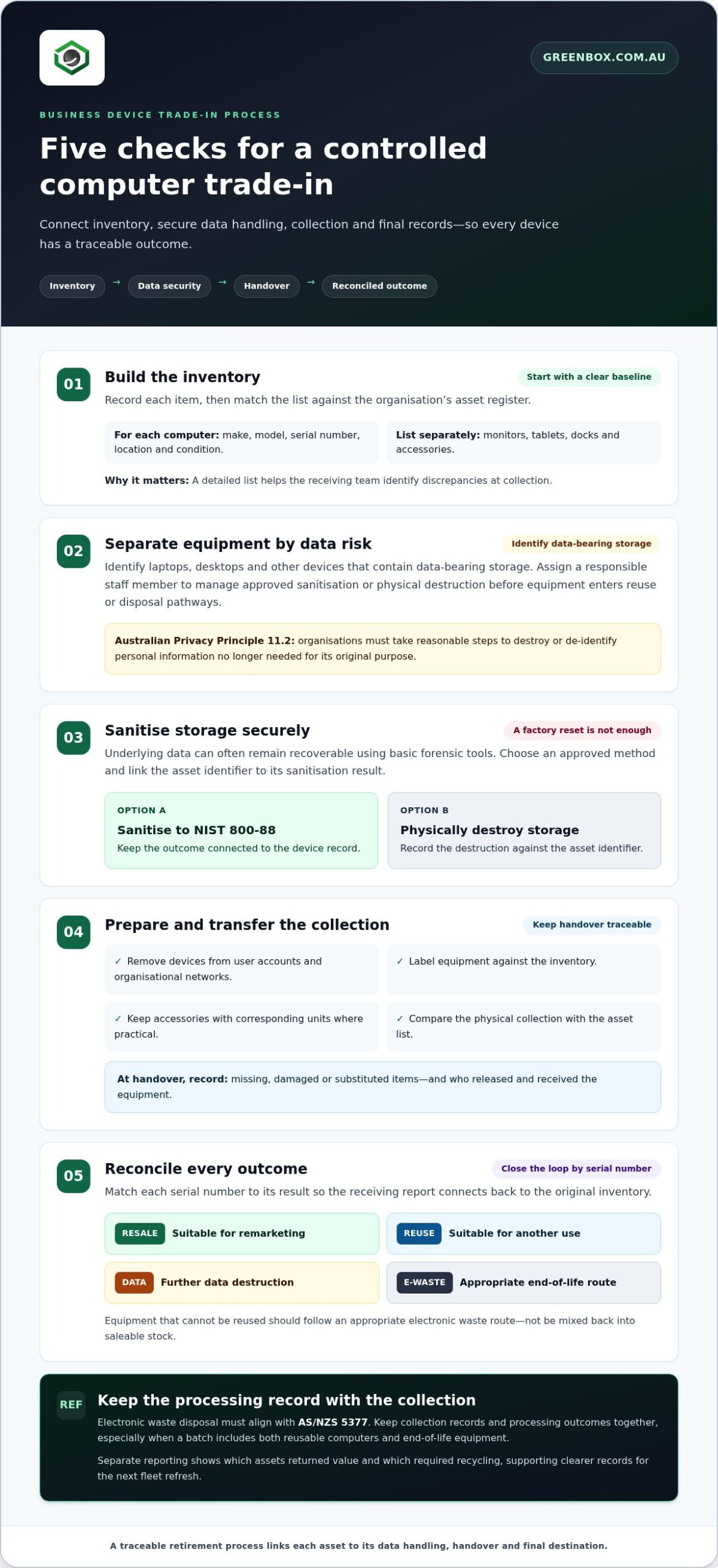
A controlled trade-in moves devices from an operating environment to resale or end-of-life processing. For an Australian organisation, the process should connect inventory, data handling, physical collection and final records. This structure helps IT and finance teams track equipment at each handover, including monitors and accessories that might otherwise be overlooked.
- Build the inventory. Record each computer’s make, model, serial number, location and condition. Add monitors, tablets, docks and accessories as separate entries, rather than grouping them under a single computer. Match the list against the organisation’s asset register. This gives the receiving team a clear baseline and helps resolve discrepancies at collection.
- Separate equipment by data risk. Identify laptops, desktops and other devices with data-bearing storage. Australian Privacy Principle 11.2 requires organisations to take reasonable steps to destroy or de-identify personal information no longer needed for its original purpose. Assign a responsible staff member to manage approved data sanitisation or physical destruction before equipment enters reuse or disposal pathways.
- Sanitise storage securely. A factory reset alone is insufficient because underlying data can often remain recoverable using basic forensic tools. Businesses should sanitise data-bearing storage to the NIST 800-88 standard or physically destroy it. Keep the asset identifier linked to the sanitisation outcome, so the record follows the device through processing.
- Prepare and transfer the collection. Remove devices from user accounts and organisational networks, then label equipment against the inventory. Keep accessories with their corresponding units where practical. At handover, compare the physical collection with the asset list and record any missing, damaged or substituted items. Document who released and received the equipment.
- Reconcile outcomes. Once assessment is complete, match each serial number to its result: resale, reuse, further data destruction or disposal. This closes the loop between the original inventory and the receiving report. Equipment that cannot be reused should follow an appropriate electronic waste route, rather than being mixed back into saleable stock.
For electronic waste, disposal must align with AS/NZS 5377. Keep the collection record and processing outcome together, especially when a batch contains both reusable computers and end-of-life equipment. Separate reporting makes it easier to identify which assets returned value and which required recycling. It also gives procurement teams a clearer record for planning the next fleet refresh.
Before scheduling collection, assign owners for inventory approval, data handling and handover. A simple checklist can show whether every device has a serial record, a sanitisation status and a final destination. For equipment that cannot be reused, business e-waste recycling provides a route into responsible end-of-life processing.
Buyback assessment and indicative valuation
An indicative valuation turns an asset list into an initial estimate of recoverable value. For each computer, record its manufacturer, model, processor, memory, storage capacity and physical condition. These details help distinguish configurations within the same product range. For example, two laptops of the same model may be valued differently if one has more memory or a damaged screen.
Assess assets in consistent categories instead of treating them as one mixed batch. A useful schedule groups equipment by model and configuration, then records working status, cosmetic wear, missing parts and included accessories. This makes it easier to see why similar devices receive different assessments. Keep the serial number with each entry so the valuation can be traced to the physical equipment.
Market demand also influences resale value. A business-grade laptop with current specifications may have a stronger reuse pathway than an older device with limited performance. Battery condition, screen quality, keyboard function and the availability of compatible accessories can affect the likely resale route. A desktop’s value may depend on its processor, memory, storage and whether it includes a usable power supply.
Use a staged assessment to make the estimate more useful for budgeting:
- Prepare the asset schedule. Export the register and reconcile it against equipment being retired.
- Supply configuration details. Include model identifiers, specifications, serials and known faults.
- Separate exceptions. List damaged, incomplete or non-working assets apart from operational devices.
- Compare the assessed schedule. Review any change between the initial estimate and the inspected condition, asset by asset.
- Record the outcome. Match each asset to resale, reuse, recycling or another disposal route.
This process supports a more reliable return-on-investment calculation. Compare expected proceeds with collection, handling, data destruction and internal processing costs. Keep each cost category visible instead of treating the initial valuation as net recovery. Finance teams can then assess the budget impact alongside the work required to retire the equipment.
A responsible assessment also accounts for assets that cannot be resold. Electronics with faults, missing components or no practical reuse pathway should go to appropriate recycling. A clear outcome record shows how each item was handled and supports compliance reporting. Keep serial-level records connected to sanitisation and disposal documentation, particularly for devices that held business or personal information.
When reviewing a provider, assess its documented process as well as its valuation method. ISO 27001 and ISO 14001 certifications provide a baseline for evaluating information security and environmental management. Ask how the assessment records condition, explains valuation adjustments and identifies each asset’s final destination. Those details make the estimate easier to review and the recovery process easier to reconcile.
Equipment testing, grading and reuse
Australian buyback programs assess business laptops, desktop computers, monitors, tablets and related IT equipment, including docks and accessories. Devices are tested and graded for reuse, resale, donation or dismantling as end-of-life electronic waste.
Equipment testing and grading
Testing establishes whether an asset works as intended and which faults affect reuse. Inspect the screen, keyboard, ports, battery, power supply and casing, then record each result against the asset’s serial number. For a desktop, check that it starts and recognises its storage and memory. For a laptop, note battery performance and screen damage. Consistent checks make grades easier to compare across a fleet.
A grade should describe observable condition, not simply label equipment “good” or “poor”. Record whether the device starts, whether components are missing and whether repairs appear necessary. A working laptop with cosmetic marks may suit reuse, while a computer with a failed hard drive needs separate handling. Link test results to each asset so the grade has a clear basis.
Accepted computers and IT equipment
Business equipment assessed for buyback can include laptops, desktop computers, workstations, monitors, tablets and accessories. Docks, keyboards, mice, power supplies and cables can be recorded separately or matched to their main device. An inventory that identifies models and components helps distinguish complete equipment from incomplete units. It also clarifies which items can be assessed for resale and which need another pathway.
Include non-working electronics in the inventory rather than leaving them out. Testing and grading determine whether equipment can be reused, resold or donated, or should be dismantled as end-of-life e-waste. This gives each asset a defined outcome and supports responsible handling of devices that cannot return to service.
Data handling is part of the assessment. A hard drive should be securely sanitised or physically destroyed before its device is reused or resold. Keep certified data-sanitisation records linked to the relevant asset identifiers. If a drive cannot be sanitised for reuse, record its destruction separately from the computer’s cosmetic or functional grade.
- Record function: note startup, display, battery and port results.
- Record condition: describe damage, missing parts and included cables.
- Assign an outcome: distinguish reuse, resale, donation and recycling.
Environmental outcomes matter when testing finds no reuse pathway. Australia’s national television and computer recycling scheme has a 90% material recovery target for recyclers. A clear grade and destination help keep reusable equipment separate from material sent for recycling, while recording the asset’s final outcome.
Computer and laptop buyback benefits
Buyback can turn usable laptops and computers into budget recovery instead of leaving them idle in storage. An organisation can put proceeds towards replacement equipment, deployment costs or another fleet-refresh priority. The financial benefit depends on resale potential, assessed condition and secure-handling costs. Compare the asset-level estimate with the full retirement process, including data destruction for devices that held business information.
There’s also a practical benefit: one planned process can assign a clear outcome to each device. A working laptop may be suitable for reuse or resale, while a failed hard drive needs separate handling. Servers and other storage equipment need particular attention because they can contain business records across multiple drives. Link each device’s identity to its sanitisation outcome and final destination.
Buyback, leasing returns, trade-ins and recycling serve different purposes. Leasing returns follow the lease agreement, while a buyback or trade-in assesses eligible equipment for potential resale and value recovery. Recycling is the appropriate route for equipment that has reached end of life or cannot be reused.
Environmental value matters alongside financial recovery. Australia generated 588,000 tonnes of e-waste in 2023, an increase of 38% over a decade. Reusing functional computers can extend their working life, while responsible recycling helps recover materials from equipment that cannot return to service. Gold, silver and copper can be present in electronic components, so sending usable equipment straight to landfill wastes recoverable resources.
For a practical decision, group retired equipment by outcome instead of treating the whole fleet alike:
- Resale or reuse: prioritise devices that function and retain practical use.
- Data handling: sanitise storage or arrange physical destruction before reuse.
- End-of-life: direct unusable devices to responsible recycling, not landfill.
- Records: match serial numbers to each device’s final outcome.
These steps connect budget recovery with controlled asset retirement. They also make the difference between a device’s resale value and environmental value visible in reporting. For example, a laptop with limited resale demand may still contribute to materials recovery when recycled through an appropriate pathway. The useful measure is each asset’s outcome, not just the total payment for a collection.
To plan secure retirement for computers, drives and servers, arrange data sanitisation and destruction as part of the asset recovery process.
Greenbox: Data Sanitisation and Destruction
Greenbox supports Australian organisations retiring business computers with Data Sanitisation and Destruction and IT Asset Recovery. Secure data handling helps separate devices suitable for reuse from equipment requiring destruction or another end-of-life pathway.
For computers with resale potential, Asset Remarketing can support value recovery after assessment and data handling. Pre-Configuration and Imaging can also prepare replacement hardware for deployment, connecting retired-equipment decisions with an organisation’s wider technology transition.
Turn to Greenbox when a fleet refresh leaves data-bearing devices to sanitise, equipment to recover or reusable assets to remarket. Contact Greenbox to discuss your organisation’s retired IT equipment and next steps.
Make your next fleet transition count
Use your next refresh to connect technology retirement with future procurement. Align the retirement plan with budget planning so recovered value and replacement needs inform the same decision. A corporate computer buyback program in Australia can form part of that lifecycle approach rather than being an isolated disposal task. Clear ownership across IT, finance and procurement helps organise the transition.
Greenbox supports this work through Data Sanitisation and Destruction, IT Asset Recovery and Pre-Configuration and Imaging. These services support secure retirement while helping prepare replacement equipment for deployment. Bringing retirement and refresh planning together gives your team a practical framework for managing the next device transition.
Contact Greenbox about computer buyback to discuss your organisation’s retired equipment and next steps. With a considered plan, your next refresh can support both operational needs and more responsible technology use.
Frequently Asked Questions
What is a corporate computer buyback program in Australia?
A corporate computer buyback program in Australia assesses retired business technology for potential resale and returns value to the organisation for eligible assets. It may cover laptops, desktops, servers and related equipment. The process can also assign non-resalable devices another outcome, such as recycling. For example, an organisation retiring mixed models can have each item assessed separately rather than treating the entire fleet as one uniform batch.
Which Australian companies offer corporate computer buyback or IT asset disposition services?
Greenbox offers IT Asset Recovery and Asset Remarketing for businesses retiring corporate IT equipment. Its Data Sanitisation and Destruction service addresses data-bearing assets as part of secure retirement. When considering an IT asset disposition service, define the required scope first: resale, data handling, equipment recovery or a combination. This helps your procurement team compare relevant service components and map them to internal security and asset-management requirements.
How do Australian corporate computer buyback providers calculate resale value and payouts?
Equipment is assessed for its configuration, working condition, completeness and resale demand to determine which assets have a viable remarketing pathway. The payout arrangement depends on the agreed commercial model, including how processing and resale proceeds are accounted for. Request an asset-level reconciliation showing accepted items, valuation adjustments and final outcomes. This lets finance match the settlement to the retired equipment register instead of relying on a single batch total.
What are typical buyback prices for used business laptops, desktops and servers in Australia?
There isn’t one typical price for used business computers because resale value depends on each device’s specifications, condition, completeness and market demand. Laptops with damaged screens, desktops missing components and servers with differing configurations can receive different assessments. The value for an individual collection depends on its assets and is provided after a quote request, with model, condition, included components and resale demand shaping the assessment.
How does a business arrange a bulk computer buyback and collection in Australia?
Start by assigning an internal owner to coordinate IT, finance and site contacts. Prepare an equipment schedule with model details, quantities, locations and known faults, then agree how devices will be packed and released. Before collection, remove equipment from active user assignments and organise data handling. At handover, reconcile the physical items against the schedule and record exceptions, such as missing power supplies or equipment that wasn’t ready.
What Australian privacy, data security and e-waste rules apply to corporate computer buybacks?
Australian Privacy Principle 11.2 under the Privacy Act 1988 requires organisations to take reasonable steps to destroy or de-identify personal information no longer needed for its original purpose. Businesses should sanitise data-bearing storage to NIST 800-88 or physically destroy it; a factory reset alone can leave recoverable data. E-waste disposal must align with AS/NZS 5377. Keep records linking devices to their data-handling and end-of-life outcomes.