

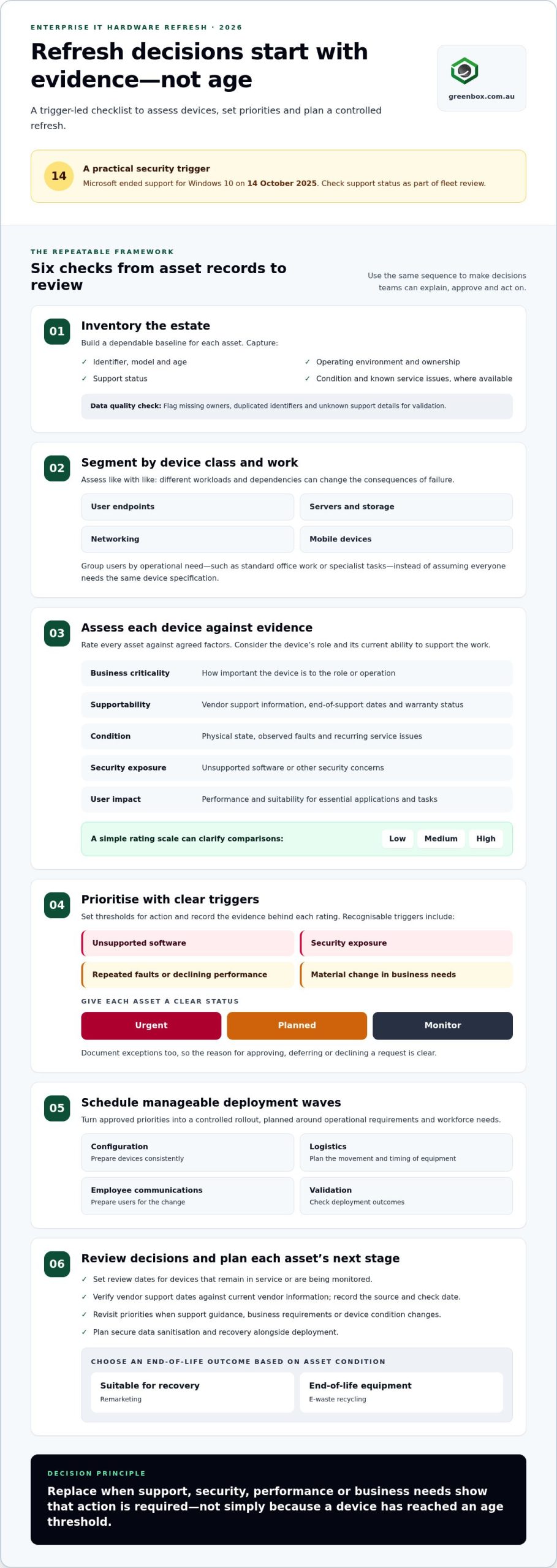
A fixed refresh calendar can replace capable devices too early while leaving higher-risk hardware in service. An effective enterprise IT hardware refresh strategy 2026 starts with evidence, not age alone. Microsoft ended support for Windows 10 on 14 October 2025, making support status a practical security trigger for organisations reviewing their fleet.
Large refresh waves can be difficult to fund and disruptive for employees. A repeatable process helps: prioritise devices by support status, security exposure, condition and workforce needs, then schedule deployments around operational requirements. This lets teams make measured decisions instead of treating every device as due at once.
This article explains how to assess what to refresh, when to act and how to plan the transition with fewer hand-offs. It connects new-device configuration and deployment with secure data sanitisation and end-of-life recovery, including remarketing or e-waste recycling based on asset condition. The result is a practical framework for balancing performance, security, predictable planning and responsible outcomes.
Key Takeaways
- Use the enterprise IT hardware refresh strategy 2026 framework to rank devices by business role, support status, condition and risk, rather than age alone.
- Compare fixed-cycle, condition-led and rolling replacement against security, service continuity, budget and workforce impact.
- Turn approved priorities into manageable deployment waves by planning configuration, logistics, employee communications and validation in advance.
- Build review points into the programme so changing device needs and operational risks inform future refresh decisions.
- Plan secure sanitisation and asset recovery alongside deployment, then direct retired equipment towards remarketing or recycling according to its condition.
Why enterprise IT hardware refresh strategy needs a rethink in 2026
Ageing devices can increase performance, supportability and security risks. Replacing equipment too early creates a different problem: it retires assets that may still serve users effectively and ties up budget that could address higher-priority needs. An enterprise IT hardware refresh strategy 2026 should balance these concerns by assessing each asset in context, not treating its purchase date as a verdict.
A laptop used daily for critical work, a shared workstation and a back-office device can have very different requirements, even if they were purchased in the same year. Consider business criticality, vendor support, warranty status, observed condition and the impact of failure. The aim is to identify which devices need action, which can stay in service with a review date, and which should be monitored for a future trigger.
A trigger-led refresh strategy replaces devices when evidence shows that support, security, performance or business needs require action, rather than relying on age alone.
What a refresh strategy must achieve beyond replacing old devices
Purchasing is only one part of the programme. Define success across selection, preparation, deployment and retirement: users receive suitable devices with disruption controlled, and outgoing assets have a documented outcome. Pre-configuration and imaging can make deployment more consistent, while secure recovery and data sanitisation connect replacement decisions to responsible end-of-life handling.
Why 2026 calls for evidence rather than a universal refresh cycle
Published age ranges can help with forecasting, but they are planning references, not automatic replacement rules. A fleet-wide three-year assumption, for example, can overlook differences in workload, usage intensity, support status and physical condition. It can also create a large replacement wave that competes with business-as-usual operations. Segmenting assets by class and role gives decision-makers a clearer basis for sequencing investment.
Use evidence that can be checked and updated. Review vendor support information and end-of-support dates, warranty status, asset records, service issues and condition assessments. A device nearing the end of vendor support may need earlier attention than an older but stable asset that remains supported and suitable for its role. Conversely, poor condition or recurring disruption can justify action before a formal support deadline.
Support timelines can change, so verify current dates against the relevant vendor information before approving priorities. Record the source and review date alongside each asset decision. This creates an audit trail and helps teams revisit assumptions when support guidance, business requirements or device condition changes. The result is a refresh plan grounded in operational evidence, with replacement timing connected to deployment readiness and the next stage of each asset’s lifecycle.
Build a trigger-led enterprise IT hardware refresh framework
A consistent framework turns asset data into decisions teams can explain, approve and act on. For an enterprise IT hardware refresh strategy 2026, use a repeatable sequence: inventory, segment, assess, prioritise, schedule and review. This moves the process from a reliable view of the estate to a controlled deployment plan, while allowing urgent risks to be handled separately from routine replacements.
Start with a documented scoring model. Rate each asset against agreed factors such as business criticality, supportability, condition, security exposure and user impact. A simple low, medium or high scale can make comparisons clearer without implying false precision. Record the evidence behind each rating, then set a threshold for action. If a business unit requests an exception, the record shows why it was approved, deferred or declined.
Create an inventory and segment devices by business role
Clean records matter. Flag assets with missing owners, duplicated identifiers or unknown support details for validation before they influence a refresh decision. A laptop assigned to a critical role may rank differently from a shared device, even if their models and ages match.
Set refresh triggers, thresholds and decision ownership
Define triggers in terms teams can recognise: unsupported software, a security exposure, repeated faults, declining performance or a material change in business needs. Specify what evidence moves an asset into urgent, planned or monitor status. Verify current vendor support dates against vendor information and record when the check was made.
Use the framework in order, but let high-risk triggers override routine scheduling. Assess the evidence, rank candidates against agreed criteria, then group approved work into waves that reflect operational dependencies and readiness. Review outcomes after each wave, including unexpected faults, deployment impacts and assets that could remain in service. Adjust the criteria if the evidence shows they are not distinguishing priorities effectively.
The minimum data to rank a refresh candidate is its asset class, business role, support status, condition and risk. Keep those fields current, alongside the decision, rationale and next review date. When planning includes both incoming devices and outgoing assets, IT asset lifecycle support can connect configuration and deployment with secure recovery and sanitisation.
Fixed refresh cycles, device extension or rolling replacement?
Each refresh model addresses a different planning need. A fixed cycle makes replacement timing easier to forecast, condition-led extension keeps useful equipment in service where it remains fit for purpose, and rolling replacement spreads deployment across planned waves. None is automatically right for an entire estate. Compare the options against the same criteria, then choose an approach by asset class, operating environment and support requirements.
| Approach | Security and supportability | Continuity and workforce impact | Budget and logistics |
|---|---|---|---|
| Fixed-cycle refresh | Creates a regular review point, but age alone may not reflect actual risk or support status. | Can make change easier to communicate, though a large wave may interrupt teams. | Supports forward planning, but concentrates purchasing and deployment activity. |
| Condition-led extension | Suitable only while support, security controls and performance remain acceptable. | Limits immediate change, but unreliable devices can affect users and service delivery. | Defers replacement activity; ongoing faults and maintenance still need consideration. |
| Rolling replacement | Lets teams prioritise assets by risk and support deadlines. | Spreads change across waves, though users may work with mixed device generations. | Distributes deployment workload and budget timing, while requiring sustained coordination. |
Use the table as a decision aid, not a universal ranking. A shared endpoint estate may suit rolling waves, while linked infrastructure may need coordinated change to protect compatibility. An enterprise IT hardware refresh strategy 2026 can use different methods for different asset groups, provided the rationale is recorded.
When extending hardware life is a controlled decision
Extension is reasonable only when vendor support remains suitable, security controls are effective and performance meets the demands of the role. Review repair history, reliability trends and user impact, not just whether a device still powers on. Set a specific reassessment date and clear stop conditions, such as a support change, recurring faults or performance falling below agreed needs. Without these limits, extension can become an unmanaged delay.
When rolling refresh or a coordinated replacement makes sense
Rolling waves can spread deployment effort and reduce the disruption of replacing a large group at once. They work best when teams can support mixed generations during the transition and have a clear sequence for users. Coordinated replacement may make more sense for linked systems or a firm support deadline. It concentrates logistics and change activity, so plan compatibility, budget timing and workforce communications together.
Before choosing, test each approach against service continuity as well as asset condition. A device that passes a technical check may still be unsuitable if a failure would interrupt a critical operation. Conversely, replacing every device in a group at once may create avoidable downtime if users can move through staged waves. Match the method to the consequences of delay and disruption.
Include outgoing equipment in the decision. A planned replacement needs a clear route for secure recovery and data sanitisation, with remarketing or recycling determined by asset condition. This connects the refresh choice to its full lifecycle impact, rather than treating procurement as the finish line.
Turn refresh priorities into a secure, low-disruption rollout
An approved refresh list is only the starting point. A dependable rollout connects replacement devices with the people, applications and services that rely on them, while planning for retired equipment at the same time. In an enterprise IT hardware refresh strategy 2026, deployment and recovery belong in one project plan, with clear owners, checkpoints and completion records.
Use a sequence that gives each wave a defined start, hand-off and close:
- Confirm the wave. Validate approved assets, user assignments, dependencies, exceptions and deployment requirements before work begins.
- Prepare devices. Align imaging and configuration with the intended user group, then check readiness before dispatch.
- Coordinate the change. Set delivery and deployment arrangements around operational needs, and tell users what to expect and where to get support.
- Validate completion. Record allocation, setup and agreed checks, then resolve exceptions before moving to the next wave.
- Recover outgoing assets. Collect retired devices, reconcile them against the approved inventory and custody records, and document their next disposition.
Prepare deployment waves around users and operational dependencies
Sequence waves according to service criticality, application dependencies and user readiness, not just convenience. A team relying on a specialist application may need compatibility checks before devices are prepared; users working independently may need different delivery and communication arrangements from a central team. Plan imaging, configuration, logistics and user communications together, and assign an owner to each hand-off. Track allocations, exceptions and completion evidence for every wave so gaps are visible before they affect later deployment.
Pre-configuration and imaging help establish a consistent starting point for deployment. Greenbox’s IT configuration and deployment framework provides further context for planning that work. To put a rollout plan into practice, work with Greenbox on enterprise IT deployment.
Close the loop on retired hardware securely
Make collection part of the deployment wave rather than a later clean-up task. Match each returned asset to its identifier and approved inventory record; log discrepancies for investigation and maintain custody records through the hand-off. Data-bearing equipment should undergo appropriate sanitisation before it is reused or moved to another disposition.
Close each wave only when deployment and recovery records are reconciled, exceptions have owners, and the asset outcome is documented. Equipment in suitable condition may be directed towards remarketing; other assets can be routed to e-waste recycling. This end-to-end approach gives teams a clearer view of what was deployed, what was recovered and what remains unresolved, supporting secure and accountable lifecycle management.
Make IT hardware refresh a connected lifecycle programme
A refresh is not complete when a new device reaches its user. The programme also needs a clear path for the outgoing asset, from collection and reconciliation through data sanitisation to its next disposition. Connecting deployment with recovery gives teams a consistent record of what entered service, what left it and how each asset was handled.
That lifecycle view strengthens governance and security oversight. It gives decision-makers evidence to review, supports internal reporting and makes exceptions easier to trace. It also helps sustainability reporting distinguish between equipment directed towards remarketing and equipment sent for e-waste recycling, rather than treating every retired device as the same outcome. An enterprise IT hardware refresh strategy 2026 should make these records part of project delivery from the outset.
Measure refresh performance across the full asset lifecycle
Choose measures that show whether the programme is progressing safely and as planned. Track priority assets completed, rollout progress, open exceptions and post-deployment issues. For outgoing equipment, record assets returned, reconciliation results, sanitisation outcomes and final disposition pathways. Link the evidence to asset identifiers and project records so teams can follow each decision from refresh approval to closure.
Review recovered value and environmental reporting using project-specific evidence. For example, distinguish assets assessed for remarketing from those directed to recycling, and record the basis for each pathway. Avoid relying on assumed recovery or environmental benefits; report only what the project can substantiate. Regular reviews can reveal process gaps, such as devices that were deployed but not matched to a returned asset, and inform improvements to the next refresh wave.
Connect refresh planning with secure, sustainable asset recovery
Greenbox supports Australian organisations nationally with IT asset recovery, data sanitisation, e-waste recycling and deployment services. Bringing these activities into the same lifecycle plan can reduce hand-offs between rollout and end-of-life handling. Data-bearing equipment is directed through appropriate sanitisation, while asset condition informs whether remarketing is suitable or recycling is the more appropriate pathway. Remarketing is an option for eligible assets, not an assumed outcome for every device.
Clear custody and outcome records give teams a more complete view of retired equipment and help connect security controls with environmental reporting. A sustainable IT asset recovery case study shows how secure recovery can fit within enterprise lifecycle management.
Make lifecycle ownership part of the refresh plan, with named responsibilities for deployment records, asset returns, sanitisation evidence and final disposition. Greenbox’s national services can support coordinated deployment and end-of-life handling as connected workstreams. Plan your enterprise hardware refresh with Greenbox.
Set your refresh programme in motion
Turn your refresh intent into an agreed starting point. Select an asset group where support, business importance and employee needs can be assessed together. Assign owners to validate the information, approve decisions and track outcomes, then use the findings to shape the next planning cycle.
A practical enterprise IT hardware refresh strategy 2026 should adapt as business priorities and device needs change. Treat each rollout as a source of evidence: capture what worked, where delays arose and which assumptions need revisiting. That learning helps make future decisions more consistent without locking the organisation into a cycle that no longer fits.
Greenbox brings deployment and end-of-life IT asset services together to support a considered refresh programme. Plan your enterprise hardware refresh with Greenbox and take the next step towards a secure, sustainable lifecycle approach.
Frequently Asked Questions
Does an enterprise hardware refresh strategy include software and licences?
Yes. It should account for software and licence dependencies that determine whether replacement devices can perform their intended work. Map key applications to device groups, note operating system compatibility and identify licences that may need reassignment, renewal or review. For example, a specialist application tied to particular hardware may need testing before a user moves devices. Coordinate these checks with the relevant software and procurement owners.
Can a business redeploy hardware internally instead of retiring it?
Yes. An asset may suit another role if it remains supported, secure and capable of meeting that role’s requirements. A device no longer adequate for a demanding user might still suit a lower-intensity task, subject to assessment. Before reassignment, remove the previous user’s data, sanitise and reconfigure the device, then update its assigned owner, location and asset record. Redeployment should be a documented decision, not an informal handover.
What should an enterprise include in a hardware refresh business case?
Include the business need, affected asset groups, security and support considerations, implementation approach, workforce impact and expected lifecycle outcomes. Compare the proposed replacement with the operational implications of retaining current equipment, including service interruptions and ongoing support effort. Set out assumptions, dependencies and risks, then describe how value will be assessed after deployment. The enterprise IT hardware refresh strategy 2026 should connect the investment case to measurable delivery and retirement outcomes, not purchase volumes alone.
How can staff be prepared for a major device refresh?
Prepare staff with clear, role-specific information before their devices change. Explain what is changing, when users will receive instructions, how essential files and work processes are affected, and where to direct questions. Identify teams with critical workflows or specialist applications and arrange targeted briefings or testing. A feedback channel during each deployment wave can reveal recurring issues early, allowing communications and user guidance to improve before the next group transitions.
What records should be kept after an enterprise hardware refresh?
Keep records that connect each replaced asset to its new status and final outcome. Useful fields include asset identifiers, previous and new assignments, deployment completion, exceptions, collection or transfer details, sanitisation results and final disposition. Retain supporting evidence according to your organisation’s recordkeeping and security policies. Reconcile the project register with asset-management and finance records so equipment no longer in service is not mistakenly treated as active inventory.
How should a refresh strategy account for leased IT hardware?
Track leased equipment separately from owned assets, including contract dates, return conditions, asset identifiers and any approved extension or purchase options. Build the return window into refresh planning so devices are collected, reconciled and prepared in line with the agreement. Before hand-back, address business data through an appropriate sanitisation process and retain evidence of the asset’s condition and transfer. Confirm responsibilities against the lease documentation and involve procurement or finance in timing decisions.