

What if shredding every retired hard drive isn’t the right security decision? For Australian organisations, onsite hard drive shredding for business can provide a controlled destruction pathway when data sensitivity or operational requirements call for it. It isn’t automatically the right answer for every device.
Concern about data being exposed during collection or disposal is understandable. So is the need to know which assets were destroyed, which may be suitable for sanitisation or recovery, and how retired equipment will be handled responsibly. Treating destruction as part of a managed IT asset disposition plan connects security decisions with asset recovery and recycling.
This guide explains when onsite destruction may suit your business, what a secure process should address, and how to plan around your data and asset requirements. It also compares sanitisation, recovery and physical destruction, and explains how Greenbox’s data sanitisation and destruction, IT asset recovery and e-waste recycling services can support a tailored end-of-life pathway.
Key Takeaways
- Choose onsite hard drive shredding for business according to data sensitivity, asset condition and the level of control your organisation requires.
- Set the asset scope and prepare records before processing so you can reconcile what was included and the outcome for each asset.
- Compare onsite destruction, controlled offsite destruction and software-based sanitisation against your security needs, logistics and reuse goals.
- Coordinate drive destruction with technology refreshes and hardware decommissioning to keep approvals, asset records and next steps aligned.
- Connect secure destruction with IT asset recovery and responsible recycling as part of a managed lifecycle pathway.
When Does Onsite Hard Drive Shredding Make Sense for a Business?
Onsite hard drive shredding means physically destroying a drive at the business location instead of transporting it elsewhere for processing. It may suit projects where keeping data-bearing assets within a controlled environment is a priority. Base the decision on the information held, the type and condition of each device, and the controls your organisation needs throughout decommissioning.
Deleting files isn’t always the same as removing every trace of data. Data remanence describes how information may persist on storage media after deletion or attempted erasure. This is one reason to choose a sanitisation or destruction pathway deliberately, rather than treating every retired drive alike.
Which business situations can favour onsite destruction?
Onsite processing may be appropriate for drives containing highly sensitive information, assets handled in a controlled environment, or a tightly managed decommissioning project where the organisation wants destruction to happen at its premises. It may also suit situations where moving particular assets would not align with the project’s security controls.
Asset condition matters, too. A failed drive may not be suitable for reuse; an obsolete drive may have no practical role in the organisation; and a surplus drive may still have recovery or remarketing potential. These are different circumstances, not automatic reasons to shred. Onsite hard drive shredding for business is most useful when the level of control and visibility matches the data risk and the project’s handling requirements.
What should a business decide before destroying a drive?
Start by identifying the information held and any retention obligations. Confirm the applicable internal destruction policy and required approvals before releasing an asset for processing. This helps distinguish a documented security requirement from the assumption that every retired drive must be physically destroyed.
Next, identify whether each device is a hard disk drive (HDD) or solid-state drive (SSD). Don’t assume one destruction approach is suitable for every storage type. Accurate identification supports a considered decision. Then assess whether the asset has reuse or recovery value. A working drive may be suitable for an appropriate sanitisation and recovery pathway, while a drive that cannot be reused may need to be destroyed. The right choice balances data protection with responsible asset management.
How Does a Secure Onsite Hard Drive Shredding Process Work?
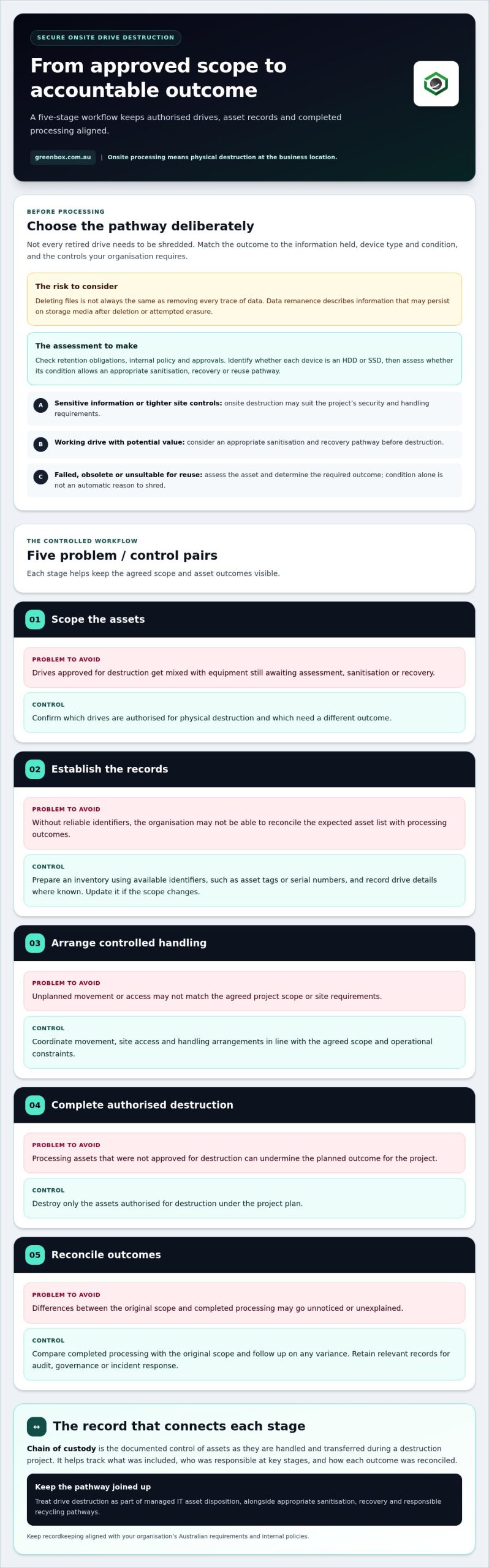
A controlled destruction project starts before any drive is processed. Identify the assets and agree on the scope to avoid mixing devices approved for destruction with those intended for assessment, sanitisation or recovery. For onsite hard drive shredding for business, clear steps also make it easier to account for assets from preparation through to final reconciliation.
Chain of custody means the documented control of assets as they’re handled and transferred during a destruction project. It gives the business a structured way to track what was included, who was responsible at key stages, and how each outcome was reconciled.
How should a business prepare drives for destruction?
Build an inventory using available identifiers, such as asset tags or serial numbers, and record drive details where known. Separate drives approved for destruction from equipment that still needs assessment, sanitisation or recovery. Then align handling and collection arrangements with site access, operational constraints and the agreed project scope. Update the inventory if the scope changes.
What records support accountable destruction?
Records should let the organisation compare the expected asset list with completed processing outcomes and investigate discrepancies. Retain relevant project records within your internal audit and governance processes so they can support review or incident response. Keep recordkeeping aligned with your organisation’s Australian requirements and internal policies.
A practical workflow has five stages:
- 1. Scope the assets. Confirm which drives are approved for physical destruction and which need a different outcome.
- 2. Establish the records. Prepare an inventory and retain the identifiers needed to reconcile the project.
- 3. Arrange controlled handling. Coordinate movement and access in line with the agreed scope and site requirements.
- 4. Complete destruction. Process only the assets authorised for destruction under the project plan.
- 5. Reconcile outcomes. Compare completed processing with the original scope and follow up on any variance.
This sequence makes destruction a managed IT asset disposition activity, rather than an isolated disposal task. Tailor the arrangements to the project, and use a clear scope and records to keep responsibility visible. For a broader view of secure destruction within a lifecycle plan, see Greenbox’s data sanitisation and destruction services.
Onsite Shredding, Offsite Destruction or Sanitisation: Which Fits?
There isn’t one suitable pathway for every retired drive. The decision depends on your organisation’s risk assessment, internal policy, media type, asset condition and whether reuse matters. Compare the trade-offs before assigning equipment to a destruction stream.
| Approach | Control and logistics | Asset condition and reuse |
|---|---|---|
| Onsite physical destruction | Destruction happens at the business location, giving the organisation direct visibility of the activity. It requires site coordination and planning around access and operations. | Once physically destroyed, the drive can’t be reused as a functioning storage device. This may suit assets designated for destruction under policy or risk assessment. |
| Controlled offsite destruction | Drives are transported for processing, so handling and transfer controls form part of the security plan. This reduces processing activity at the business site. | Physical destruction also removes the drive from reuse as storage. This can suit projects where offsite handling aligns with the organisation’s requirements. |
| Software-based sanitisation | Data is addressed through a software-based process rather than physical destruction. Suitability depends on the media, device condition and required outcome. | It may preserve an asset for reuse or recovery when the drive and sanitisation approach are suitable. The outcome should align with the organisation’s policy and risk assessment. |
When can physical destruction outweigh sanitisation?
Physical destruction may be appropriate when internal policy or a risk assessment calls for the media to be rendered unusable, or when the device’s condition makes reuse unsuitable. Sanitisation, by contrast, aims to address data while leaving the physical asset intact. Neither approach is automatically right for every drive. Weigh information sensitivity, asset condition, handling requirements and reuse potential. For broader context on methods and assurance, read the enterprise guide to certified data sanitisation.
How do HDDs and SSDs affect the decision?
Hard disk drives (HDDs) store data magnetically on rotating platters, while solid-state drives (SSDs) use flash memory and have no spinning platters. That difference matters: a process suitable for one media type shouldn’t be assumed to suit the other. Identify the drive type, then match the technical treatment to the media, security requirements and intended outcome. Review method selection against current technical guidance and your organisation’s policy.
The practical aim of onsite hard drive shredding for business isn’t to destroy everything by default. It’s to choose a controlled, accountable pathway that addresses data risk while preserving recovery or reuse options where appropriate.
How Can Businesses Plan Onsite Drive Destruction Without Losing Control?
Good planning connects security decisions with the wider technology transition. When destruction is organised alongside a hardware refresh or decommissioning project, teams can identify which drives are approved for destruction, which devices need assessment, and what equipment may be recovered. This keeps onsite hard drive shredding for business within a managed asset plan instead of treating it as a separate disposal task.
What belongs on a business project-readiness checklist?
Before the project begins, document the agreed scope and responsibilities. This checklist can help teams coordinate the work while keeping business operations in view:
- Confirm asset categories and quantities. Separate drives for destruction from devices awaiting assessment, sanitisation or recovery.
- Assign approvals. Identify who authorises destruction and who can resolve scope changes or exceptions.
- Coordinate the site. Plan access, timing and stakeholder communications around operational requirements.
- Maintain asset records. Use available identifiers to track which assets are included in the agreed scope.
- Reconcile outcomes. Compare completed processing with the planned inventory and record any variances for follow-up.
Build these steps into the refresh schedule, not as an afterthought. For example, align drive identification and approvals with the point at which equipment is withdrawn from service. This helps prevent assets from being overlooked or sent down the wrong pathway during a larger transition.
How can businesses connect security with responsible recovery?
Data controls come first, but they aren’t the end of the asset lifecycle. Drives approved for destruction and equipment that may retain reuse or recovery value need separate pathways. Keep those streams distinct in the project plan, and consider responsible recycling for equipment that has reached end of life. Recycling supports environmental handling, but it doesn’t replace the need to decide how data-bearing media should be treated.
For broader lifecycle context, explore this sustainable IT asset recovery case study and the business e-waste recycling guide. They show how recovery and end-of-life handling can sit alongside secure asset decisions. Greenbox’s IT asset recovery and e-waste recycling services bring these considerations together within a project-tailored ITAD pathway.
Learn more about Greenbox’s secure IT asset recovery pathway as part of a wider decommissioning project.
How Greenbox Connects Secure Destruction with Business ITAD
Drive destruction is one decision within a broader IT asset lifecycle. Greenbox connects data sanitisation and destruction with IT asset recovery, asset remarketing and e-waste recycling, helping businesses plan different outcomes for different assets. A drive approved for destruction may follow a different pathway from equipment that remains suitable for assessment or recovery.
Project planning can bring security requirements, asset records and end-of-life handling into one coordinated view. Greenbox tailors its approach to project requirements, so the plan can reflect the asset mix, the organisation’s priorities and the intended outcomes. Greenbox operates R2-certified facilities and is a carbon-neutral organisation. These credentials and organisational attributes are distinct from any promised result for an individual asset.
What does an integrated business pathway help coordinate?
An integrated pathway helps teams consider data handling alongside the next step for each asset. Depending on condition and business requirements, equipment may be assessed for recovery or remarketing, while other items may be directed to recycling. These pathways have different purposes: data destruction addresses information risk, while recovery and recycling address the equipment’s subsequent handling. Reuse, resale value and environmental outcomes depend on the assets and project, so don’t assume them in advance.
This lifecycle view can be useful during a technology refresh or hardware decommissioning, when different asset types leave service at the same time. Aligning the decisions helps maintain a clear distinction between drives approved for destruction and equipment with another intended outcome.
What are the next steps for a business project?
Bring together the information that will shape the project: a drive inventory, security needs, site requirements, internal approvals and desired outcomes for the wider equipment. Identify which assets are being considered for destruction and which may need recovery or another pathway. This creates a practical starting point for defining scope, accountability and responsible end-of-life handling.
For organisations considering onsite hard drive shredding for business, the key is to connect the destruction decision to the full asset plan rather than treating it as a standalone task. Greenbox’s business ITAD services bring data destruction and asset recovery considerations together in a project-tailored pathway.
Explore Greenbox’s business destruction programme.
Set a Secure, Accountable Path for Retired Drives
Onsite hard drive shredding for business is a considered security choice, not a default step for every retired drive. Match the destruction pathway to data sensitivity, drive type, asset condition and internal requirements. Agree on the scope before processing, maintain clear asset records and reconcile outcomes so accountability carries through the project.
Security decisions also shape what happens to the wider equipment. Separating drives approved for destruction from assets suited to assessment, recovery or recycling connects data protection with responsible IT asset disposition.
Greenbox has supported Australian IT asset lifecycle management since 2000. Its facilities are R2-certified, and the organisation is carbon neutral. These foundations support a project-tailored approach to data destruction, IT asset recovery and end-of-life handling.
Bring your drive inventory, security needs, site requirements and approvals together to define a clear programme. Plan a secure business destruction programme with Greenbox.
Frequently Asked Questions
What is onsite hard drive shredding for business?
Onsite hard drive shredding for business is the physical destruction of hard drives at the business’s premises. Organisations may consider it when security requirements, internal policy or project arrangements favour destruction at the site rather than transporting drives for offsite processing. Before proceeding, identify the assets approved for destruction, record available asset details and separate drives that may be suitable for sanitisation, assessment or recovery.
Is onsite hard drive shredding more secure than offsite destruction?
Not automatically. Onsite destruction keeps processing at the business location and may provide greater direct visibility, while controlled offsite destruction relies on planned handling and transfer controls. The stronger fit depends on your data risk, internal policy, site requirements and accountability measures across the project. Compare the full handling pathway, not just the destruction location, and ensure the approach aligns with your organisation’s requirements.
Can solid-state drives be shredded onsite?
Solid-state drives can be physically destroyed onsite when the project’s process is suitable for that media and its security requirements. SSDs use flash memory, unlike hard disk drives, which store data magnetically on rotating platters. Don’t assume a method intended for one drive type suits the other. Identify the media first, then determine the appropriate technical treatment against your internal policy and required outcome.
When should a business shred a hard drive instead of sanitising it?
Physical destruction may suit a drive when internal policy or a risk assessment requires it, or when the device’s condition makes reuse or sanitisation unsuitable. Sanitisation may be appropriate when the aim is to address data while retaining the asset for potential reuse or recovery. Neither option is right for every drive. Consider data sensitivity, media type, asset condition, retention requirements and reuse potential before approving a destruction pathway.
What happens to hard drives during an onsite shredding service?
A well-planned project starts with an agreed scope and identification of the drives approved for destruction. The assets are handled according to the project arrangements, physically destroyed at the business location, then reconciled against the expected inventory. Keep drives requiring assessment, sanitisation or recovery separate, and record any differences between the planned asset list and completed outcomes for follow-up.
What documentation should a business retain after hard drive destruction?
Retain the approved scope, available asset inventory, relevant internal approvals and records of completed outcomes. Reconcile the expected drives with the assets recorded as processed, and document any exceptions or discrepancies and how they were addressed. Store these records within your organisation’s governance and audit processes so they can support internal review or incident response. Align retention of project records with your own policies and obligations.
Can a business recycle IT equipment after its hard drives are destroyed?
Yes. After data-bearing media has been addressed, other IT equipment can be assessed for recovery, remarketing or e-waste recycling according to its condition and your business requirements. Keep those pathways distinct: recycling is an end-of-life handling decision, not a substitute for data controls. Planning destruction alongside equipment recovery helps maintain asset accountability and direct each item towards an appropriate next step without assuming that every device can be reused.