

Donating equipment doesn’t transfer away the risks of donating used corporate IT equipment. In Australia, a business supplying second-hand equipment must meet supplier duties. If the equipment is intended for use, provide its condition, service records and user instructions in writing. Data sanitisation is just as important: a device can appear ready to pass on while still holding sensitive information.
Donation can extend technology’s useful life and support a recipient’s work, but only when the equipment is safe, suitable and genuinely wanted. A mismatch can leave the recipient with unusable hardware, unexpected handling needs or exposed data.
This article explains how to assess condition, match equipment to recipient needs, set clear donation terms, understand supplier obligations and sanitise data before transfer. It also explains when recovery, remarketing or responsible recycling may be more appropriate than donation.
Key Takeaways
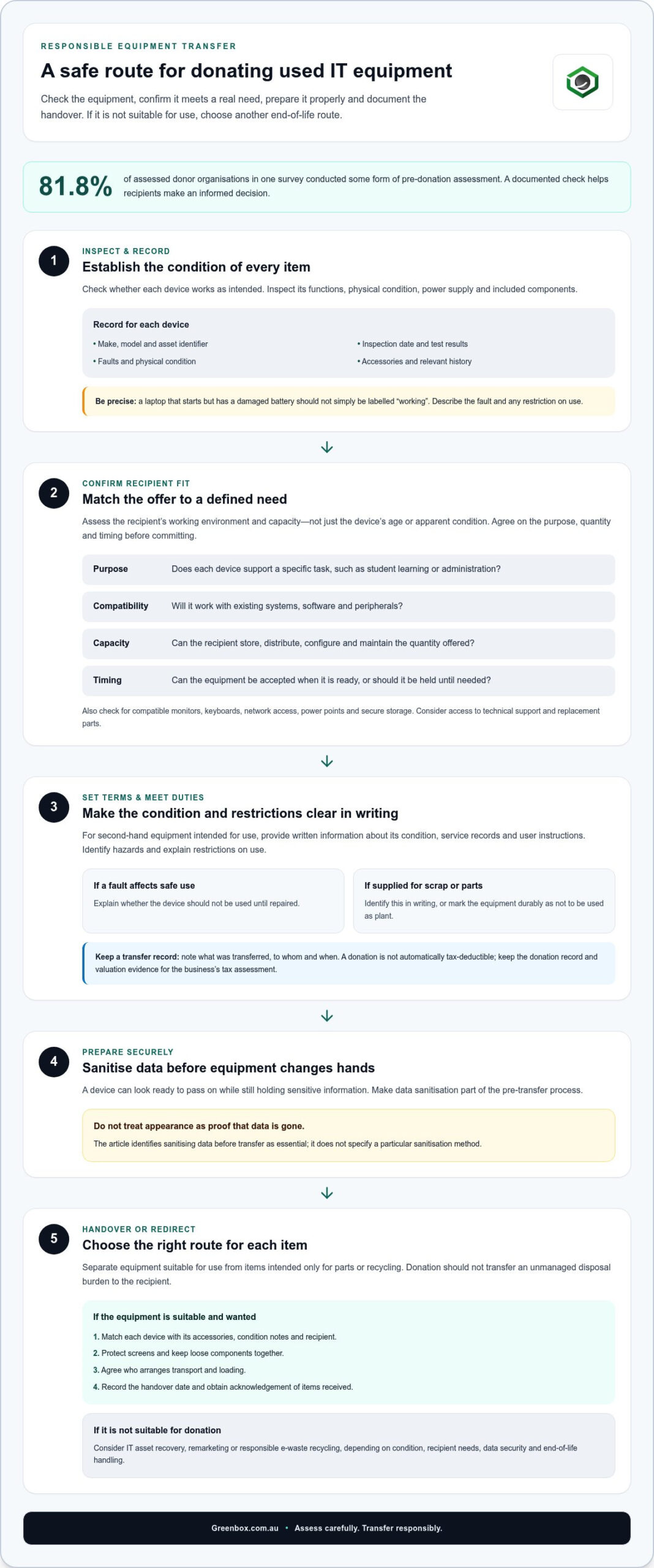
- Assess each item’s condition and intended use, and document faults, service history and instructions before it changes hands.
- Match equipment to the recipient’s actual needs, technical infrastructure and capacity to use and maintain it.
- Set clear donation terms and keep a record of what was transferred, to whom and when.
- Account for supplier duties when giving away used equipment, including identifying hazards and explaining any restrictions on use.
- Sanitise data before transfer, then consider recovery, remarketing or recycling for equipment that isn’t suitable to donate.
Eligibility and condition of donated equipment
The risks of donating used corporate IT equipment increase when condition, intended use and recipient needs aren’t clearly established. Donate a device only if it suits its proposed use and the recipient understands its condition.
Equipment condition checks and records
A condition check records whether each device works as intended, along with faults, accessories and relevant history. This helps the recipient make an informed decision before accepting or using the equipment.
Inspect functions, physical condition, power supplies and included components. Record the make, model, asset identifier, inspection date and test results. In one survey, 81.8% of assessed donor organisations conducted some form of pre-donation assessment. For example, a laptop that starts but has a damaged battery shouldn’t simply be labelled “working”. Describe the fault and any restriction on use.
A donation isn’t automatically tax-deductible just because a business gives equipment away. Whether a deduction applies, and how the equipment’s value is established, depends on the transfer circumstances and applicable Australian tax rules. Keep the donation record and valuation evidence for the business’s tax assessment.
Environmental risks arise when equipment unsuitable for reuse becomes an unmanaged disposal burden. The risks of donating used corporate IT equipment include passing a non-functional device to a recipient who then has to arrange its end-of-life handling. Separate items suitable for use from those intended only for parts or recycling.
Safe preparation and handover
A safe handover means organising equipment, transport and records so the recipient receives the agreed items. This reduces the risk of damage, missing components or uncertainty about what changed hands.
Before collection, match each device to its accessories, condition notes and recipient. Protect screens and keep loose components together. Agree who will arrange transport and loading, then record the handover date and obtain acknowledgement of the items received. This creates a useful record if a device is later found damaged or incomplete.
Donation can extend equipment’s useful life, while IT asset recovery or recycling offers another route for devices unsuitable for reuse. The right choice depends on condition, recipient needs, data security and end-of-life handling.
Donated equipment mismatch with local needs and infrastructure
A donation helps only when the receiving organisation can use the equipment to meet a current need. In Australia, a capable laptop may still be unsuitable if it can’t run required applications, connect to existing systems or be maintained locally. Assess the recipient’s working environment, not just the device’s age or apparent condition.
Start by matching the equipment to a defined use. A school might need laptops for student learning, while a community organisation may need desktop computers for administration. These uses call for different quantities, configurations and peripherals. Without a clear purpose, a donation can leave the recipient sorting, storing or disposing of items it can’t use.
Infrastructure can determine whether devices are practical. Check whether the recipient has compatible monitors, keyboards, network access, power points and secure storage. For instance, a batch of desktop computers may not suit a small office with limited desk space. A device that depends on specific software or accessories may be unusable if those requirements aren’t met.
Timing matters as much as technical fit. Unsolicited goods may be unsuitable if enough items are already available or the need has passed. A recipient planning an office move, for example, may not be able to receive equipment immediately. Agreeing on timing and quantity first helps prevent a well-meant donation from disrupting operations.
Before committing, compare the proposed donation with the recipient’s stated requirements:
- Purpose: Does each device support a specific task?
- Compatibility: Can it work with existing systems and peripherals?
- Capacity: Can the recipient store, distribute and support the quantity offered?
- Timing: Can the recipient accept the equipment when it is ready?
Corporate donations should be targeted and appropriate. If the equipment is useful but the recipient can’t take it yet, discuss holding it until it’s needed. This gives the organisation time to prepare space, allocate equipment and plan deployment. A smaller, relevant donation can deliver more practical value than a larger shipment of mismatched devices.
When no recipient need matches the equipment, don’t make donation the default. Separate devices suitable for use from those better suited to recovery, remarketing or e-waste recycling. This directs functional equipment towards a realistic next use and avoids transferring an unmanaged disposal task to the recipient.
Donor policies and recipient agreements
A written donation policy sets consistent rules for approving, transferring and recording equipment. It helps a business apply the same controls across departments instead of relying on informal arrangements. For example, a policy can state who approves a donation, which records accompany it, and how transport and handover are documented.
Use a recipient agreement to clarify transfer terms before equipment leaves the business. Identify the recipient, the equipment, its intended use, collection arrangements and each party’s responsibilities. Record whether the recipient may pass items on, how unsuitable devices will be handled and who will receive later recall notices.
Written terms are useful even when the recipient is a community group or school. In a survey, 6 of 12 donor organisations used extensive Memoranda of Understanding with partner facilities. The agreement can also set expectations for collection, such as who arranges transport, supplies loading staff and acknowledges receipt. Keep a copy with the asset register and donation record.
Reputation and security call for practical due diligence. Review the organisation’s written donation policy, how it records received items and how it controls access to devices and stored data. The survey found four donor organisations conducted field visits, while five used remote recipient assessments. These approaches can help establish whether an organisation has suitable facilities and processes.
Ask for evidence of the intended destination and handling process, then compare it with the donation terms. For example, a refurbisher should explain whether devices will be prepared for reuse, passed to another recipient or separated for recycling. Record the agreed outcome and who is responsible for each handover. A survey found four of nine medical surplus recovery organisations provided written donation policies, illustrating why documented processes matter.
Build a simple agreement around specific points:
- Recipient and purpose: Name the organisation and the planned use.
- Equipment scope: Attach an inventory and identify any exclusions.
- Transport and receipt: Allocate collection duties and record acceptance.
- Handling changes: State how onward transfers, recalls or unsuitable items are managed.
- Records: Keep signed terms, inventory and handover evidence together.
Corporate donations should be targeted and appropriate, and a recipient may need equipment stored until it’s required. Record any agreed storage period and release arrangements so items aren’t delivered before the organisation can receive them. Keep matching records of what is donated and received, and resolve any inventory or delivery discrepancies before closing the transfer.
Surveyed international medical humanitarian organisations required CE/FDA approvals and ISO 13485 for donated equipment, while many standard assistive technology programs do not accept returns of donated equipment.
Supplier obligations when giving away used equipment
Giving equipment away doesn’t remove the duties attached to supplying it. In Australia, a business disposing of second-hand plant or equipment becomes its supplier under plant safety regulations. Those duties apply when equipment is intended for use, even if no payment changes hands.
The key question is whether the item is supplied for use or clearly designated for another purpose. A computer offered for workplace use, for example, needs a different handover from a damaged unit supplied solely for parts. Record the intended use in the transfer documents and make it clear to the recipient.
Before supplying second-hand equipment for use, identify faults. A risk assessment can help determine hazards and whether the item is safe for its intended setting. For an IT example, inspect a desktop’s casing, power lead and ports, then document exposed wiring or damaged components. A successful start-up doesn’t prove every function is safe.
Written disclosure should explain known faults and any restriction on use until repairs are completed. Give the recipient relevant condition information, service records and user instructions. If equipment is supplied for scrap or parts, state this in writing or mark it durably as not to be used as plant. Clear labelling reduces the chance of an item being mistaken for operational equipment.
If personal or confidential data is recovered later, responsibility can’t be determined solely by identifying who received the device. Relevant circumstances include who controlled the information, what sanitisation took place and how each party handled the equipment. Retain transfer and sanitisation records to establish the sequence.
Don’t rely on a donation agreement alone to manage equipment hazards. Describing an item as “as is” doesn’t replace identifying faults or providing clear instructions. If a device has a damaged power supply, for example, record the defect and state that it must not be connected until repaired. Keep the disclosure with the asset record.
Use a consistent handover record for each device or batch. Include identifying details, intended use, inspection findings, known faults, instructions and the recipient’s acknowledgement. These records give staff a practical reference if equipment is moved, repaired or later found unsuitable. They also make transfer criteria clear across procurement, IT and workplace safety teams.
Separate equipment that isn’t suitable for donation from items intended for use. An IT Asset Recovery process can organise equipment for an appropriate next step, rather than transferring devices with unresolved faults or unclear status. Base the decision on each item’s documented condition and intended use.
Secure data sanitisation before donation
Before a device leaves your control, remove data using a method suited to its storage media and destination. Treat sanitisation as a separate release control, not as something achieved by deleting files or resetting the device.
Secure data sanitisation
Secure sanitisation makes stored information inaccessible before equipment is reused or transferred. It matters because laptops, servers and multifunction printers can retain business records, credentials or cached files after ordinary deletion.
Identify every storage component, including removable drives and internal media. Choose a sanitisation method suited to the device, then record its asset identifier, method, outcome and completion date. For failed or inaccessible media, use destruction rather than passing on the device with data intact. Keep the evidence with the donation record so the release decision can be traced.
A factory reset or file deletion alone doesn’t prove data is unrecoverable. The method must account for the storage type and information sensitivity. A laptop may contain a solid-state drive, for example, while a printer can retain scanned documents on internal storage. Include those components in the sanitisation scope.
IEEE 2883-2022 downgrades ATA Secure Erase to Clear status, removing its Purge designation for external disposition. That distinction matters when selecting a method for equipment leaving organisational control. Don’t assume a familiar drive command meets the required sanitisation outcome; document the method against the media and intended disposition.
A practical release record links each device to its sanitisation evidence. Match serial or asset identifiers, record exceptions and isolate any item that hasn’t passed the required process. If a drive fails or can’t be accessed, pause its donation and route it for secure destruction. Mixing cleared and uncleared equipment in one shipment can undermine the entire release control.
Privacy laws and data breach obligations
Australian privacy and data-breach requirements depend on an organisation’s legal coverage and the personal information it handles. Before donating equipment, identify whether it holds personal information, restrict access during preparation and ensure the data is removed before the recipient receives the device.
If sanitisation reveals recoverable personal information after transfer, treat the discovery as a potential exposure. Preserve relevant records, identify the affected device and information, and assess the incident under the organisation’s breach-response process. A donation agreement doesn’t itself remove privacy responsibilities.
Include storage media in the same controls as the computer. A detached drive left inside a workstation, for example, may retain staff files even after the operating system is wiped. Reconcile the final equipment inventory against sanitisation records before handover, and keep devices awaiting action physically separate.
For managed data sanitisation and destruction, align the treatment of each device with its storage media and intended next use. A clear record of the method and outcome supports a controlled donation decision.
Greenbox: Data Sanitisation and Destruction
Greenbox provides Data Sanitisation and Destruction for businesses preparing IT equipment for donation or another end-of-life pathway. This service is useful when devices contain business or personal information that must be addressed before transfer. For equipment unsuitable for donation, IT Asset Recovery and Asset Remarketing provide alternative routes. Pre-Configuration and Imaging can prepare suitable equipment for its next deployment.
Choose the right pathway based on device condition, data requirements and intended use. Separating equipment for reuse from devices requiring sanitisation or destruction helps organise the transition and support responsible asset management.
Contact Greenbox to discuss your corporate IT equipment.
Plan your next IT asset transition with confidence
Use your next equipment refresh to set clear release criteria before devices leave the business. This connects procurement, information security and sustainability decisions, helping teams plan the right pathway for each asset instead of treating donation as an automatic final step.
The risks of donating used corporate IT equipment are easier to manage when data controls and asset decisions are built into the transition. Greenbox provides Data Sanitisation and Destruction to securely handle stored information, alongside IT Asset Recovery for equipment leaving service. Pre-Configuration and Imaging can also prepare suitable devices for their next deployment.
Bring your equipment requirements and intended outcomes together before the transfer. Discuss your IT asset transition with Greenbox and identify a practical next step for your organisation. A considered transition can protect information, support responsible reuse and give each asset a clearer future.
Frequently Asked Questions
What are the data security risks when donating used corporate IT equipment in Australia?
Residual data can expose customer details, staff records, saved passwords or internal documents if someone accesses a device after donation. Information may remain in browser profiles, email caches, printer storage or removable memory, even when familiar files appear deleted. Active credentials add another risk: a donated laptop could still access cloud accounts or business systems. Treat every storage component as a potential source of sensitive information, not just the main drive.
What steps should Australian businesses take to securely erase data before donating computers and devices?
Start by identifying internal and removable storage, including memory cards and printer drives. Remove the device from account management, revoke saved credentials and software access, then use a sanitisation method suited to its storage media. Check the result and match the evidence to the device’s asset record. If a laptop can’t be sanitised because its drive has failed, isolate it rather than sending it with the donation.
What are the risks of donating equipment with licensed software, asset tags, or company credentials still installed?
Installed software may contain licence keys or be subject to terms that don’t allow transfer to another organisation. Asset tags can expose internal inventory details, while saved VPN profiles, certificates or administrator accounts may provide access to company systems. Before handover, remove organisational labels where appropriate, deauthorise software, and revoke credentials and device certificates. If a computer boots to a staff member’s familiar desktop, stop the transfer.
What records and chain-of-custody documents should businesses keep when donating IT assets?
Keep an asset schedule linking each serial number or asset tag to its condition, sanitisation outcome and donation approval. Add collection records showing the date, releasing staff member, carrier or collecting representative, recipient and receipt confirmation. Record exceptions, such as a missing device or failed drive, and document how they were resolved. These records help reconcile the business’s asset register and establish where each item went during transfer.