

A drive that appears empty can still hold recoverable data. For enterprise equipment, recognised data-erasure standards include DoD 5220.22-M and NIST 800-88; the right approach depends on whether the media will be reused or must be destroyed. Secure disposal of data centre hardware means matching the sanitisation method to the asset and documenting what happens to it.
It’s understandable to want one clear standard for every retired server and drive. In practice, the right approach depends on the media type and condition, your organisation’s policy, and whether the equipment will be reused, resold or permanently retired.
This guide explains how to choose between data sanitisation and physical destruction, what decommissioning involves, and how Australian privacy obligations apply to stored information. It also covers access credentials, asset records, chain of custody and responsible recycling, so you can plan a controlled process from removal through to final documentation.
Key Takeaways
- Choose a sanitisation method according to the drive’s condition and whether it will be reused, resold or permanently retired.
- Track each rack, server and drive through removal, transport and final treatment to maintain a clear chain of custody.
- Plan for privacy obligations by identifying stored personal information and controlling credentials and access during decommissioning.
- Separate reusable equipment from end-of-life components so secure data handling can work alongside responsible recovery and recycling.
- Use a recognised wiping standard for suitable equipment, and keep records that show how each storage device was treated.
Physical destruction of storage media
Physical destruction makes storage media unretrievable or unreconstructable. A secure disposal of data centre hardware plan should link each drive to its treatment, transport and final record.
A data centre clearance can involve many drives, so organise collection and sorting before equipment leaves the racks. Record each drive against its asset details, separate media by type and intended treatment, then document every handover. This helps reconcile items received with those scheduled for destruction and recycling.
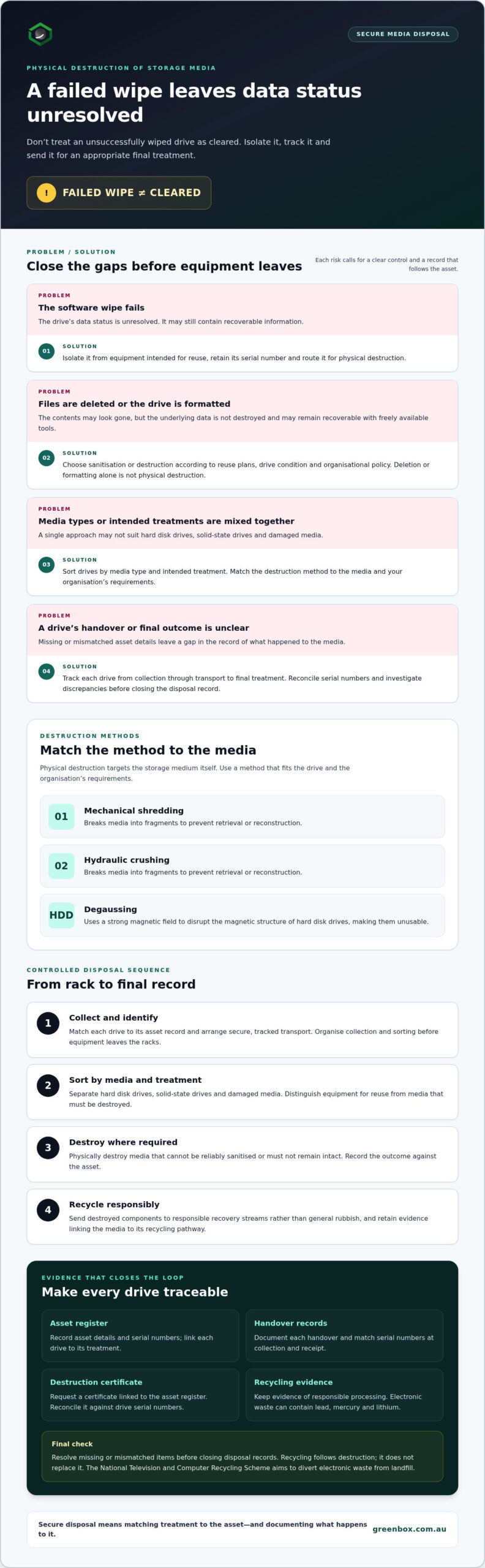
- Collect: Match each drive to its asset record and arrange secure, tracked transport.
- Sort: Separate hard disk drives, solid-state drives and damaged media for suitable methods.
- Destroy: Physically destroy media that cannot be reliably sanitised or must not remain intact.
- Recycle: Direct destroyed components to responsible recovery streams rather than general rubbish.
Drives that fail software wiping
A failed wipe leaves the data’s status unresolved, so don’t treat that drive as cleared. Isolate it from equipment intended for reuse, retain its serial number, and route it for physical destruction. Mechanical shredding or hydraulic crushing breaks the media into fragments to prevent retrieval or reconstruction. Degaussing uses a strong magnetic field to disrupt hard disk drives, making them unusable.
Destruction certificates and component costs
Request a destruction certificate that links completed work to the asset register. Serialised certificates provide a defensible record of how identified media was treated. Reconcile each certificate against drive serial numbers and investigate missing or mismatched items before closing disposal records.
Per-component costs depend on media type, quantity, collection arrangements, transport and the selected destruction method. The price depends on the case and is given after a quote request. Separating failed drives from media suitable for wiping helps define the required work.
Destruction compared with deletion or formatting
Deleting files or formatting a drive changes how its contents appear, but doesn’t destroy the underlying data. It may remain recoverable with freely available tools. Physical destruction targets the storage medium itself. For secure disposal of data centre hardware, choose sanitisation or destruction based on reuse plans, drive condition and organisational policy.
Mechanical shredding and hydraulic crushing physically break drives; degaussing disrupts the magnetic structure of hard disk drives. Match the method to the media and your organisation’s requirements, then record the outcome against the asset. Destruction suits media that cannot be reliably sanitised or must no longer remain intact.
Recycling follows destruction, not instead of it. The National Television and Computer Recycling Scheme aims to divert electronic waste from landfill. Electronic waste can contain lead, mercury and lithium, so route components through responsible recycling. Retain evidence linking destroyed media to its recycling pathway.
What is data centre decommissioning?
Data centre decommissioning is the planned removal, treatment and final accounting of retired equipment. In Australia, secure disposal options include data wiping for suitable reuse, physical destruction, asset recovery, remarketing and responsible e-waste recycling.
Decommissioning planning and asset inventory
Before removal begins, record every rack, server and drive individually, ideally by serial number. The register should identify each asset’s location and intended outcome, such as reuse, resale, destruction or recycling. This gives operations and security teams a shared removal plan and helps crews distinguish equipment scheduled for recovery from devices that must remain within a controlled destruction process.
Plan the sequence around equipment dependencies so teams can identify assets without disrupting systems still in service. After disposal, update the inventory to show each item’s final status. A server recorded as removed but missing from the recovery or recycling record creates a gap that requires investigation.
Chain of custody and asset tracking
A documented chain of custody tracks equipment from the data centre to its final treatment. Keep an itemised asset register, record each handover, and use secure, tracked transport. Match serial numbers at collection and receipt to detect missing or substituted items. These records make the movement of drives and servers traceable, rather than relying on a general count of equipment leaving the site.
Link the final records to the asset register. For destroyed media, include the destruction certificate; for equipment sent to recycling, retain evidence of responsible processing. Together, these records show what happened to each retired asset and where its custody changed. Resolve discrepancies before closing the decommissioning record.
Asset verification and compliance reporting
Verification compares the equipment collected with the planned inventory. Check server and drive serial numbers at removal, receipt and final processing, then record exceptions such as damaged labels or unmatched devices. Reconcile those exceptions before issuing a final report. This helps teams distinguish a genuine inventory change from an asset that has gone unaccounted for.
A useful compliance record links the itemised register with transport records, destruction certificates and evidence of responsible recycling. Keep these records together so an auditor can follow an asset’s path without reconstructing it from separate emails. Update the internal equipment inventory after disposal, including the final disposition of components retained for refurbishment or resale.
IT asset disposition
IT asset disposition, or ITAD, manages retired equipment through data treatment and its next destination. Working components can go to refurbishment or resale once data destruction is complete. Media that cannot be reliably sanitised can be physically destroyed, while end-of-life components go to responsible recycling. Choose a route for each asset based on its condition and data requirements.
For data centre IT asset disposition, treat security and recovery as linked decisions. Confirm data destruction before releasing a working server or component for remarketing. Keep recycling evidence for equipment that cannot be reused, and update the asset record with its final outcome. This reduces uncertainty about both information security and material recovery.
When retired equipment needs a managed recovery pathway, IT asset recovery can support the transition from removal to the next disposition, including remarketing or recycling where appropriate.
Australian privacy obligations for retired IT equipment
Retired servers and storage media can retain personal information after leaving production systems. Australia’s Privacy Act 1988 requires organisations to take reasonable steps to destroy or de-identify personal information once it is no longer needed.
Secure logistics and equipment removal
Apply privacy controls before equipment leaves the data centre. Identify servers, drives and other assets that may hold sensitive data, then record their condition and destination. Keep media under controlled handling until sanitisation or physical destruction is complete. For sensitive data, a documented chain of custody helps show who handled equipment and when.
Plan removal logistics alongside security arrangements. Confirm loading dock bookings, freight lift access and building management approvals before removing server equipment. Match collected assets against the register, then use secure, tracked transport and record each handover. These steps reduce the risk of a device being misdirected between the data centre and its final treatment.
Equipment disposal policies
A written disposal policy should define how staff identify data-bearing equipment, approve its removal and record its final outcome. Set criteria for reuse, resale, sanitisation, physical destruction and recycling. For example, a working server may be considered for refurbishment or resale after data destruction is complete, while a drive that cannot be reliably sanitised can be routed for destruction.
Make responsibilities clear across security, IT, facilities and records teams. The Privacy Act 1988’s reasonable-steps requirement makes it important to connect the disposal decision with the information held on each asset. Keep the asset register, treatment evidence and recycling records together, then update the inventory after disposal.
End-of-life computers and related equipment may enter an e-waste stream rather than ordinary rubbish. Several Australian jurisdictions restrict how electronic waste can be disposed of, so a disposal policy should distinguish reusable assets from equipment requiring recycling. The National Television and Computer Recycling Scheme aims to divert electronic waste from landfill. Route each item according to its condition and destination, and retain evidence of responsible recycling.
Privacy controls also apply to information that remains on equipment during removal. A server may contain production data, cached files or copies left by an earlier system. Identify data-bearing components before disconnection, and manage credentials and access permissions through your organisation’s decommissioning process. Don’t assume that powering down a server removes stored information.
Under Australia’s Notifiable Data Breaches scheme, a breach likely to cause serious harm can require an organisation to notify affected individuals and the regulator. A lost drive during transport, or a device released before its data is addressed, can therefore create both an information-security incident and a reporting concern. Record discrepancies promptly and escalate them through the organisation’s incident process.
For each disposal, retain a clear record of the decision, the asset’s movement and its final treatment. Link serialised equipment records with sanitisation or destruction evidence, transport handovers and recycling documentation. This gives privacy, security and facilities teams a consistent account of how sensitive data and retired IT equipment were managed.
What About Network Configuration and Access Credentials?
Decommissioned servers, switches and storage can expose sensitive information through residual data, saved credentials or network settings. Before removal, revoke access, rotate shared passwords, disable management interfaces and remove device certificates linked to retired equipment.
Network configuration also carries operational and security risks. A retired switch may retain management addresses, routing details or authentication settings. Record configuration needed for approved migration, then remove or securely retain copies under your organisation’s controls. Check service accounts, remote-management tools and backup locations, not just the physical device. A forgotten credential can remain useful even after the hardware leaves the rack.
Environmental planning starts by separating reusable equipment from material that has reached end of life. Working servers and components may be considered for refurbishment or resale after data destruction is complete. This sequence protects information while keeping usable equipment in circulation. Components that cannot be reused can go to appropriate material recovery rather than general rubbish.
Australia’s National Television and Computer Recycling Scheme aims to divert electronic waste from landfill. Retired data centre equipment can contain lead, mercury and lithium, so keep it out of landfill. Sorting assets by condition and material helps direct reusable devices to recovery and end-of-life equipment to recycling. Record each destination so asset records show both the security treatment and environmental outcome.
- Reuse: Identify working servers, memory and networking components for assessment after data destruction.
- Remarket: Route suitable assets for resale when their condition and configuration support another operational life.
- Recover materials: Send unusable electronic equipment through responsible recycling pathways.
Asset remarketing can recover value from working equipment, but the outcome depends on condition, age, configuration and demand. A server with complete components may have different resale prospects from an incomplete unit. Keep these assessments separate from data-security approval. An asset should move towards resale only after its stored information has been addressed and records support its release.
Close the process by reconciling removed hardware with updated network records. Mark retired switches and servers out of service, remove their management entries and document any retained configuration copies. Then confirm that associated credentials, certificates and remote access permissions have been withdrawn. These steps connect technical decommissioning with environmental recovery and reduce the risk of a forgotten device or account remaining active.
What Data Destruction Standard Should Apply to Enterprise Equipment?
For enterprise equipment, recognised data-erasure standards include DoD 5220.22-M and NIST 800-88. Choose a sanitisation method according to the device, its condition and whether it will be reused.
Data wiping and cryptographic erasure
For equipment intended for reuse or resale, certified data wiping can use overwriting or cryptographic erasure to a recognised sanitisation standard. Overwriting replaces stored information with new data, while cryptographic erasure removes the encryption keys needed to access encrypted information.
Before choosing cryptographic erasure, determine whether the device encrypted all relevant data and whether its keys can be securely removed. A drive containing unencrypted data needs another sanitisation method. Record the method and outcome against the device’s asset details, so operations can distinguish completed processing from an exception.
Recognised data-erasure standards
DoD 5220.22-M and NIST 800-88 are recognised data-erasure standards for enterprise drives. Naming a standard in a policy helps define the required treatment, but the selected method still needs to suit the media and its intended destination.
Use the standard as part of a documented decision, not as a substitute for checking the device. For example, a working drive intended for reuse may be wiped, while a damaged device that cannot complete sanitisation may require physical destruction. Keep the standard, device identifier and result together in reporting records.
Software-based data erasure
Software-based erasure runs a sanitisation process through compatible equipment or software. Digital shredding or wiping can overwrite data with random characters in multiple passes. The process must reach the storage areas that hold information, and the device must complete it successfully.
During collection, separate devices scheduled for wiping from media awaiting physical treatment. Record each serial number, then capture the wipe result and any failure against that record. A failed process is an exception, not completed sanitisation. This helps prevent an uncleared drive from entering reuse or resale operations.
Choose the method based on three practical factors: media condition, intended asset use and organisational policy. A working drive may be suitable for certified wiping; an unreadable drive may need physical destruction. Keep the decision and evidence with the asset record, including the standard applied and process outcome. This gives reporting teams a traceable account from collection and treatment through to final disposition.
Apply the same decision framework to servers, storage devices and other data-bearing equipment. Confirm that the chosen method covers each device type, then review exceptions before equipment leaves controlled processing. Consistent records let facilities and security teams reconcile completed wiping with devices routed for physical destruction.
For a managed sanitisation pathway, arrange data sanitisation and destruction for enterprise equipment requiring secure treatment.
Greenbox: Data Sanitisation and Destruction
Greenbox provides Data Sanitisation and Destruction for enterprises retiring data centre equipment. Use this service when drives need wiping or destruction as part of a managed decommissioning process. Once data has been addressed, IT Asset Recovery and Asset Remarketing can direct suitable working equipment towards continued use, while Pre-Configuration and Imaging supports hardware prepared for deployment.
This approach helps align information security with asset recovery. Greenbox operates as a carbon-neutral organisation with R2-certified facilities, supporting a focus on environmental responsibility alongside data security. The appropriate pathway depends on each asset’s condition, data treatment requirements and intended destination.
To discuss your data centre equipment requirements, contact Greenbox or visit greenbox.com.au.
Make decommissioning part of your next hardware plan
Retirement is easier to manage when secure disposal of data centre hardware is built into technology lifecycle planning, rather than treated as a final clearance task. Set the intended outcome for each asset early, align it with your security and operational requirements, and give teams a clear point to hand over responsibility.
Greenbox can support this transition with Data Sanitisation and Destruction, IT Asset Recovery and Pre-Configuration and Imaging. These services can connect secure treatment of retired equipment with recovery and preparation of hardware for future deployment, helping your organisation plan beyond the removal date.
Bring your equipment requirements and preferred outcomes together as the basis for the next step. Contact Greenbox to discuss secure disposal and plan a controlled path for your retired hardware.
Frequently Asked Questions
Can server data be wiped on site rather than removed first?
Yes. On-site erasure or destruction can suit equipment that must remain inside the building until its data is addressed. For example, an organisation handling sensitive production data might require drives to be sanitised before servers leave a controlled room. Plan the work around device access, power and network isolation, then record each asset’s result before approving its removal.
What Does Server Decommissioning Actually Involve?
Server decommissioning coordinates technical shutdown, access removal and the equipment’s final disposition. A practical sequence is to confirm system dependencies, migrate required services, revoke management access, then disconnect and identify each asset. For a server scheduled for reuse, record its condition and intended destination separately from its data-treatment status. Close the process by updating infrastructure and asset records so retired equipment no longer appears active.
What Physical Logistics Need to Be Planned in Advance?
Plan building access and equipment movement before removal. Confirm loading dock bookings, freight lift access and building management approvals, then map the route from server racks to the collection point. Include rack access, packing materials, staging space and secure transport in the schedule. For example, a freight lift booking may affect removal order, so align it with the equipment inventory and site access arrangements.
Which Australian laws and standards apply to data destruction and IT asset disposal?
Australia’s Privacy Act 1988 requires organisations to take reasonable steps to destroy or de-identify personal information once it is no longer needed. Under the Notifiable Data Breaches scheme, a breach likely to cause serious harm can require notification to affected individuals and the regulator. DoD 5220.22-M and NIST 800-88 are recognised erasure standards, not substitutes for privacy obligations. E-waste disposal restrictions also vary across Australian jurisdictions.
How should data centre hard drives, SSDs and other storage media be securely erased or destroyed?
Choose treatment based on media type, condition and intended use. A functioning hard drive or SSD intended for reuse may undergo certified wiping to a recognised sanitisation standard. Cryptographic erasure is suitable when the device’s encryption and key removal allow it. If a drive fails wiping or policy requires it, use physical destruction. Keep each device identifiable throughout treatment, since SSDs and hard drives store data differently.
What are the steps for a secure chain of custody and certified data destruction?
Start with an asset register that identifies each device, preferably by serial number. At collection, reconcile the equipment against the register and record the handover. Maintain secure, tracked transport records, then match destruction certificates to processed devices. Finally, update the inventory and retain evidence of responsible recycling for equipment sent for recovery. Resolve missing or mismatched serial numbers before closing the disposal record.
What certifications should Australian IT asset disposal and e-waste providers have?
There is no single certification that covers every part of IT asset disposal. Consider what each credential applies to: data-security processes, facility controls or recycling practices. Greenbox operates R2-certified facilities, which relates to its recycling capability. For your records, distinguish facility certification from the sanitisation standard used on individual devices, and retain both relevant evidence types alongside asset and processing records.
How much does secure data centre hardware disposal cost in Australia?
The price depends on the case and is given after a quote request. Cost factors include the number and type of assets, their condition, collection and transport requirements, the selected sanitisation or destruction method, and recycling or recovery needs. A project involving servers across multiple racks may require different handling from a small, consolidated drive collection. An itemised asset list helps define the required work.