

What if a device you’ve reset still holds business data? A factory reset or ordinary deletion can feel like a clean finish, but secure data erasure for corporate devices takes more than pressing a button. Devices move between teams, storage types and end-of-life pathways, so a consistent, verifiable process matters.
When corporate hardware changes hands, clear controls and evidence matter. The right sanitisation approach depends on the device and its storage media. Accountable handling also requires reliable records at each stage. Without a repeatable process, it can be difficult to know whether data risks have been addressed before equipment is reused, remarketed or recycled.
This 2026 guide explains how to manage the process, from identifying devices and selecting suitable sanitisation methods to verifying results and keeping meaningful records. It also explores how secure data handling can support responsible asset recovery. Greenbox provides data sanitisation and destruction alongside recovery, remarketing and recycling for corporate hardware.
Key Takeaways
- Secure data erasure for corporate devices needs a planned process, not just a reset before equipment changes hands.
- Match the sanitisation pathway to the device’s storage media and condition, including whether it’s operational or damaged.
- Set clear owners and handover points, then define how results are verified and records retained.
- Consider device condition, data risk and intended use when deciding between reuse, remarketing, recycling or destruction.
- Coordinating sanitisation with asset recovery supports secure handling and responsible equipment reuse or recycling.
Why secure data erasure matters when corporate devices change hands
A laptop is signed out of an employee’s name, a server is disconnected, or a batch of phones is collected during a refresh. The equipment may then leave the control of the team that knows what it contains. Before it is redeployed, returned, resold, donated or recycled, the organisation needs a deliberate process for addressing the data stored on it.
Secure data erasure for corporate devices means removing stored information using a sanitisation approach suited to the media and situation, then checking whether the process achieved its intended result. It’s different from tidying a desktop or deleting a few folders. A Data erasure overview describes how erasure methods differ from routine deletion. The practical choice for an organisation still depends on its equipment and process.
A quick reset may prepare a device for another user, but it doesn’t show what was removed or whether the action suited the storage inside. A laptop with a working drive, a damaged phone and a failed server may need different handling. Treating every item identically can leave gaps, especially when devices move between teams or into another organisation’s hands.
Controlled erasure makes a device handover an accountable transition, with a defined action, an outcome check and a clear point of responsibility.
Which corporate device transitions create data exposure risk?
Risk can arise during a technology refresh, internal redeployment, resale, lease return, donation or recycling. It applies to laptops and desktops, servers, mobile devices and removable storage such as external drives or USB media. Information may include work files, cached credentials, local copies of records or configuration details.
The level of risk depends on what the device held, its condition and where it’s going next. A working laptop assigned to a new employee presents a different transition from a damaged server sent for recovery or a phone returned under a lease. Include accessories and removable media in the handover plan, rather than assuming they’re covered by the main asset record.
What secure data erasure means in a corporate setting
Routine file deletion or user-level cleanup removes items from view, but shouldn’t be treated as evidence that all stored information has been sanitised. Secure erasure uses a deliberate process selected for the device and storage. Verification means checking that the intended process completed as expected.
Verification gives the organisation a basis for deciding whether equipment can proceed to its next destination or needs further handling. The enterprise guide to certified data sanitisation provides further detail on standards and assurance. Make erasure and outcome checks part of the managed device transition, not an informal final step.
How corporate device type and storage condition shape erasure
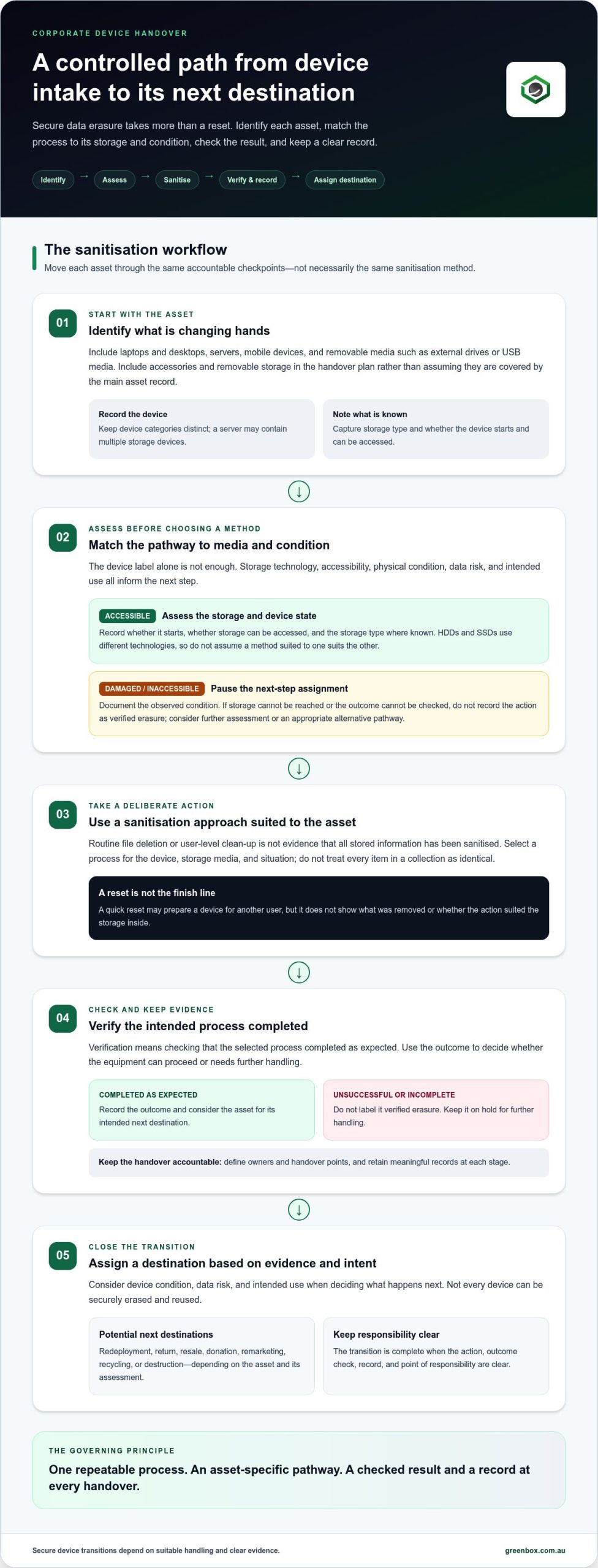
Once equipment is identified for transition, determine whether it can be sanitised using a suitable process in its current state. The device label alone isn’t enough. Storage technology, accessibility and physical condition all affect what can be checked and what should happen next. Assess these factors before assigning an asset for reuse or another destination.
This assessment avoids a common process gap: treating every item in a collection as though it has the same storage and operating condition. An erasure workflow shouldn’t assume every device is identical. The right pathway depends on what’s inside and whether the device can be accessed and assessed.
Laptops, desktops, servers and mobile devices
Device categories help teams organise their assessment, but they don’t replace asset-level checks. Laptops and desktops may hold locally stored work files, cached information or user profiles. Track mobile devices as their own category because they can hold business information and are often managed differently from computers. Servers also warrant distinct inventory treatment: one server may contain multiple storage devices and support shared workloads.
Record the storage type where it’s known. Hard disk drives (HDDs) and solid-state drives (SSDs) use different technologies, so don’t assume a method suited to one is also suitable for the other. Technical guidance such as the NIST SP 800-88 Guidelines for Media Sanitization can help explain why media type and data sensitivity inform sanitisation decisions. Use it as reference material, not as a claim about a particular method for every corporate asset.
- Laptops and desktops: note the device, storage type and whether it starts and can be accessed.
- Servers: record the server and its storage components as distinct inventory items where practical.
- Mobile devices and removable storage: track them separately so small, easily overlooked items remain in the transition process.
When a device is damaged, inaccessible or not reusable
A failed device changes what can be assessed. If it won’t start, its storage may not be reachable through the usual operating environment. Physical damage can also affect whether information can be sanitised and the outcome checked. Don’t record an unsuccessful or incomplete action as verified erasure.
Document the observed condition and pause the asset’s next-step assignment until an appropriate decision is made. Depending on its condition, data risk and intended disposition, the pathway may involve further assessment, data destruction or recycling rather than return to service. Not every device can be securely erased and reused. Base decisions on the individual asset, not the preferred outcome of the programme.
For corporate programmes that need to align secure handling with recovery and end-of-life planning, Greenbox’s IT asset recovery connects sanitisation and destruction with the next disposition decision.
How to assess a corporate data erasure process
A reliable assessment looks beyond whether someone ran an erasure task. Check whether the organisation can account for each asset, explain the control applied, identify who made key decisions and retain records of what happened. Define owners and handover points before devices move, so responsibility doesn’t fall between teams or lifecycle stages.
Build an inventory and data-risk classification
Start with a record that connects each device to its storage, business owner, condition and planned destination. Classify the information risk and intended next use, then use those factors to guide the control. A complete inventory makes exceptions visible, including an unrecorded drive, an asset with an unknown owner or equipment in a different condition from the initial assessment.
Assess the process in sequence:
- Inventory assets. Capture available identifiers, such as asset tags or serial numbers, alongside storage media, business ownership and device condition.
- Classify risk and destination. Record the data sensitivity and whether each item is intended for redeployment, remarketing, return, recycling or another outcome.
- Assign controls. Set the sanitisation pathway and identify who is authorised to approve it. Define how damaged, inaccessible or unlisted assets are escalated instead of treated as routine items.
- Verify outcomes. Establish what evidence will show that the defined process completed, and how unsuccessful or inconclusive results are handled before an asset proceeds.
- Retain appropriate records. Specify which records are kept, who receives them and how they connect the asset to its outcome and any approved exception.
Set verification, accountability and records requirements
Verification is evidence that the defined sanitisation process completed as intended. It shouldn’t be reduced to a tick beside an asset number. The organisation’s procedure should specify what counts as an acceptable check, who reviews the result and what happens if the check fails or can’t be completed. This makes the control usable for both routine transitions and exceptions.
Assign an accountable process owner, an approver for exceptions and a recipient for the resulting records. Set handover points between the business team releasing equipment, the team managing its transition and anyone responsible for approving its next destination. Records should match internal policy and actual process outputs. Don’t promise or request evidence the process doesn’t produce. The NIST data sanitisation standards discussion can provide further context for shaping those controls.
For Australian organisations, verify current Australian Privacy Act requirements and relevant OAIC guidance before adopting a policy. General guidance isn’t a substitute for checking how current requirements apply to the organisation’s information and circumstances. A well-structured assessment gives teams a practical basis for consistent decisions while keeping oversight tied to actual outcomes.
How secure erasure supports reuse, remarketing and responsible disposal
Erasure is a step in an asset’s journey, not the decision about where it should go. Once information has been appropriately sanitised and the outcome assessed, consider the equipment’s condition, remaining usefulness and intended purpose. A device may suit another team or remarketing, while another may need recycling or destruction.
Secure data erasure for corporate devices can help preserve the opportunity to use functional equipment again, but it doesn’t make every asset fit for resale or redeployment. Consider data risk and asset condition together. A working laptop with a useful service life presents a different recovery opportunity from a damaged device that can’t be assessed or returned to service.
Match disposition to data risk and asset condition
Connect the data-handling decision with the asset’s next destination. Reuse keeps suitable equipment within the organisation; remarketing may allow it to serve another user. Recycling is appropriate for equipment that has reached end of life, while destruction may be considered when condition or data risk makes other pathways unsuitable.
These outcomes depend on the asset and process. Sanitisation alone doesn’t confirm that equipment is functional, safe to reuse or commercially suitable. Choosing recycling doesn’t remove the need to address data risk first. A clear disposition decision should reflect the device’s condition, sanitisation outcome and intended purpose.
- Reuse or remarketing: consider equipment that remains suitable after the required data controls and assessment.
- Recycling: direct end-of-life equipment into responsible processing after its data risks have been addressed.
- Destruction: consider where the device’s condition or risk profile makes other options unsuitable.
Environmental benefits depend on what happens next. Reuse extends an asset’s life only if it’s fit for use and put back into service. Recycling outcomes depend on appropriate processing, so a recycling label alone doesn’t prove a particular recovery result. The sustainable IT asset recovery case study illustrates how security decisions can sit within broader lifecycle management.
Keep secure handling connected to environmental responsibility
Coordinating sanitisation with recovery gives teams a more controlled path from collection to final disposition. Defined handovers can reduce the chance that devices are left in unmanaged storage or moved onward before their data status and destination are understood. It also connects security decisions with opportunities for recovery, remarketing or recycling, rather than treating them as separate tasks.
Greenbox provides data sanitisation and destruction alongside IT asset recovery, remarketing and e-waste recycling. Its facilities are R2-certified, and Greenbox is a carbon-neutral organisation. These credentials relate to its facilities and organisation, not a particular certification for its data-erasure process. To align secure handling with recovery and end-of-life planning, explore Greenbox’s corporate IT asset recovery.
Greenbox helps organisations manage secure corporate device recovery
Retiring technology involves more than deciding whether to keep or dispose of a device. Organisations need to coordinate handling, address information security, assess recovery opportunities and determine the next destination. Greenbox brings data sanitisation and destruction together with IT asset recovery, asset remarketing and e-waste recycling, helping organisations manage these connected decisions as part of a corporate technology lifecycle.
A device’s data status, physical condition and intended destination are related. A suitable asset may move towards reuse or remarketing after appropriate sanitisation and assessment. Equipment that isn’t suitable for continued use may need a different pathway. Keeping these decisions connected helps organisations maintain oversight as assets move through retirement, processing and final disposition.
Bring data sanitisation into the asset recovery lifecycle
Plan data sanitisation as part of the recovery process, not as a last-minute task once equipment is already moving to its next destination. A coordinated programme can connect asset identification and handling with sanitisation or destruction, assessment for recovery, and onward remarketing or recycling. This gives teams a clearer view of how security decisions relate to each asset’s next step.
Greenbox provides corporate IT asset lifecycle management. Coordination helps teams plan the asset handover, data controls and disposition together rather than managing each as an isolated task. The process should reflect each organisation’s policies and the condition and intended use of its equipment.
Plan a controlled device retirement programme
Start by aligning the asset inventory with data classification and disposition decisions. Identify who owns each handover, how exceptions are handled and what information teams need to make decisions. This gives the organisation a defined programme for corporate devices, while allowing individual assets to follow a suitable pathway based on their condition and risk.
Greenbox supports corporate technology lifecycle requirements across Australia. Its facilities are R2-certified, and the organisation is carbon neutral. These credentials relate to its broader recovery and recycling operations, not a specific certification for its data-erasure process. Coordinating secure data erasure for corporate devices with asset recovery helps businesses address data handling while considering reuse, remarketing and responsible end-of-life processing.
A managed programme gives internal teams a clearer sequence of responsibilities, from identifying equipment for retirement through to deciding its next destination. It also brings security and recovery into the same operational conversation, so reuse is considered only where appropriate and recycling remains part of the wider lifecycle plan. Greenbox’s data sanitisation and destruction services sit alongside those recovery pathways, supporting a structured approach to corporate device transitions.
Discuss secure corporate device recovery with Greenbox to plan how sanitisation, recovery and disposition can work together across your organisation’s technology lifecycle.
Make your next device transition more deliberate
Make secure data erasure for corporate devices a planned part of technology change, not a last-minute task during a refresh or retirement. Start by deciding who owns the transition, how exceptions are escalated and how each asset’s next destination is approved. Clear responsibilities help teams act consistently as equipment moves through the organisation and beyond it.
This planning also connects information security with asset recovery. Where equipment remains suitable, consider reuse or remarketing after the appropriate controls. Where it doesn’t, responsible end-of-life handling remains part of the decision. The aim is a process that supports accountable device management and considered use of corporate resources.
Greenbox brings sanitisation and destruction together with corporate asset recovery and downstream disposition. Discuss secure corporate device recovery with Greenbox and take the next step towards a more controlled, responsible device lifecycle.
Frequently Asked Questions
Is deleting files enough to securely erase a corporate device?
No. Deleting files usually removes their visible references, but may not remove the underlying data from storage. A former employee’s documents could appear to be gone while information remains recoverable through the device or related storage. Use a sanitisation process appropriate to the media, and record whether its outcome was checked. Include removable drives and memory cards in the asset review, not just the main computer.
Can corporate devices be reused after secure data erasure?
How do you securely erase data from a damaged or failed device?
First, document the failure and don’t treat an incomplete process as successful erasure. A device that won’t power on, or whose storage can’t be accessed, may need a different assessment from functioning equipment. The next step depends on the type and extent of damage, the information risk and the intended destination. If sanitisation can’t be completed or its result can’t be assessed, consider whether destruction or another controlled disposition is appropriate.
Does a factory reset remove all corporate data from a phone?
Not necessarily. A reset can return a phone to a clean setup state, but the business should still consider how its model and storage handle data, and whether the reset completed as intended. Also account for information held outside the handset, such as cloud services, work profiles, removable storage or linked accounts. Before a phone is reassigned or returned, confirm it’s removed from relevant business management and identity systems under your organisation’s procedures.
What records should a business keep after device erasure?
Keep records that connect each action to the asset and its next step. Depending on your process, these may include the asset tag or serial number, device and storage details, recorded condition, sanitisation outcome, date, responsible owner and any exception or escalation. Keep records consistent with internal policy and what the process actually produces. A record should distinguish a completed and checked action from one that failed or remains unresolved.
Does the Australian Privacy Act apply to data stored on retired devices?
It may apply where personal information is held on a retired device and the organisation is covered by the Privacy Act. Whether particular obligations apply depends on the organisation and circumstances, so device retirement doesn’t automatically end privacy considerations. Identify whether the storage may contain personal information, and check current Privacy Act requirements and OAIC guidance when setting policy. This FAQ isn’t legal advice, and the relevant facts can vary between organisations.
Can data be erased from devices before they leave a business site?
Yes, an organisation can plan to sanitise accessible devices before they leave its premises, provided the chosen process suits the equipment and the outcome can be assessed. This can be useful where local teams control the assets, but it still requires accurate identification and a clear record of exceptions. For a damaged or inaccessible device, don’t assume an on-site reset is possible. Set its next handling step before it enters the collection or handover flow.