

Treating a hardware refresh as merely a software installation task is the fastest way to overwhelm your engineers and stall business momentum. For IT leaders wrestling with multi-site rollouts and unboxing bottlenecks, modern device imaging and deployment requires an operational shift; it must be executed as an integrated lifecycle event rather than a repetitive desktop chore.
Managing the logistics of national fleet distribution while maintaining strict security during hardware handovers stretches internal resources to breaking point. You already know your skilled team shouldn’t spend their valuable hours configuring base operating systems or coordinating freight. This guide details how to architect a seamless, low-touch rollout that cuts operational downtime, removes technical debt, and maintains rigorous chain-of-custody data protection. From zero-touch cloud provisioning models to certified, sustainable recovery for retiring assets, here’s how forward-thinking organisations modernise their endpoint rollouts.
Key Takeaways
- Move beyond legacy golden images by adopting modern cloud provisioning models that configure operating systems dynamically.
- Architect a scalable device imaging and deployment strategy that resolves national distribution bottlenecks and frees internal IT teams to focus on core strategic goals.
- Implement a structured staging framework covering asset tagging, BIOS hardening, and desk-ready distribution to maintain security and end-user productivity from day one.
- Close the hardware lifecycle loop by coupling new fleet rollouts with certified data sanitisation and sustainable asset recovery to eliminate the security risks of stockpiled equipment.
What is Device Imaging and Deployment in the Modern Enterprise?
Enterprise device imaging is the disciplined process of building a standardised, secure software foundation across corporate hardware fleets. Deployment represents the corresponding logistical operation; it covers the physical movement, warehousing, staging, and final handover of ready-to-use devices to end-users across national operations. In high-stakes enterprise environments, establishing an approved Standard Operating Environment (SOE) is vital for Australian regulatory and cybersecurity compliance. While early IT models relied on manual disk cloning and imaging to mirror hard drives across identical systems, modern device imaging and deployment orchestrates both technical configuration and freight logistics to eliminate desk-side friction. Today, zero-touch deployment serves as the enterprise benchmark, provisioning machines securely over the cloud with minimal manual intervention.
The Core Components of an Imaging Strategy
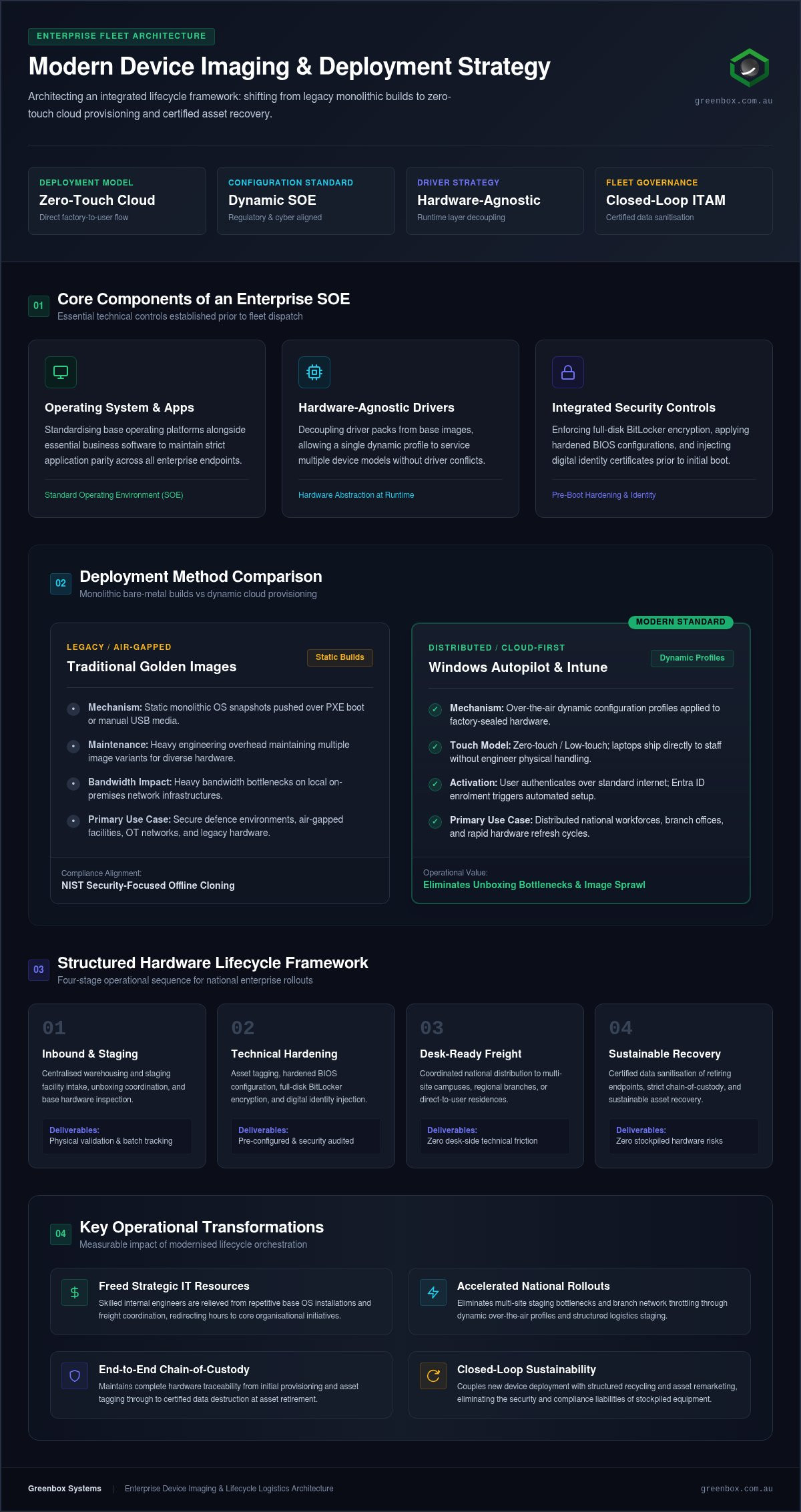
A reliable imaging strategy combines technical governance with repeatable configuration controls. It ensures that every endpoint meets organizational standards prior to dispatch through three critical components:
- Operating System and Core Applications: Standardising base operating platforms alongside essential business software to maintain application parity.
- Hardware-Agnostic Driver Management: Decoupling driver packs from base images, allowing a single profile to service multiple device models without driver conflicts.
- Integrated Security Controls: Enforcing full-disk encryption like BitLocker, applying hardened BIOS configurations, and injecting digital identity certificates before initial boot.
Why Traditional Imaging is Evolving
Distributed workforces and branch offices have fundamentally disrupted traditional deployment models. Staging fleets through an on-premises local network using heavy monolithic images creates severe bandwidth bottlenecks and consumes excessive engineering hours. Modern provisioning represents the transition from monolithic images to dynamic, cloud-based configuration profiles. Instead of wiping factory hardware to lay down massive custom operating systems, engineering teams now apply tailored security policies, application stacks, and access privileges over the air. Adopting dynamic provisioning within your device imaging and deployment workflow accelerates hardware handovers and removes the ongoing maintenance overhead of static system builds.
Modern Imaging Techniques: Golden Images vs. Autopilot Provisioning
Selecting the right deployment method directly shapes rollout speed and internal resource allocation. Historically, IT departments relied on monolithic “golden images”: static operating system snapshots containing base configurations, drivers, and software packages. Pushing these heavy builds across networks via Preboot Execution Environment (PXE) boot or manual USB media works reliably for dense, centralised office campuses. However, managing custom driver injections across diverse hardware models frequently creates driver conflicts, forcing teams to maintain dozens of distinct image variants. Hardware-independent imaging and dynamic provisioning decouple these layers, resolving driver management issues by applying hardware abstraction and vendor-specific driver packs at runtime.
When to Use Traditional Golden Images
While dynamic deployment dominates modern workplace strategy, static bare-metal imaging still serves specific operational architectures. Secure defence environments, air-gapped facilities, and operational technology (OT) networks often lack cloud connectivity. In these high-assurance environments, aligning with NIST security-focused configuration management guidelines requires fully controlled, offline disk cloning. Monolithic imaging also remains useful when refreshing legacy equipment that cannot support modern unified endpoint management protocols, or in remote branches with constrained data networks.
The Rise of Cloud-Based Provisioning
For distributed workforces, cloud-first provisioning through platforms like Windows Autopilot and Microsoft Intune delivers rapid scalability. Autopilot transforms the out-of-box experience: factory-sealed laptops ship directly to staff, connect to standard internet connections, and transform into corporate-ready endpoints upon user authentication. Entra ID enrollment triggers automated policy enforcement, driver updates, and business software installations without an engineer ever touching the physical machine. This direct-to-desk model eliminates local staging depots and reduces onboarding time from several days to under an hour.
Adopting this model does not mean abandoning physical staging controls entirely. High-volume enterprise environments achieve optimal efficiency when they align cloud registration with structured IT configuration and deployment frameworks. By engaging a specialist pre-configuration and imaging partner to execute bulk hardware enrollment, custom asset labelling, and BIOS security configurations before shipment, internal IT departments streamline their device imaging and deployment workflows while maintaining total governance over enterprise fleets.
The Logistical Challenge: Scaling Rollouts Across National Operations
Most fleet deployment plans fail not in the software console, but in the warehouse and transit network. Unpacking pallets, auditing serials, applying physical asset tags, and coordinating couriers across national operations turns into an administrative nightmare for internal technical teams. When engineers spend weeks unboxing machines, high-priority digital transformation projects stall. Scaling enterprise device imaging and deployment demands robust physical supply chain controls alongside software automation. White glove deployment models solve this bottleneck; hardware arrives fully staged, pre-configured, and delivered directly to the user’s desk, allowing staff to resume work without configuration delays.
Centralised Staging vs. Localised Rollouts
Staging assets locally inside regional office cupboards invites configuration errors, fragmented inventory data, and physical theft. Centralising intake and configuration within secure, R2-certified facilities provides absolute operational integrity. Hardware unboxing, BIOS updates, baseline provisioning, and laser etching happen under controlled conditions before secure freight dispatch. Managing the last mile with precision ensures that every distributed worker receives a ready-to-use machine. Enterprise teams looking to overcome transit friction should learn how to organise efficient bulk laptop deployment in Australia through unified supply pathways.
Minimising Operational Downtime
Uncoordinated rollouts disrupt everyday business operations. To preserve user productivity, national hardware transitions rely on proven scheduling frameworks and field labour:
- Phase-Driven Scheduling: Executing hardware handovers outside peak operational cycles or during low-impact business windows.
- The “Swap and Go” Method: Handing over an active, pre-configured machine while instantly reclaiming the legacy endpoint, completing desk-side transitions in minutes.
- Augmented Technical Labour: Deploying vetted field engineers to handle desk drops, dock connections, and peripheral checks, ensuring internal IT teams remain focused on architecture and security.
A synchronised physical logistics model establishes immediate chain of custody for every asset. Handling freight through a single partner with national coverage guarantees that newly delivered units meet corporate standards while retired machines enter auditable workflows aligned with the sustainable management of electronics. Treating logistics as an equal discipline to technical imaging protects business continuity across the entire organisation.
A Best-Practice Framework for Seamless Hardware Refresh Cycles
Executing an enterprise fleet replacement requires clear stage gates rather than fragmented tactical efforts. When teams manage refresh projects ad hoc, deployment timelines blow out and security risks multiply. A structured five-stage lifecycle architecture ensures consistent quality across national operations:
- Stage 1: Audit and Procurement: Assessing current fleet performance, identifying hardware refresh thresholds, and aligning hardware specifications with organisational Standard Operating Environment (SOE) profiles.
- Stage 2: Configuration and Staging: Applying base OS images or dynamic provisioning profiles, recording asset telemetry, and enforcing hardware-level security policies.
- Stage 3: Logistics and Distribution: Coordinating secure transport, managing regional delivery schedules, and dispatching on-site technical labour for desk drops.
- Stage 4: User Onboarding: Guiding staff through profile initialisation, validating business applications, and verifying day-one network access.
- Stage 5: End-of-Life Management: Reclaiming legacy hardware at the point of delivery, securing chain of custody, and routing retired assets into certified sanitisation streams through a structured end of life hardware management framework.
Pre-Configuration and Asset Tagging
Physical governance must begin inside the staging facility before endpoints leave for delivery. Applying physical asset barcodes during initial configuration prevents unrecorded equipment from entering production networks. In modern IT environments, asset tagging directly integrates with your Configuration Management Database (CMDB) via API, automatically binding serial numbers to hardware hashes and assigned user profiles. Staging engineers also secure the firmware layer by locking BIOS settings with administrative passwords, disabling unauthorised boot paths, and enabling Platform Trust Technology before packaging.
The Critical Handover: Managing User Data
Desktop transitions succeed or fail on the user experience. Poorly coordinated data transfers lead to lost working hours and an influx of helpdesk tickets. Enterprises eliminate friction by implementing Known Folder Move and cloud redirection tools before delivery, migrating user documents to secure cloud storage automatically. Validating core software packages during the configuration stage ensures that staff receive functional devices with all required productivity applications ready on first login. Pre-testing builds under authentic user profiles drastically limits day-one technical incidents.
Managing this five-step cycle internally pulls IT engineers away from strategic infrastructure initiatives. Partnering with Greenbox for scalable pre-configuration and imaging allows organisations to professionalise their device imaging and deployment pipeline while keeping internal technical resources focused on high-value business objectives.
Integrating Configuration with Sustainable Asset Lifecycle Management
The single most vulnerable moment in an endpoint’s lifecycle occurs when it is decommissioned. Too often, retired laptops sit forgotten in office storage cupboards, creating an unmonitored security risk and quietly losing market value. Synchronising device recovery with active rollouts solves this exposure. The moment a new machine reaches a desk, the outgoing unit should immediately enter an audited reverse logistics stream. By tying collection directly to device imaging and deployment, organisations transform a one-way freight expense into an integrated, circular lifecycle model. Enterprises seeking to unify these disciplines should explore comprehensive IT hardware lifecycle services that connect front-end provisioning with certified asset recovery under a single governance framework.
Closing the Loop with Secure ITAD
Unmanaged hardware stockpiles expose organisations to severe regulatory penalties and intellectual property theft. Integrating certified IT Asset Disposition (ITAD) into the rollout workflow eliminates this exposure at the point of exchange. Mandating certified data sanitisation in Australia ensures storage media is purged in strict accordance with NIST SP 800-88 standards, generating auditable certificates of sanitisation mapped to individual serial numbers. Prompt recovery also preserves commercial value. Through sustainable IT asset recovery and structured asset remarketing, enterprises recover residual capital from aging equipment, directly offsetting the procurement costs of the incoming fleet.
Choosing a Carbon-Neutral Deployment Partner
Modern enterprise governance requires technology upgrades to align with environmental, social, and governance (ESG) targets. Large-scale refreshes inevitably generate packaging waste, logistics emissions, and redundant electronics. Working with a certified carbon-neutral lifecycle partner ensures these environmental impacts are actively measured and mitigated across national operations. Processing redundant equipment through R2-certified facilities guarantees that non-marketable hardware undergoes responsible, transparent e-waste recycling rather than entering landfill.
Greenbox closes the hardware loop entirely by unifying pre-configuration, logistics, and certified asset recovery under a single national framework. Managing the transition from cradle to grave allows government and enterprise bodies to execute complex endpoint rollouts with guaranteed data security, zero operational disruption, and verified sustainability credentials.
Architecting a Resilient Hardware Rollout for 2026 and Beyond
Modern workplace agility depends on how swiftly and securely your organisation provisions hardware. Shifting from monolithic disk cloning to dynamic cloud provisioning eliminates technical debt, while disciplined staging prevents disruption for distributed teams. True fleet efficiency, however, requires looking beyond unboxing. Treating rollout logistics and asset recovery as a single continuous cycle protects corporate data and removes storage clutter across your enterprise.
Achieving this balance demands an operational framework equipped to manage technical configuration alongside national supply chains. Backed by national Australian coverage, R2-certified facilities, and carbon-neutral ITAD services, Greenbox delivers complete governance across every phase of your refresh project. You don’t have to stretch internal engineering teams with repetitive manual staging or coordinate risky disposal handovers alone. Optimise your next hardware rollout with Greenbox and modernise your device imaging and deployment pipeline with complete confidence.
Frequently Asked Questions
What is the difference between device imaging and provisioning?
Traditional imaging creates a sector-by-sector duplicate of a pre-configured operating system onto storage media. In contrast, modern provisioning preserves the factory-installed operating system, dynamically applying corporate policies, identity settings, and software over the cloud. While imaging requires heavy custom builds and ongoing driver updates, cloud provisioning applies tailored configurations during initial setup. This shift modernises device imaging and deployment workflows for distributed teams.
How long does it typically take to image and deploy 100 laptops?
Staging 100 laptops manually inside an internal IT workshop often takes three to four weeks when balancing routine helpdesk tickets. With automated staging lines in dedicated facilities, that turnaround compresses to several business days. Technicians apply standardised profiles, enrol hardware serials, and execute asset tagging concurrently across high-density test benches. Dispatch schedules then align with operational requirements to ensure zero downtime across target sites.
Does Greenbox support both Windows and Apple device deployment?
Greenbox supports multi-platform enterprise fleets, including Windows, macOS, and iOS environments. Fleet deployments integrate with platform frameworks such as Windows Autopilot and Apple Business for Automated Device Enrollment. Staging specialists manage bulk physical enrollment, asset labelling, and peripheral staging regardless of operating system. This unified approach provides national organisations with consistent configuration governance across mixed hardware estates.
Can device imaging be done remotely for staff working from home?
Remote endpoints no longer require hands-on physical imaging by in-house technicians. Factory-sealed devices can dropship directly to an employee’s residence. Upon unboxing and connecting to local Wi-Fi, modern cloud provisioning frameworks automatically authenticate the user, enforce baseline security policies, and download business software packages. The entire environment configures dynamically over the internet, transforming remote hardware rollouts into a streamlined zero-touch process.
What security standards does Greenbox follow for data sanitisation during a refresh?
Greenbox executes data sanitisation in strict compliance with current NIST SP 800-88 standards across R2-certified facilities. The process employs cryptographic erase, firmware-level purge protocols, or physical destruction for damaged media. Every processed drive produces an auditable Certificate of Data Sanitisation tied to its serial number. This rigorous chain of custody ensures total data elimination before hardware enters remarketing channels or material recovery streams.
How does a hardware refresh impact my company’s carbon footprint?
Hardware refreshes generate substantial carbon emissions through new manufacturing, transport, and electronic waste. Organisations mitigate this impact by choosing a certified carbon-neutral lifecycle partner. Extending asset lifecycles through refurbishment and remarketing avoids premature scrap, while non-marketable components undergo audited e-waste recycling. This closed-loop approach reduces Scope 3 greenhouse gas reporting metrics and helps enterprise leadership hit mandatory sustainability benchmarks.
Is it better to image devices in-house or use a third-party provider?
In-house staging works for small, single-site teams, but quickly overwhelms internal engineers during major multi-site upgrades. Unboxing pallets, updating BIOS firmware, and arranging national freight distracts technical teams from strategic infrastructure goals. Outsourcing to an experienced specialist streamlines device imaging and deployment through dedicated industrial staging lines, strict quality controls, and established transport networks that protect delivery timelines.
What is a “Golden Image” and is it still relevant in 2026?
A golden image is a static snapshot containing an operating system, default driver set, and core corporate software stack. While dynamic cloud provisioning has superseded golden images for mainstream enterprise fleets, static builds remain relevant in specialised environments. Air-gapped government networks, secure defence facilities, and legacy operational systems without internet access still rely on controlled, offline cloning to maintain strict configuration baselines.