

A retired device can leave your site without leaving its data behind. That gap is where data security risks in hardware disposal begin, whether equipment is awaiting collection, in transit or moving through later processing. Laptops and servers are obvious concerns, but printers, network equipment and storage media also deserve attention.
It’s understandable to focus on the devices themselves, but the risk continues until every data-bearing asset is identified, sanitised and accounted for. For organisations covered by the Privacy Act 1988, Australian Privacy Principle 11.2 requires reasonable steps to destroy or de-identify personal information that’s no longer needed, subject to applicable exceptions. A breakdown in the disposal process can also bring regulatory, financial and reputational consequences.
This article explains where information may remain, how exposure can occur during retirement and onward handling, and what an accountable end-of-life process should cover. You’ll learn how data sanitisation and destruction connect with asset recovery, remarketing and e-waste recycling, so your organisation can manage retired hardware with greater control and visibility.
Key Takeaways
- Disposal risk can persist throughout decommissioning, storage, collection, transport and onward processing, not just when equipment leaves your site.
- Include peripherals and accessories in your asset review, as well as computers and servers, and account for differences between device models.
- Data security risks in hardware disposal often arise from incomplete asset records, unclear custody or unverified sanitisation before equipment is reused or recycled.
- Assess risk by identifying assets, classifying data, assigning ownership, recording custody and reviewing evidence of final disposition.
- Connect data sanitisation or destruction with asset recovery, remarketing and e-waste recycling to support a more accountable end-of-life process.
What are the data security risks in hardware disposal?
Hardware disposal risk is the loss of control over equipment that may contain sensitive information before its data has been sanitised and its final disposition verified. A device leaving everyday use doesn’t mean it has left the organisation’s security responsibilities. Risk can arise during decommissioning, while equipment is stored, at collection, in transit, during processing, or later if an asset is resold or recycled without its status being clear.
The full lifecycle matters. Collection from a workplace is only one handover in a chain that may involve internal teams and further handling. If responsibility, asset identity or sanitisation status becomes unclear at any stage, it can be difficult to establish whether information remains exposed. This doesn’t mean every retired device will cause a breach. It means organisations need to maintain control and verify disposition rather than assume the risk has ended.
Data security exposure is also distinct from environmental harm. Mishandled equipment may create both concerns, but they’re not interchangeable: responsible recycling addresses material recovery and e-waste, while data sanitisation or destruction addresses information held on equipment. End-of-life planning needs to account for both, without treating one as proof that the other has been managed.
Why does hardware disposal create a security blind spot?
Active devices are usually more visible to IT teams because they connect to networks, appear in management systems and have assigned users. Once equipment is retired, those routines can fall away. A laptop may sit in a storeroom, a printer may be collected with other assets, or a server may pass between teams before it leaves the site.
Each handover can weaken oversight if no one clearly owns the asset or records its status. Without a reliable link between the physical device and its inventory record, an organisation may struggle to establish what was collected, what still needs sanitisation and where the equipment went next. This is a control gap, not evidence that an incident is inevitable.
What counts as business hardware at end of life?
Start with an inventory that looks beyond familiar computers and servers. Business hardware can include mobile devices, printers and network equipment, as well as accessories or peripherals used alongside them. A device’s function or appearance alone doesn’t establish whether it stores, processes or provides access to sensitive information.
Storage capability varies by device and model, so don’t assume an older, basic-looking or non-computer asset is data-free. Data remanence describes how information may persist on storage media after attempts to erase it. An inventory helps teams assess equipment consistently, record what is known and identify assets that need closer review before disposition.
Keep the inventory practical: record enough detail to identify each asset and its status, and include equipment that might otherwise be missed during a refresh or office clear-out. This gives the organisation a clearer basis for deciding what needs sanitisation, destruction, recovery or recycling. Appearance and age are poor substitutes for an accountable record.
Where can sensitive data remain in retired IT hardware?
Retired equipment can contain more than files saved on a computer. Depending on its model and configuration, a device may hold stored information, settings or other data linked to its previous use. Inventory the equipment’s role and identity, then use product documentation to establish what it may retain and how it can be sanitised.
Printers, phones, tablets and network equipment belong in the inventory alongside laptops and servers, because an asset’s size or everyday function doesn’t show whether it holds information. Including peripherals and less obvious devices helps prevent gaps in the asset record and makes decisions about sanitisation or disposition more deliberate.
Which devices beyond laptops and servers deserve attention?
Assess each category without assuming that every model stores data in the same way. A multifunction printer’s capabilities can vary by model; phones and tablets can contain user data; network equipment may retain configuration information. These are prompts for assessment, not claims that every device has the same storage or content.
Check the relevant manufacturer documentation and record the model and asset identifier where available. Include equipment that can be missed during a standard computer refresh, such as:
- Printers and multifunction devices
- Mobile phones and tablets
- Network equipment, including routers and switches
- Peripherals and other non-standard assets used by the organisation
For each item, note what is known about its data-bearing capabilities and sanitisation requirements. If the inventory only tracks laptops and servers, other equipment may be left out of the review because it wasn’t recognised as relevant. A consistent register gives teams a practical way to identify what needs closer assessment.
Why can deleted files or a reset leave uncertainty?
Deleting a file or resetting a device changes what a user can readily access, but that action alone doesn’t establish that data has been sanitised. What can be verified depends on the device, its storage technology and the method used. A procedure suitable for one type of media may not provide the same assurance for another.
That’s why a blanket instruction to “wipe everything” can leave questions unanswered. The NIST SP 800-88 Guidelines for Media Sanitization provide a reference for considering sanitisation across different media. Match the approach to the asset and retain evidence that supports the decision, rather than treating deletion or a factory reset as proof of a verified outcome.
For technical guidance on sanitisation decisions, Greenbox’s certified data sanitisation guide can help inform your review. Greenbox provides data sanitisation and destruction as part of end-of-life IT asset management, connecting information protection with responsible hardware recovery.
How do data security risks emerge during hardware disposal?
Data security risks in hardware disposal can develop through several connected gaps, rather than one dramatic failure. An incomplete asset record can leave a device out of the retirement process. An unclear handover can make it difficult to establish who is responsible for it. Sanitisation may be assumed rather than verified, and equipment may move to resale or recycling before its data status is clear.
Risk increases when an organisation can’t evidence an asset’s status, custody or sanitisation. A missing record doesn’t prove that anyone accessed information. It does mean the organisation may have less certainty when it needs to locate equipment, confirm what happened to it or assess whether information was exposed.
How can custody and inventory gaps expose an organisation?
Consider a device removed during an office refresh but not matched to the asset register. It may be stored, collected with other equipment or transferred between teams without a clear record. If a discrepancy is discovered later, the organisation may need to reconstruct those movements before establishing whether the device is still on site, has been processed or has gone elsewhere.
Responsibility should remain identifiable at each transfer, from internal decommissioning through collection, transport and onward processing. A handover record can help show which assets moved and who was responsible at that point. Gaps warrant investigation, but they aren’t the same as confirmed unauthorised access or an eligible data breach. Establish the facts before drawing conclusions.
Four pathways are worth distinguishing:
- Record gap: equipment is missing from, or incorrectly described in, the inventory.
- Custody gap: the organisation can’t clearly account for a transfer or period of storage.
- Sanitisation gap: completion is assumed, but the available evidence doesn’t establish the outcome.
- Onward-transfer gap: equipment is resold or recycled without its disposition status being clear to the organisation.
What business impacts can follow a disposal-related incident?
If a device is unaccounted for or potential exposure is identified, teams may need to investigate its history, assess what information it could contain and coordinate a response. That work can compete with day-to-day responsibilities and, depending on the circumstances, disrupt operations. Stakeholders may also seek clear answers, so incomplete records can make it harder to explain what is known and what remains under review.
Regulatory consequences aren’t automatic. For organisations covered by the Privacy Act 1988, obligations depend on the information, circumstances and applicable requirements. Under Australia’s Notifiable Data Breaches Scheme, an eligible data breach likely to result in serious harm can trigger notification obligations. An inventory mismatch alone doesn’t establish that threshold; the organisation needs to assess the facts and applicable duties.
Financial-sector organisations can consider disposal within broader control frameworks, where asset custody and information handling need to be managed together. Greenbox’s ITAD risk management resource addresses this sector-specific context.
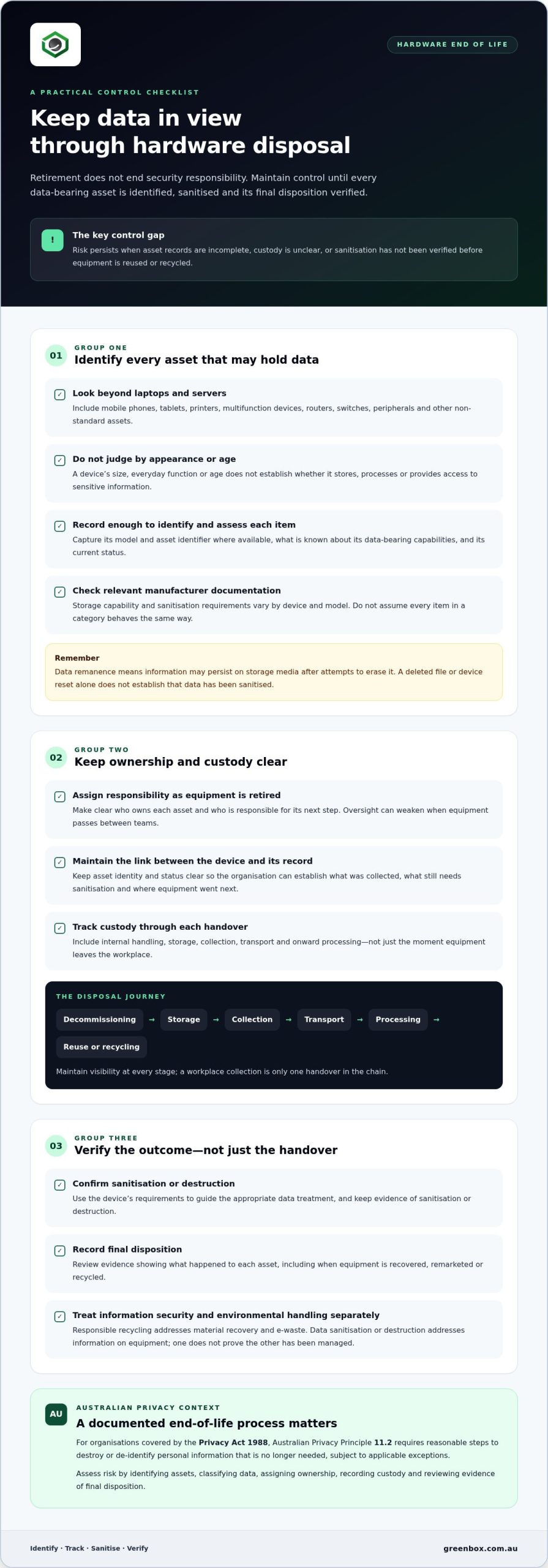
How can organisations assess hardware disposal security risk?
A structured assessment makes it easier to identify where information, responsibility or evidence may be missing. It doesn’t need to become a separate, complex audit. Use a consistent sequence to assess the assets being retired, the sensitivity of their data and whether their final status can be established. This helps focus attention on data security risks in hardware disposal without treating every asset as equally sensitive.
- Identify the assets. Match equipment scheduled for retirement against available asset records, including less obvious devices and peripherals.
- Classify the data. Use the organisation’s information classification to understand the sensitivity of information associated with each asset. Where this is unknown, record the uncertainty for review.
- Assign ownership. Identify the team or role responsible for each asset and for decisions about its end-of-life handling.
- Document custody. Record transfers using the organisation’s established controls, so the asset’s movement can be followed.
- Verify disposition evidence. Review available records to establish whether the asset was sanitised, destroyed, remarketed or recycled as intended.
What should an end-of-life asset register capture?
Keep the register useful to the people who maintain it. At a minimum, consider recording an asset identifier, device type, assigned owner, data classification and retirement status. Add fields that reflect your organisation’s governance and operational needs, such as handover details, sanitisation status or final disposition. The aim is to reconcile what was planned with what can be evidenced.
Use the same register, or a clearly connected record, throughout the retirement process. If an asset is transferred, update its custody details; when its disposition is complete, record the outcome in line with internal controls. A field marked “disposed” may not show whether data sanitisation was completed, so keep separate statuses when that distinction matters to your organisation.
How should organisations review evidence and obligations?
Assess whether the available evidence supports the recorded status. Check that asset identifiers align across records and that the documented sanitisation or disposition outcome relates to the equipment under review. Evidence supports accountability, but it isn’t a guarantee that an incident can’t occur. Certification, technical standards and legal obligations are separate considerations: verify what each covers rather than treating one as proof of the others.
Australian obligations depend on the organisation and circumstances. For entities covered by the Privacy Act 1988, Australian Privacy Principle 11.2 requires reasonable steps to destroy or de-identify personal information that is no longer needed, subject to applicable exceptions. Under the Notifiable Data Breaches Scheme, eligible breaches likely to result in serious harm may require notification. Verify the current rules and their application to your organisation before relying on them as part of an assessment.
For further technical context, Greenbox’s NIST 800-88 sanitisation standards and data breach prevention guidance covers sanitisation and the separate prevention considerations involved in IT disposal. Greenbox also provides data sanitisation and destruction alongside IT asset recovery. Explore Greenbox’s IT asset recovery and data sanitisation services as part of your end-of-life planning.
How does secure IT asset disposition reduce hardware disposal risk?
Secure IT asset disposition (ITAD) connects information protection with decisions about each retired asset. Rather than treating data sanitisation, resale and recycling as separate end points, organisations can consider them within one end-of-life framework. The aim is to make the asset’s route and intended outcome clearer, while reducing the work of coordinating separate tasks.
The right outcome depends on the asset. Equipment that can be recovered for remarketing has different end-of-life needs from equipment destined for recycling. In either case, data sanitisation or destruction should be considered as part of the disposition decision, not left as an assumption. A managed approach can help organisations address data security risks in hardware disposal while planning how equipment will be recovered, reused or recycled.
What does a managed end-of-life service bring together?
End-of-life management brings asset recovery together with decisions about sanitisation, destruction and final disposition. Greenbox provides IT asset recovery, data sanitisation and destruction, asset remarketing and e-waste recycling. These services relate to different stages and outcomes, allowing businesses to consider information handling alongside what happens to the equipment next.
Connecting these decisions can help prevent work from falling between internal teams or separate tasks. An organisation can plan for data-bearing assets to be addressed while also considering whether equipment may be remarketed or should be recycled. This doesn’t replace the need to understand asset status and applicable requirements, but it provides a more joined-up basis for managing end-of-life hardware.
- Data sanitisation or destruction addresses information on equipment before its next disposition.
- Asset recovery and remarketing support the recovery and potential reuse of suitable equipment.
- E-waste recycling provides an end-of-life pathway for equipment that is not being remarketed.
How can security and sustainability work together?
Data protection and environmental responsibility are connected parts of asset management, but neither should be treated as proof of the other. Sanitisation addresses information risk; remarketing and recycling relate to the equipment’s disposition. Keeping these considerations visible together can help organisations make more deliberate decisions about retired hardware, without assuming every asset can be reused or that every environmental outcome is the same.
Greenbox operates as a carbon-neutral organisation and has R2-certified facilities. These are part of its approach, but they don’t replace an organisation’s own assessment of asset handling or establish a particular outcome for every item. The sustainable IT asset recovery case study offers related lifecycle context for considering security and responsible disposition together.
For organisations reviewing their current arrangements, the practical next step is to connect data-handling decisions with asset recovery, remarketing and recycling plans. Greenbox’s ITAD services bring these end-of-life considerations together for Australian businesses, supporting a more considered approach to retired equipment.
Make end-of-life hardware part of your security plan
Greenbox brings data sanitisation and destruction together with IT asset recovery, supporting a considered approach to end-of-life equipment. Its carbon-neutral operations and R2-certified facilities connect information handling with responsible asset management.
Take the next step by aligning your retirement process with your organisation’s security and sustainability priorities. Explore Greenbox’s secure IT asset recovery services and consider how a coordinated approach can support clearer, more accountable hardware disposition.
Frequently Asked Questions
Can a factory reset remove all data from retired business hardware?
Not necessarily. A factory reset shouldn’t automatically be treated as verified sanitisation. Its effect depends on the device, storage technology and reset method, so it may not establish that data has been removed to the organisation’s required standard. When managing data security risks in hardware disposal, distinguish a user-level reset from a documented sanitisation outcome. Apply the organisation’s approved process for each asset category, and record any uncertainty for review.
Can printers and multifunction devices retain sensitive business information?
Yes, some models may retain information or configuration data, although capabilities vary between devices. For example, assess a printer used for confidential work using its model documentation and the organisation’s records, rather than assuming it is data-free. Apply the same principle to network equipment and peripherals. Identify the specific device and how it was used before deciding what retirement steps are appropriate.
What happens if a disposed device is later found to contain business data?
Start by identifying the device and establishing what information it may contain, where it has been and who handled it. Follow internal incident processes to determine whether anyone accessed the data and preserve relevant records. Finding residual information doesn’t by itself confirm unauthorised access or a reportable breach. Document the assessment and consider whether the circumstances meet any applicable Australian notification requirements under current guidance.
Do cloud-connected devices still pose a data security risk when disposed of?
Yes. Cloud services don’t necessarily remove information or access details held on the physical device. Depending on its use, a retired laptop or phone may still have local files, cached information, credentials or configuration. Include both the device and associated accounts in the retirement assessment. Follow your organisation’s processes for removing access and sanitising the asset, and record completion separately for each where required.
Does Australian privacy law apply to every organisation disposing of IT hardware?
No, the Privacy Act 1988 and Notifiable Data Breaches Scheme don’t necessarily apply in the same way to every organisation or situation. Applicability depends on factors including the organisation, information involved and relevant circumstances. Check current Office of the Australian Information Commissioner (OAIC) guidance when assessing your obligations. For a specific legal interpretation, seek advice suited to your organisation rather than relying on a general disposal checklist.
Should leased or vendor-managed equipment be included in a disposal risk review?
Yes. Include leased and vendor-managed equipment in the review even if your organisation doesn’t own it. For example, a returned laptop may have been used to access business systems or handle personal information. Record the responsible parties, the asset’s expected return or retirement route, and any data-handling responsibilities set out in relevant agreements. Ownership alone doesn’t establish that information has been addressed or access removed.