

A laptop can be securely deployed and still become an unmanaged risk when it’s time to retire it. An IT asset lifecycle management policy template helps close that gap by linking each decision to a clear owner, control and record.
When procurement, IT, security, finance and disposal teams follow different processes, asset records can fall behind and refreshes, audits and retirements become harder to manage. A useful policy does more than assign responsibilities: it explains what happens at each stage, who is accountable and what evidence must be retained.
This guide provides a practical framework Australian organisations can adapt to their needs. It covers lifecycle roles, decision points and recordkeeping, including how data sanitisation informs reuse, remarketing or recycling. Follow the asset from planning and acquisition through deployment and operations to recovery and retirement, with a clear owner at each handover.
Key Takeaways
- Adapt the IT asset lifecycle management policy template with a named owner, approver, scope and review arrangements that suit your organisation.
- Set consistent governance requirements, then tailor controls to each asset’s sensitivity, ownership model and lifecycle stage.
- Compare your current inventory and processes with the policy to identify practical gaps before rollout.
- Make each lifecycle handover traceable, from acquisition and deployment to recovery and retirement.
- Specify how data sanitisation evidence informs reuse, remarketing or recycling decisions.
Why an IT asset lifecycle management policy matters across the whole asset journey
A lifecycle policy sets consistent decision-making, accountability and controls from the point an organisation identifies a technology need to the asset’s recovery or retirement. Without an agreed framework, procurement, IT, security and finance may work from different assumptions, leaving gaps between purchase, use and disposal.
IT asset lifecycle governance assigns an accountable owner, required controls and supporting evidence to every stage of an asset’s journey, from business need and acquisition through use, transfer, recovery and retirement. An Asset management framework provides a useful foundation: IT assets need active oversight, not just an entry in a spreadsheet or management system.
An IT asset lifecycle management policy template should set the organisation’s principles and minimum requirements. It doesn’t replace procedures, work instructions or system configuration. For example, the policy might require purchase approval and evidence of data sanitisation before retirement. A procedure explains who completes each step and how; a work instruction provides task-level guidance; system settings support the process. Keeping these layers distinct makes the policy adaptable while keeping its controls clear.
Which assets and lifecycle stages should the policy cover?
Define the scope explicitly. Include end-user devices, servers, network equipment and data-bearing peripherals, then state whether the requirements also apply to leased, owned, shared, remote and spare assets. Clear boundaries help prevent equipment being missed because it’s held off-site or assigned to a team rather than an individual.
What risks does a lifecycle policy help manage?
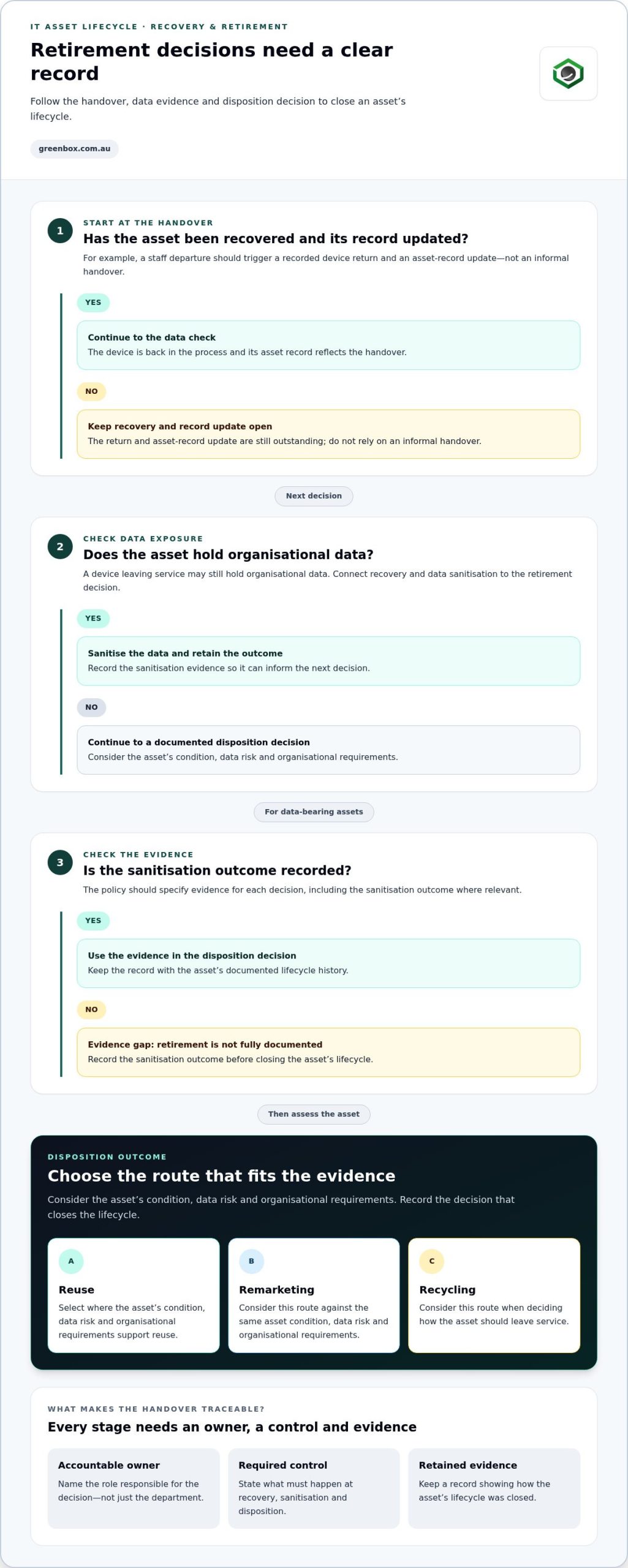
Retirement belongs in the same governance framework as procurement and deployment. A device leaving service may still hold organisational data, so the policy should connect recovery and data sanitisation with a documented disposition decision. Consider reuse, remarketing or recycling according to the asset’s condition, data risk and organisational requirements, and retain a record showing how its lifecycle was closed.
IT asset lifecycle management policy template: sections to customise
Use this framework as adaptable guidance, not legal advice or a one-size-fits-all control set. Tailor each clause to your organisation’s risk profile, operating model and existing governance. The Victorian Government’s Victorian Government IT Asset Management Guidance offers a useful reference for considering how people, processes, data and technology work together.
Core policy clauses and fill-in fields
Start with document control fields so staff can identify who owns the policy and which version applies:
- Policy owner: [role or business unit]
- Approver: [role or governance body]
- Effective date and version: [date] and [version number]
- Scope: [asset classes, business units, locations and ownership models covered]
- Review arrangements: [review owner, interval or triggers]
- System of record: [authoritative asset register or platform]
- Approval thresholds: [delegated roles or criteria for asset requests and purchases]
Adapt this sample purpose clause: “This policy establishes consistent requirements for managing [organisation] technology assets from business need and acquisition through deployment, use, transfer, recovery and retirement.” For scope, list the end-user devices, servers, network equipment and peripherals covered. State whether leased, shared, remote and spare assets are included.
Set out requirements for roles, asset records, procurement, receipt and deployment, acceptable use, changes, transfers, returns, exceptions and retirement. Make the exception clause direct: “An exception must identify an accountable owner, document the rationale and record approval by [authorised role] before it is applied.” Specify the evidence required for each decision, such as an approval record, updated asset entry or sanitisation outcome, rather than relying on informal handovers.
Roles, records and policy governance
Specify minimum inventory fields: unique identifier, asset type, assigned owner or custodian, status, location, acquisition date and relevant lifecycle dates, such as deployment, transfer and retirement. Add fields your organisation needs to manage risk, such as data sensitivity or lease status. Use a consistent identifier so records can be matched across systems and handovers.
Include approval, version control and review arrangements in the policy. Define who approves changes and which events trigger a review, such as a material process change, audit finding or change in asset scope. Require exception reporting so approved deviations remain visible. A workable policy covers scope, roles, asset records, lifecycle controls, exceptions, evidence and governance.
To connect deployment requirements with operational practice, see this enterprise IT configuration and deployment framework. Greenbox’s IT lifecycle services support documented controls from configuration through recovery and retirement.
One policy, different controls: tailor lifecycle requirements to asset risk
A single policy can govern a varied technology estate, but it shouldn’t impose identical handling on every asset. Set organisation-wide requirements for ownership, accurate records, approved transfers, exception management and documented retirement. Then scale procedures to asset type, data sensitivity, ownership model and lifecycle stage. This keeps governance consistent while directing tighter controls to higher-risk assets.
For example, an end-user laptop may need a named custodian and a recorded return when a staff member leaves. A server may require controlled access and a planned change process, while removable media needs close oversight during movement because it’s easy to misplace. Data sensitivity should influence who can access or move an asset, what sanitisation is required and what evidence must be recorded at retirement. The IT asset lifecycle management policy template should define these control outcomes, while supporting procedures explain how teams apply them.
Organisations can assess references such as NIST SP 800-88 for media sanitisation and ISO/IEC 19770-1 for IT asset management systems. Check current editions and applicability before adopting them. A reference should inform your controls, not be presented as an automatic legal requirement.
Match asset risk to accountable controls and evidence
| Asset category | Key risk | Accountable owner | Required record | Retirement evidence |
|---|---|---|---|---|
| End-user devices | Loss, unauthorised access or untracked reassignment | Assigned custodian and IT | Identifier, custodian, status and location | Return record and sanitisation outcome |
| Servers | Service disruption or exposure of sensitive data | Infrastructure owner | Identifier, service relationship, status and change history | Decommission approval and sanitisation record |
| Removable media | Loss during storage or movement | Named media custodian | Identifier, sensitivity, custodian and movement history | Destruction or sanitisation record |
| Network equipment | Exposure of configuration data or credentials | Network owner | Identifier, location, status and configuration reference | Decommission record and disposition outcome |
Govern transfers, exceptions and end of life
Require approval and an updated custody record for reassignment, off-site movement, return and staff exit. The record should show who released and received the asset, when the handover occurred, and any change in status or location.
Make exceptions time-bound and visible. Record the rationale, accountable risk owner, compensating controls, approval and closure date. At end of life, retain evidence of the sanitisation outcome and disposition decision. Depending on condition, data risk and policy, the asset may be prepared for reuse, remarketing or responsible recycling. Greenbox’s certified data sanitisation enterprise guide provides further context for documenting this control pathway.
How to implement, measure and maintain the policy
Put the policy into operation in a deliberate sequence. An IT asset lifecycle management policy template provides a starting point, but it becomes effective only when its requirements match actual workflows, assigned responsibilities and retained evidence.
- Confirm scope: identify the asset classes, business units and ownership models covered.
- Establish the baseline: compare the current inventory and day-to-day processes with the proposed requirements.
- Assign owners: name an executive sponsor, policy owner, operational leads and asset custodians.
- Map processes and evidence: connect each policy clause to a system record, approval, report or retained document.
- Approve and communicate: obtain the appropriate governance approval, then explain responsibilities and escalation paths to affected teams.
- Measure and review: track control performance and update the policy when relevant risks, systems, processes or obligations change.
Start with the current-state inventory. Look for assets without an owner, inconsistent status or location details, and lifecycle events recorded in separate systems. Compare the written requirements with what staff can demonstrate in practice. If a requirement has no reliable record or evidence trail, clarify ownership, revise the process or improve system support.
Who owns implementation and evidence?
The executive sponsor provides direction and resolves cross-team barriers. The policy owner maintains the document and coordinates reviews; operational leads carry out controls in their areas, while custodians keep assigned asset information current. For each clause, record where evidence lives and who creates or checks it. Greenbox’s IT asset recovery case study offers context on connecting lifecycle requirements with recovery activity.
How can organisations test and improve the policy?
Pilot the requirements against a sample journey, such as a device request, approval, deployment, transfer and eventual retirement. At each handover, check whether the owner is clear, the record is updated and the required approval or evidence can be produced. Test for missing owners, duplicate records, undocumented exceptions and incomplete disposition evidence. Resolve process gaps before scaling the policy across the organisation.
Useful measures include inventory completeness, overdue asset returns and the proportion of retired data-bearing assets with recorded sanitisation evidence. Define how each measure is calculated, who reviews it and what action follows when results fall short. Set targets and review intervals to reflect organisational risk, governance arrangements and applicable obligations, rather than adopting arbitrary benchmarks. Greenbox’s IT asset recovery services support a controlled recovery and retirement pathway.
Connect policy requirements to secure IT asset recovery and retirement
A retirement control is effective only when teams can show what happened to the asset. The policy should link an authorised handover with data sanitisation and a recorded disposition, closing the asset’s lifecycle with evidence rather than an unverified status change.
Secure data handling and responsible end-of-life decisions belong together: sanitise information, record the outcome, then direct each asset to an appropriate next use or recovery pathway. Depending on asset condition, data risk and organisational policy, that pathway may be reuse within the organisation, remarketing after sanitisation, or recycling when continued use isn’t appropriate. These outcomes aren’t interchangeable, so record the decision and its basis.
Environmental considerations also belong in retirement governance for Australian organisations. Business e-waste management in Australia offers a related operational perspective.
What evidence should accompany retired IT assets?
Set a consistent evidence set for every retirement, scaled to asset and data risk. Records can include:
- Asset identifier and recorded status.
- Custody transfers, including handover dates and accountable parties.
- Sanitisation or destruction record, including the outcome and relevant asset identifier.
- Approved disposition decision and final outcome, such as reuse, remarketing or recycling.
Together, these records create an auditable trail for internal governance and review. They support accountability, but don’t by themselves promise a particular certification outcome. Define applicable retention arrangements through your organisation’s records governance and verify the requirements that apply before setting a retention period. For more detail on sanitisation processes, read the certified data sanitisation guide.
How Greenbox services can support policy execution
A policy can specify controls across configuration, deployment, recovery, data sanitisation, remarketing and recycling. Greenbox provides services across these lifecycle stages, supporting the execution of documented requirements. Its facilities are R2-certified, and Greenbox describes its operations as carbon neutral.
For organisations adapting an IT asset lifecycle management policy template, map retirement clauses to a defined handover, sanitisation evidence and disposition record. Greenbox’s IT asset recovery and e-waste recycling services support a documented path from recovery to final outcome.
Put your lifecycle policy into practice
A practical IT asset lifecycle management policy template gives your organisation a clear foundation, but its value depends on consistent execution. Assign owners and evidence requirements at every stage, tailor controls to asset risk and test the process against real asset journeys. Keep inventory records current, track exceptions and use review findings to improve the framework.
Manage retirement with the same care as acquisition. Document custody, data sanitisation and final disposition so secure handling and responsible reuse, remarketing or recycling are connected in one controlled process.
Greenbox’s services span technology configuration and deployment through recovery and end-of-life outcomes. Greenbox operates R2-certified facilities and describes its operations as carbon neutral, bringing security and environmental responsibility together.
Explore Greenbox’s secure IT asset lifecycle services to plan a more accountable, controlled asset journey.
Frequently Asked Questions
What should an IT asset lifecycle management policy include?
An IT asset lifecycle management policy should define its purpose, scope, accountable roles, required asset records and controls at each lifecycle stage. Include requirements for requests and approvals, acquisition, deployment, use, transfers, exceptions, recovery and retirement. Specify what evidence must be retained and where it’s recorded. The policy should also name its owner and approver, set version-control arrangements and explain when reviews are triggered.
How do you create an IT asset lifecycle management policy?
Start by defining the asset classes and business areas in scope, then compare your current inventory and practices with the controls you need. Assign accountable owners across relevant teams, map each lifecycle handover and specify the record or approval that provides evidence. Draft the policy around clear requirements, then test it against a sample asset journey. Obtain approval, communicate responsibilities and set measures and review triggers.
Does an IT asset lifecycle policy need to cover every device?
It should clearly state which assets are included and explain any exclusions. Consider end-user devices, servers, network equipment, removable media and data-bearing peripherals, as well as owned, leased, shared, remote and spare assets. Apply consistent governance principles, but tailor procedures to asset risk and data sensitivity. If an asset is excluded, document the boundary and ensure it remains covered by an appropriate management process.
How often should an IT asset management policy be reviewed?
Set a review schedule that reflects your organisation’s risk, governance arrangements and applicable obligations; there isn’t one universal interval suitable for every organisation. Define review triggers as well, such as a significant change to systems, processes, asset scope or risk, or findings that expose a control gap. Record the review outcome, approver and version so teams can identify the current policy and any changes.
What is the difference between an IT asset policy and an IT asset procedure?
A policy sets the organisation’s mandatory principles and control outcomes. A procedure describes the steps and responsibilities for meeting those requirements. For example, the policy might require approval and a recorded custody transfer when an asset changes hands; the procedure explains who updates the asset register, obtains approval and completes the handover. Work instructions can provide more detailed task guidance, while system settings support the process.
How should a policy handle data sanitisation when IT assets are retired?
Require a documented sanitisation or destruction outcome before a data-bearing asset is reused, remarketed or recycled, in line with its data risk and the organisation’s approved controls. Link the record to the asset identifier and retain relevant custody and disposition evidence. Define who authorises the outcome and where records are stored. Set evidence-retention arrangements through your organisation’s records governance, checking applicable requirements before specifying periods.
How can an organisation measure whether its IT asset policy is working?
Track measures that show whether controls operate as intended, such as inventory completeness, overdue asset returns, unassigned assets, approved exceptions and the completion of sanitisation evidence for retired equipment. Define each measure consistently, name who reviews it and document follow-up actions when results reveal gaps. Compare the records with actual practice, then use findings from audits, handovers and policy reviews to refine ownership, procedures or controls.