

If your next bulk laptop deployment Australia initiative resulted in a $50 million privacy penalty, would your current logistics plan survive the scrutiny? As we enter 2026, the complexity of managing a national hardware rollout has shifted from a simple delivery task to a high-stakes security and environmental operation. You already know that coordinating thousands of devices across metropolitan hubs and remote regional sites is a logistical gauntlet that often leads to employee downtime and security gaps. It’s a heavy burden for any internal IT team to carry alone, especially when a poorly executed bulk laptop deployment Australia wide can erode your bottom line through hidden operational costs.
This guide provides the strategic framework you need to master large-scale hardware transitions with precision. We explore how a modern bulk laptop deployment Australia framework integrates zero-touch provisioning to eliminate manual imaging, verified data destruction to mitigate privacy risks, and carbon-neutral ITAD services to satisfy your ESG requirements. By shifting your perspective from linear logistics to a circular lifecycle, you can achieve a seamless transition that protects both your data and your reputation.
Key Takeaways
- Learn how to navigate the logistical complexities of a national hardware rollout while maintaining peak employee productivity across your entire organisation.
- Discover how to transition from manual imaging to modern zero-touch provisioning for efficient bulk laptop deployment Australia wide.
- Identify the hidden operational costs of in-house deployment and the strategic advantages of utilising specialised technical labour for staging and configuration.
- Master the integration of asset recovery and certified data sanitisation to ensure your fleet refresh meets stringent 2026 ESG and privacy compliance targets.
- Follow a disciplined, step-by-step framework to manage every phase of your hardware transition, from the initial fleet audit to final secure distribution.
Navigating the Logistics of Large-Scale Technology Rollouts
Executing a bulk laptop deployment Australia wide in 2026 requires more than just a courier account. It involves a sophisticated orchestration of hardware, software, and logistical precision. The scope of a modern refresh has expanded beyond simple hardware replacement; it now encompasses cloud-native provisioning, rigorous security protocols, and strict environmental compliance. When organisations treat a rollout as a mere box-shifting exercise, they inadvertently invite higher operational costs. This fragmented approach forces internal IT teams to spend weeks troubleshooting unconfigured devices, which erodes the financial benefits of the new hardware.
Integrating a professional IT configuration and deployment framework into your business strategy ensures that every device arrives ready for immediate use. While legacy methods relied heavily on disk imaging and golden images, the modern standard prioritises zero-touch models that adapt to the user’s profile upon first login. In the Australian market, the tyranny of distance adds another layer of complexity. Distributing thousands of units across multiple states requires adherence to strict transport regulations, particularly for lithium-ion batteries under UN 3481 classifications. Failing to account for these logistical nuances can lead to significant delays and regulatory fines.
Operational Continuity vs. Rapid Deployment
Minimising employee downtime is the primary metric of a successful rollout. If a staff member spends four hours setting up their new machine, an organisation with 1,000 employees loses 4,000 hours of productivity. We recommend a staggered deployment schedule. This approach preserves the capacity of your internal IT support desk, ensuring they aren’t overwhelmed by a sudden surge in support tickets. Clear communication across departments helps manage expectations and ensures that high-priority user profiles receive their equipment during optimal windows. It’s about finding the balance between speed and stability.
Security Risks in the Deployment Chain
The period between a device leaving the warehouse and reaching the employee’s hands is a critical security vulnerability. Enterprise-grade deployments must ensure that hardware-level security features, such as TPM and secure boot, are active before dispatch. Maintaining a transparent chain-of-custody is no longer optional. Under the Australian Privacy Act 1988, the stakes for data protection are immense, with corporate penalties reaching up to $50 million for serious breaches. Every movement of the hardware must be documented to ensure compliance and provide peace of mind for the organisation. We ensure that security isn’t an afterthought but a core component of the distribution process.
Technical Configuration and Custom Imaging Protocols
In 2026, the technical baseline for bulk laptop deployment Australia wide has moved definitively toward cloud-native architectures. The era of monolithic ghosting has been superseded by Zero-Touch Provisioning (ZTP). Using tools like Microsoft Intune and Windows Autopilot device preparation, devices don’t require manual handling by internal IT staff. Instead, they’re configured dynamically the moment a user signs in for the first time. This shift reduces the out-of-box time from hours to minutes, allowing your workforce to remain productive without technical friction.
While cloud provisioning handles the software layer, off-site pre-configuration centres remain essential for enterprise-grade readiness. These centres provide a controlled environment to customise BIOS settings, enable hardware-level encryption, and ensure compliance with the ACSC Guidelines for System Hardening. Unlike factory-level imaging which often lacks vendor flexibility, a dedicated configuration partner can manage multi-vendor fleets, applying consistent security standards across Dell, HP, and Lenovo hardware simultaneously.
Standardising the Corporate Image
A resilient Standard Operating Environment (SOE) is built on role-based profiles rather than a single, bloated image. By automating the installation of essential security and productivity applications through Intune, you ensure that every department receives the specific tools they need without manual intervention. Rigorous pilot testing is a non-negotiable phase of the rollout. We recommend a canary deployment to a small group of power users to identify edge-case software conflicts before the bulk rollout commences. This disciplined approach prevents small configuration errors from scaling into national outages.
Asset Tagging and Inventory Management
Physical visibility is just as critical as digital configuration. Integrating physical asset tags with your Configuration Management Database (CMDB) provides a single source of truth for your fleet. Modern tagging utilises RFID or QR-based tracking, enabling real-time visibility as devices move from the staging centre to the end user. This level of detail is vital for financial auditing, insurance compliance, and future asset recovery. Our IT configuration and deployment services bridge the gap between physical logistics and technical excellence, ensuring your inventory is accounted for at every stage of the lifecycle.
Evaluating In-House vs. Managed Deployment Models
Decisions regarding bulk laptop deployment Australia often hinge on a perceived cost saving by keeping the project in-house. However, this “DIY” approach frequently masks systemic inefficiencies that erode the bottom line. Managing a large scale hardware transition requires a unique blend of high volume logistics and specialised technical labour. When an organisation attempts to absorb these tasks internally, they often find that their existing infrastructure isn’t equipped for the sheer scale of the operation. A managed model shifts this operational burden to a partner with the dedicated facilities and frameworks required for a secure, rapid rollout.
Scalability is a critical factor in the 2026 corporate environment. Managed services provide the flexibility to handle sudden growth or organisational restructuring without the need to hire temporary staff or lease additional warehouse space. By linking your deployment strategy to sustainable IT asset recovery, you create a circular lifecycle that maximises return on investment. This integrated approach ensures that as new hardware arrives, retired assets are immediately processed, securing your data and recovering residual value in a single, coordinated movement.
Hidden Costs of In-House Rollouts
The most significant hidden expense is the opportunity cost of diverting internal IT staff from core strategic projects. If your senior engineers are unboxing hardware or manually tagging assets, they aren’t driving the digital transformation initiatives that fuel business growth. Logistics management also presents a substantial hurdle. Most office environments lack the secure, climate controlled staging areas needed to house thousands of units during the configuration phase. There’s also the risk related cost of compliance. Under the Australian Privacy Act 1988, a single data breach during an uncoordinated transition can result in corporate penalties of up to $50 million. Entrusting this process to an uncertified internal team increases your liability profile significantly.
Strategic Advantages of a Lifecycle Partner
Partnering with a specialist provides immediate access to R2-certified facilities and high standard security protocols that are difficult to replicate in-house. This ensures a seamless transition where new hardware arrival is perfectly synchronised with old hardware removal. This synchronisation is vital for meeting ESG goals and environmental compliance targets. Under the National Television and Computer Recycling Scheme, organisations are increasingly held accountable for the entire lifecycle of their electronics. A lifecycle partner provides the granular reporting and carbon neutral certifications needed to satisfy these regulatory requirements. We provide the transparency and verified data destruction that modern enterprise governance demands, turning a complex logistical challenge into a predictable, high performance process.
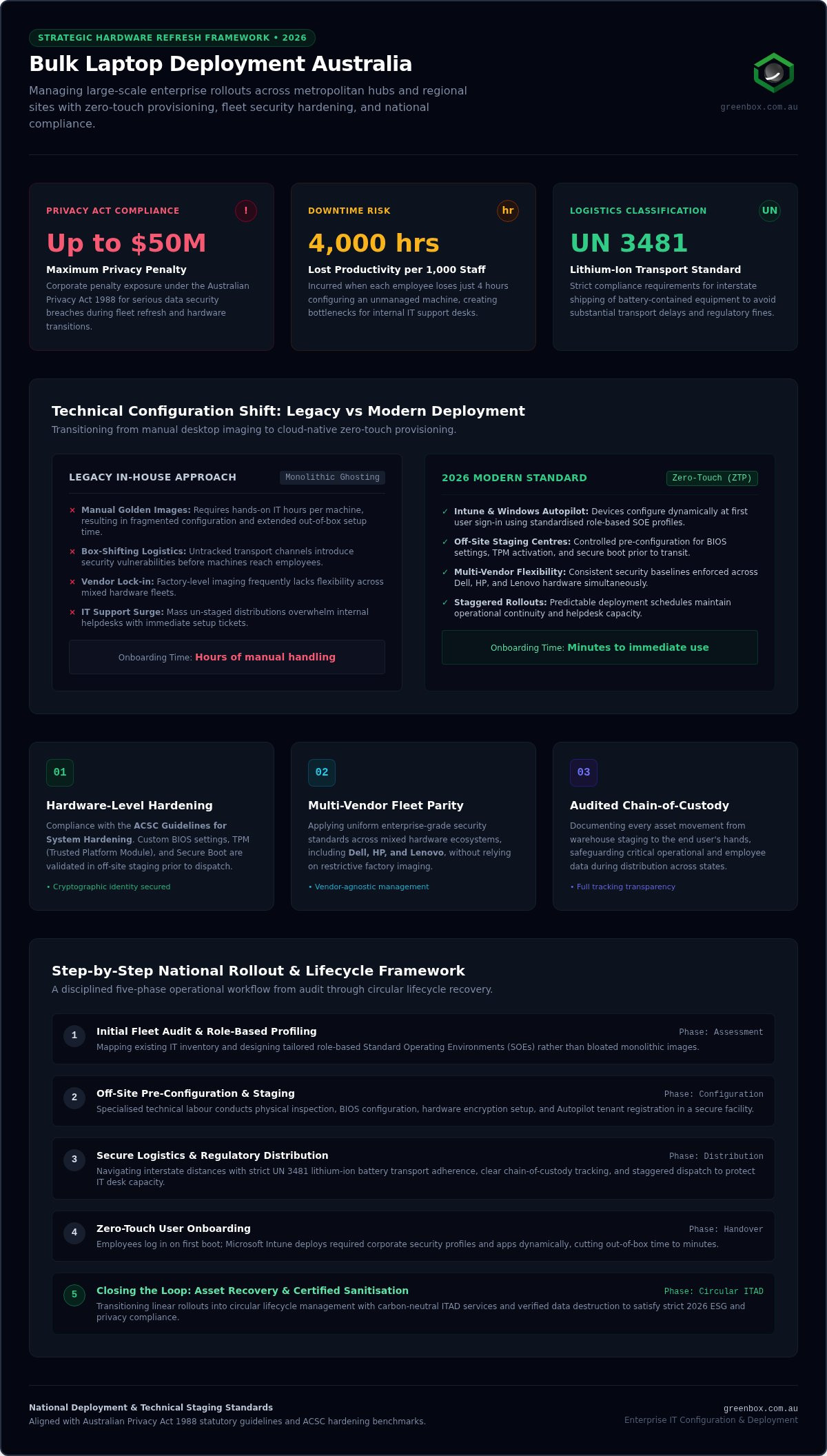
A Step-by-Step Guide to Executing Your Bulk Laptop Deployment
A successful bulk laptop deployment Australia wide requires a transition from strategic theory to tactical precision. By breaking the rollout into five distinct phases, organisations can mitigate risks and ensure a predictable outcome. The process begins with a comprehensive fleet audit and strategic planning. This phase identifies user personas and technical requirements, ensuring the hardware selected is fit for purpose and that procurement aligns with the permanent $20,000 instant asset write-off threshold established in the 2026-27 Federal Budget.
Phase 2: The Staging Process
Efficiency in a staging centre is measured by throughput and accuracy. To achieve maximum output, the facility must be organised into logical zones: receiving, configuration, kitting, and dispatch. Every device undergoes a rigorous quality assurance check before it leaves the facility to ensure BIOS settings and security protocols are correctly applied. Kitting is equally vital. Bundling chargers, peripherals, and clear “Day One” instructions into a single package reduces user confusion and prevents a surge in support tickets during the initial handover.
Once staged, Phase 3 involves national logistics and secure distribution. This stage demands strict adherence to Australian Dangerous Goods standards for lithium-ion batteries. Devices are tracked in real-time until they reach their destination, maintaining the chain-of-custody established during staging.
Phase 4: Optimising the User Experience
The “white-glove” installation phase is where the technical work meets the human element. Utilising a desk-side support model ensures rapid user adoption and immediate resolution of any login or connectivity issues. This phase focuses on the seamless migration of user profiles and local data, ensuring that employees can resume work without delay. Crucially, this is the point where old hardware is collected. Implementing a one-for-one swap at the desk ensures no retired assets are left unsecured in the office environment, facilitating immediate transport to R2-certified facilities for processing.
Finally, Phase 5 establishes a post-deployment support and feedback loop. Monitoring early support trends allows for rapid configuration adjustments if required. To ensure your next rollout is handled with this level of professional rigour, partner with our expert deployment team to manage your end-to-end hardware lifecycle.
Closing the Loop: Integration with Asset Recovery
A successful bulk laptop deployment Australia wide is only half the battle. The moment new hardware reaches an employee’s desk, the retired device becomes a liability that requires immediate, disciplined management. Treating asset recovery as a separate, subsequent project is a common strategic error that exposes organisations to data breaches and regulatory fines. By integrating recovery into the initial rollout plan, you ensure that decommissioned units don’t sit unsecured in storage cupboards or loading docks. This integrated approach closes the loop, transforming a potential security risk into a source of recovered value and environmental compliance.
Secure Decommissioning Protocols
Security protocols must remain rigorous during the decommissioning phase. Under the Australian Privacy Act 1988, organisations face corporate penalties of up to $50 million for failing to protect personal information on retired assets. Standard disk formatting is insufficient for enterprise compliance; it often leaves data fragments that can be recovered with basic tools. We employ software-based certified data sanitisation Australia wide, adhering to NIST 800-88 Rev. 1 standards. This process ensures that data is irrecoverable while preserving the hardware’s functional integrity. Every asset processed through our R2-certified facilities receives a serialised Certificate of Destruction, providing a definitive audit trail for your governance and insurance requirements.
Remarketing vs. Responsible Recycling
Maximising the return on your technology investment requires a nuanced approach to asset disposition. Not all retired hardware belongs in a shredder. Many enterprise laptops retain significant residual value that can be recovered through asset remarketing. We evaluate every unit to determine its viability for the secondary market, providing rebate credits that can offset the cost of your new fleet. This financial recovery is a key metric for a sustainable IT strategy.
For hardware that has reached the true end of its functional life, we provide environmentally compliant e-waste recycling. This ensures adherence to state landfill bans in Victoria, South Australia, and Western Australia, while meeting the 90% material recovery targets mandated by the National Television and Computer Recycling Scheme. Our carbon neutral ITAD services allow your organisation to meet its ESG goals with total transparency. We facilitate a truly circular IT lifecycle for Australian business, ensuring that technical success and ecological stewardship are inseparable. It’s a professional, end-to-end resolution that removes the operational burden from your team while protecting the planet’s future. For a comprehensive governance framework covering every stage of device retirement, our enterprise checklist for end of life hardware management provides the structured, audit-ready approach your organisation needs in 2026.
Future-Proofing Your Enterprise Hardware Lifecycle
Mastering a bulk laptop deployment Australia wide requires a shift from simple logistics to comprehensive lifecycle management. A successful refresh in 2026 isn’t just about hitting a delivery date; it’s about a disciplined transition that protects your data and the environment. By synchronising new hardware arrival with the secure removal of retired assets, you eliminate the security gaps and environmental risks that often plague uncoordinated rollouts.
Choosing a partner who offers R2 certified data security and carbon-neutral operations ensures that your organisation meets its strict privacy and ESG obligations. With Australia-wide lifecycle support, you gain the peace of mind that every device is tracked, sanitised, and either remarketed or recycled responsibly. This disciplined approach removes the operational burden from your internal teams, allowing them to focus on high-value initiatives that drive your business forward.
Streamline your next technology rollout with Greenbox and ensure your fleet refresh is secure, efficient, and sustainable. Your next hardware transition is the perfect moment to prove that technical excellence and ethical responsibility go hand in hand.
Frequently Asked Questions
What is the best way to handle bulk laptop deployment for a remote workforce?
Handling remote staff is best achieved through a combination of Zero-Touch Provisioning and secure direct-to-door logistics. Devices are shipped in unopened factory boxes from a configuration centre where they’ve been pre-enrolled in Microsoft Autopilot. When the remote employee receives the laptop and logs in, the corporate profile and security settings download automatically over the internet. This model eliminates the need for staff to visit a central office, ensuring high productivity across the country.
How long does a typical enterprise-scale laptop rollout take in Australia?
A typical enterprise-scale rollout generally spans between four and twelve weeks, depending on the fleet size and geographic distribution. This timeline includes the initial fleet audit, procurement, staging, and the physical distribution phase. Using a managed partner for your bulk laptop deployment Australia wide often compresses this schedule by utilising dedicated configuration centres that can process hundreds of units daily. Detailed planning ensures the transition remains predictable and avoids common delays associated with in-house logistics.
What are the security risks of not using a certified ITAD provider during a refresh?
Failing to use an R2-certified ITAD provider exposes your organisation to significant financial and reputational liabilities. Without certified data sanitisation, sensitive corporate information may remain on retired drives, leading to breaches that trigger penalties of up to $50 million under the Australian Privacy Act. Certified providers deliver serialised Certificates of Destruction, which are essential for legal compliance and financial audits. Uncertified disposal also risks violating state landfill bans in Victoria, South Australia, and Western Australia.
Can bulk deployment be managed without disrupting daily business operations?
Yes, bulk deployment can be managed with minimal disruption by implementing a staggered rollout strategy. Instead of a “big bang” approach, devices are replaced department by department or in specific tranches. Providing desk-side “white-glove” support during the handover ensures that any immediate connectivity or software issues are resolved on the spot. Pre-configuring devices off-site means employees spend minutes, not hours, setting up their new workstations, keeping your daily operations running smoothly.
What is “Zero-Touch” deployment and is it suitable for large organisations?
Zero-Touch deployment is a cloud-native provisioning method where devices are configured automatically upon the first user login. Using tools like Microsoft Autopilot, it’s highly suitable for large organisations as it removes the need for IT staff to manually handle every machine. In the 2026 environment, this is the standard for Windows 11 Enterprise fleets. It ensures that security baselines and essential applications are applied consistently across thousands of endpoints without requiring a physical disk image. For a deeper look at how to architect this process end-to-end, our guide on streamlining device imaging and deployment covers the full operational shift from legacy golden images to modern cloud provisioning models.
How does a carbon-neutral deployment partner help with ESG reporting?
A carbon-neutral deployment partner provides the verified data and certifications required for robust ESG reporting. By choosing a partner that prioritises a circular economy and offsets its operational emissions, your organisation can demonstrate a commitment to sustainability. This includes meeting the 90% material recovery target set by the National Television and Computer Recycling Scheme. We provide granular reporting on carbon offsets and landfill diversion, turning your IT refresh into a measurable sustainability win.
What happens to the data on our old laptops after the deployment is finished?
After the deployment is finished, the data on retired assets must undergo professional sanitisation to NIST 800-88 Rev. 1 standards. This software-based process overwrites all data sectors, making information irrecoverable while keeping the hardware functional for remarketing. If a drive is physically damaged or non-functional, it’s shredded in a secure facility. You receive a Certificate of Destruction for every asset, confirming that your legal obligations under the Privacy Act have been fully satisfied.